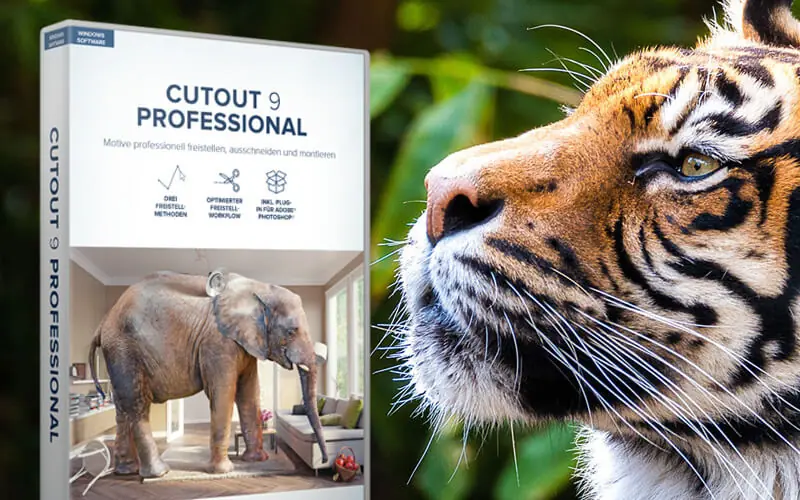






CutOut 9 Pro – Background Removal Tool | Lifetime Access

TL;DR

  • Remove unwanted backgrounds from images quickly for cleaner, more professional visuals.
  • Create transparent-background images that are ready for websites, product listings, and marketing materials.
  • Simplify image editing by eliminating the need for time-consuming manual background selection.
  • Produce polished product photos, portraits, and graphics that fit seamlessly into different designs.

Quick Overview

Alternative to:

  • Adobe Photoshop
  • Canva
  • PhotoRoom

Best for:

  • Content Creators
  • Graphic Designers
  • Marketers
  • Photographers

Compatibility:

  • Browser Support:
    Brave, Chrome, Edge, Firefox, Safari
  • Operating Systems:
    Windows

When you click a picture, you are often expected to create a masterpiece. But at times, mishaps occur.

Sometimes you don’t want a particular background, or you capture an unwanted object, etc.

To escape these misfortunes, a background removal tool comes in handy. Meet CutOut 9 Pro – Background Remover.

What is CutOut 9 Pro?

CutOut 9 Pro is a professional background removal tool that helps you remove backgrounds & unwanted objects from your photos.

Instead of spending hours making selections manually, it gives you dedicated tools for:

  • Automatic Edge Recognition
  • Background and layer replacement
  • Hair, fur, and delicate detail cutouts
  • Mask improvement and precise contour selection
  • Chroma Key blue-screen effects

It allows you to –

  • Remove backgrounds
  • Remove unwanted objects
  • Replace photo backgrounds
  • Create precise masks and cutouts
  • Edit RAW images with the integrated RAW developer

Whether you’re creating – 

  • Product photos
  • Portraits
  • Creative compositions
  • Everyday edits

CutOut 9 Pro helps you create cleaner, more professional-looking images.

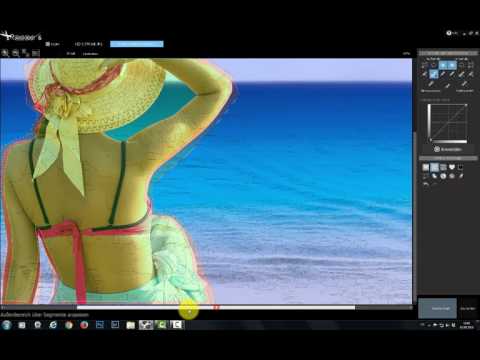
Demos Of This Background Removal Tool –

Youtube video

Features Of CutOut 9 Pro – Remove Background From Photo

After
Before

Automatic Edge Recognition & Smart Detection:

  • Optimized Edge Recognition algorithms detect subjects instantly, no manual outlining
  • Combines color, edge & segment recognition to save time on every cutout
  • Cut out hair, fur & other delicate details in just a few clicks
After
Before

Precision Masking & Matting Tools:

  • Segmented micro-cut for clean, accurate white-background removal
  • Chroma Key matting delivers Hollywood-style blue-screen results
  • Inner/outer edge matting plus contour tools for pixel-precise selection
  • Three finely tuned matting methods, refined with dedicated mask-improvement tools
Before
After

Background Swapping, Layering & RAW Editing:

  • Swap and layer backgrounds effortlessly, with full control in Preview Mode
  • Built-in RAW developer lets you fine-tune images before cutting them out
  • Change any scene in seconds, from studio shots to full landscapes

Why Choose CutOut 9 Pro?

  • Remove Complex Backgrounds More Easily
  • Create Cleaner Photo Cutouts
  • Preserve Fine Hair & Fur Details
  • Replace Backgrounds in a Few Steps
  • Create Professional Chroma Key Effects

CutOut 9 Pro is best for:

  • Content Creators
  • Graphic Designers
  • Marketers
  • Photographers

Choose Your Plan

With DealClub
$17.00
$99.00
Without DealClub
$20.00
$99.00
Buy Now
Limited Time Deal

Deal Terms

  • Access via redemption of coupon code
  • 30-Day Coupon Code Validity
  • One Coupon Code for one user/account
  • Coupon Codes are not stackable
  • For both - New & Existing Users
  • Paid Updates
  • Free Support
  • Accessible only on Windows- Desktop & Laptop

Customer Testimonials

now this program saves me more time rather that cutout with photoshop

-lisa.marie648

After some familiarisation you achieve good results

-Ernst

Takes some time, but good.

-Olivia Solifera

Plans & Features

Choose the perfect plan for your needs.

Plans & Features
Lifetime Access
$99 $20
Buy Now
Individual Cutting Methods

3

Reduce JPEG Artifacts
Precise Cutting With Curve Adjustment
Photoshop® Plug-in Support
Configurable Edge Optimization
OS

Windows Only

Lifetime Access

$99.00 $20.00
Buy Now
30-Day Refund | Lifetime Access | One-Time Payment
  • Individual Cutting Methods: 3
  • Reduce JPEG Artifacts
  • Precise Cutting With Curve Adjustment
  • Photoshop® Plug-in Support
  • Configurable Edge Optimization
  • OS: Windows Only

Frequently Asked Questions

Find Answers to common questions about CutOut 9 Pro

Does CutOut 9 Pro support 4K?

Yes. The software includes 4K compatibility.

What matting methods are included?

CutOut 9 Pro includes three finely tuned matting methods, including segmented and inner/outer edge matting.

Can I remove unwanted objects?

Yes. CutOut 9 Pro includes tools for removing unwanted objects from images.

Does it support RAW images?

Yes. An integrated RAW developer is included.

Customer Feedback

Customer Reviews (0) Customer Q&A (0)

No Reviews Yet

Be the first to try this deal and share your experience.

You must purchase this product to leave a review.

Be The First To Ask

Get clarity before you buy—your question might help others too.

×

You Might Also Like

InkSprout - AI Text To Video Generator
4K Download Bundle - Download, Backup, Compress, & Save Your Digital Media

4K Download Bundle - Download, Backup, Compress, & Save Your Digital Media

, , , , , , , , , ,

AI Manga Translator | Annual Access
SoftOrbits - Video Converter Software - Edit, Convert & Compress Videos

SoftOrbits - Video Converter Software - Edit, Convert & Compress Videos

, , , , , , ,

Buy with DealClub
$17.00 $99.00
Buy without DealClub
$20.00 $99.00

Deal Terms

  • ✓ Access via redemption of coupon code
  • ✓ 30-Day Coupon Code Validity
  • ✓ One Coupon Code for one user/account
  • ✓ Coupon Codes are not stackable
  • ✓ For both - New & Existing Users
  • ✓ Paid Updates
  • ✓ Free Support
  • ✓ Accessible only on Windows- Desktop & Laptop
Scroll to Top