Home > All > Operating System > Browser Based > Open eLMS – Learning Generator | Lifetime Access

Open eLMS – Learning Generator | Lifetime Access

Vendor: Dom Ley
Open eLMS Learning Generator Feature Image

Creating an engaging eLearning course can be a daunting task, even when you have compelling topics and comprehensive data. That is why DealFuel brings to you –

Open eLMS Learning Generator

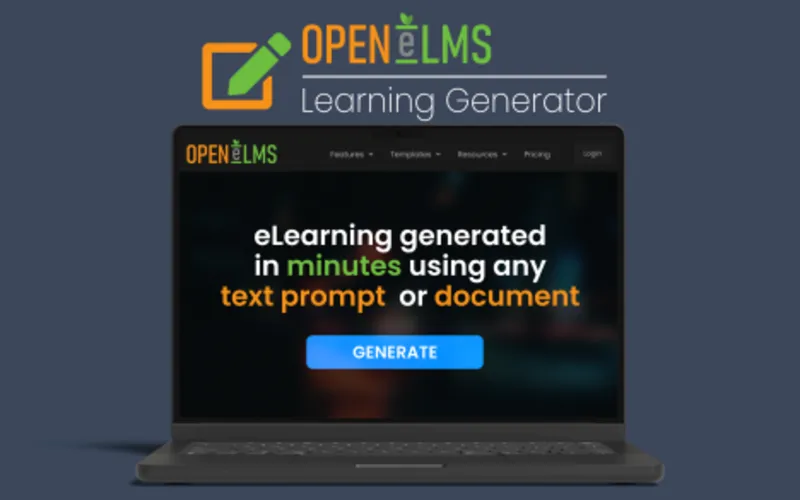
Open eLMS Learning Generator is a course creator that uses AI to transform text prompts and documents into fully customisable, professional-standard eLearning in minutes.

From one prompt, it generates countless resources, including stunning AI imagery, animations, diagrams, custom narrators,  mindmaps & more.

It includes direct import links to Articulate Rise, Captivate, Podia, and Thinkific for course resale.

It exports courses as SCORM v1.2 and 2004 compliant, as well as ensuring WCAG 2.1 level AA accessibility.

Introduction to Open eLMS Learning Generator:

Features of Open eLMS Learning Generator:

Automated Content Creation:

  • Automatically generate eLearning materials from text prompts or documents in minutes.
  • One prompt delivers countless resources at your fingertips, including full course text, mindmaps, and summaries.

Multimodal Learning:

  • Use AI to automatically produce text, images, animations, voiceovers, and presenters to enhance engagement.
  • Includes stunning imagery (with custom AI image generation), complex diagrams, and custom narrators.

Personalised Learning Experiences:

  • Customise the tone and length of e-learning during the generation process to suit different audiences.
  • Adjustable parameters include style, wordiness, and specific document interpretation.

Knowledge Checks & Assessments:

  • Automatically generate interactive knowledge checks throughout the content to reinforce learning.
  • Includes full assessments to validate learner understanding and track progress.

Versatile Export Options:

  • Once generated, export your creations (depending on plan) as SCORM files, PowerPoints, Videos, or Podcasts.
  • Additional options include embedding directly on your website or creating Gamification (Custom Arcade Games).

LMS & Third-Party Integration:

  • Integrate eLearning content seamlessly into any Learning Management System.
  • Includes direct import links to Articulate Rise, Captivate, Podia, and Thinkific for course resale.

Editing Flexibility:

  • Edit eLearning content and upload your own media post-generation.
  • A full editing suite is included, allowing you to customize and personalise every resource.

Enhanced Accessibility:

  • The platform ensures compliance with WCAG 2.1 standards at conformance level AA.

Scalability:

  • Efficiently create high-quality eLearning for audiences of any size.

User-Friendly Interface:

  • The simple and easy-to-use interface requires no training or prior design skills.
  • Follow on-screen instruction prompts to generate engaging content instantly.

AI Support Feature:

  • 24/7 support is provided through Open eLMS’s chatbot.
  • The assistant is available to answer any questions during the production process.

Highlights of Open eLMS Learning Generator

Efficiency and Speed:

  • It eliminates lengthy development cycles by converting documents into eLearning instantly.

Cost-Effectiveness:

  • It reduces administrative and design costs, allowing for more feature-rich eLearning.

Previews of Open eLMS Learning Generator:
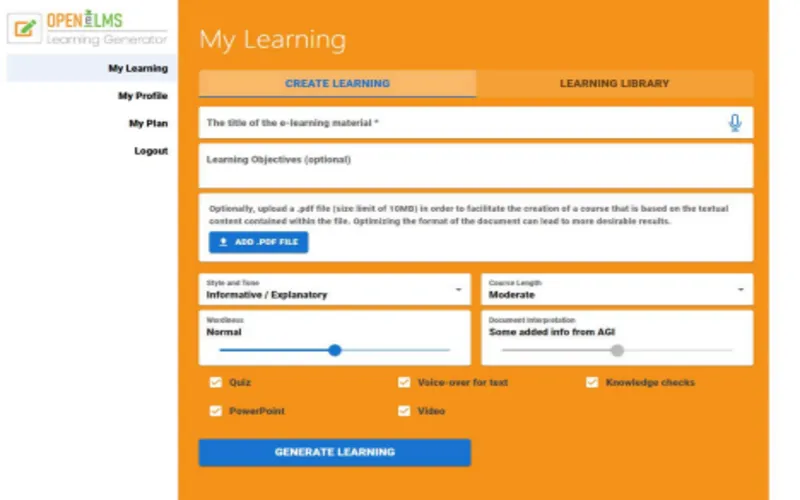
Open eLMS Interface Image
Open eLMS - AI Course Creator Edit mode User interface
Edit Mode UI
Open eLMS -AI Course generator - Course preview
Course Preview

Open eLMS Customer Testimonials 

Deal Terms:

How to download/activate this product?
After completing your purchase, you will receive an instructions document. Follow the instructions in this document to redeem the coupon code and get access to this product.

What is the validity of the license key/coupon code? (Within how many days the coupon code must be redeemed?)
The coupon code must be redeemed within 30 days from the date of purchase.

Do you get Lifetime Access to this deal?
Yes, this deal gives you lifetime access to Open eLMS – Learning Generator.
Lifetime means the lifetime of the product.
We try to get great products that last for our customers, but products do get acquired, or sometimes the products go bankrupt. Many of these products are startup companies, giving us a great deal for our customers. However, in an unfortunate situation where the product does not last long, there is not much DealFuel can do about it.

Are Lifetime Updates available for this product?
Yes, Lifetime updates are available for this product.

Is support available for this product?
Yes, support is available for this product.
For support, contact – [email protected].

Is this deal for new users only?
No, this deal is available for both new and existing users of Open eLMS AI.

How many users can use the license key/coupon code?
1 coupon code can be used for 1 user/account.

Are the coupon codes stackable?
Yes, the coupon codes are stackable.

Can this product be accessed on all devices?
Yes, Open eLMS is accessible on all devices, provided the devices have a good internet connection.

Reviews

  1. Ad

    Hi there,
    When generating a course the AI will create learning on each topic. If you want a more in depth dive on a certain topic you can ‘expand section’ and more in depth learning on that topic will be created. Note this custom section expansion only applies if you manually choose the generation settings and not when you press ‘Let AI Decide’. You can also still go in and create more screens manually if you wish, without using any credits.

    Plans 1 to 3 differ with the amount of courses, expansions and images available for creation. Plan 1 and 2 allows for company wide distribution only, whilst plan 3 gives no limits on course distribution and resell.

    Hope that helps!
    Open eLMS Support

  2. Adam Shaw

    Yes it can be changed with tier 3 Model, (equivalent to enterprise level). If you go into the course editor, and navigate to settings (Cog icon on the top toolbar). You can replace the logo on the menu to your own logo. Thanks, Support

  3. Chris Scotto

    Hi,
    The amount of pages/slides generated per topic depends on the complexity of the course (which can be decided by you) and is typically around 3 and 8 slides depending on the depth/complexity chosen. Extra screens can be added manually and filled out with your own information if needed. We recommend a 14 day free trial at http://www.openelms.ai to trial the interface and see exactly what is meant by this.

Only logged in customers who have purchased this product may leave a review.

TL;DR

  • AI-Powered eLearning course generator
  • Export courses as SCORM v1.2 and 2004 compliant, PowerPoint, videos, and reports
  • Leverages AI to generate images, presenters, narrators, animations, and assessments.

Creating an engaging eLearning course can be a daunting task, even when you have compelling topics and comprehensive data. That is why DealFuel brings to you –

Open eLMS Learning Generator

Open eLMS Learning Generator is a course creator that uses AI to transform text prompts and documents into fully customisable, professional-standard eLearning in minutes.

From one prompt, it generates countless resources, including stunning AI imagery, animations, diagrams, custom narrators,  mindmaps & more.

It includes direct import links to Articulate Rise, Captivate, Podia, and Thinkific for course resale.

It exports courses as SCORM v1.2 and 2004 compliant, as well as ensuring WCAG 2.1 level AA accessibility.

Introduction to Open eLMS Learning Generator:

Features of Open eLMS Learning Generator:

Automated Content Creation:

  • Automatically generate eLearning materials from text prompts or documents in minutes.
  • One prompt delivers countless resources at your fingertips, including full course text, mindmaps, and summaries.

Multimodal Learning:

  • Use AI to automatically produce text, images, animations, voiceovers, and presenters to enhance engagement.
  • Includes stunning imagery (with custom AI image generation), complex diagrams, and custom narrators.

Personalised Learning Experiences:

  • Customise the tone and length of e-learning during the generation process to suit different audiences.
  • Adjustable parameters include style, wordiness, and specific document interpretation.

Knowledge Checks & Assessments:

  • Automatically generate interactive knowledge checks throughout the content to reinforce learning.
  • Includes full assessments to validate learner understanding and track progress.

Versatile Export Options:

  • Once generated, export your creations (depending on plan) as SCORM files, PowerPoints, Videos, or Podcasts.
  • Additional options include embedding directly on your website or creating Gamification (Custom Arcade Games).

LMS & Third-Party Integration:

  • Integrate eLearning content seamlessly into any Learning Management System.
  • Includes direct import links to Articulate Rise, Captivate, Podia, and Thinkific for course resale.

Editing Flexibility:

  • Edit eLearning content and upload your own media post-generation.
  • A full editing suite is included, allowing you to customize and personalise every resource.

Enhanced Accessibility:

  • The platform ensures compliance with WCAG 2.1 standards at conformance level AA.

Scalability:

  • Efficiently create high-quality eLearning for audiences of any size.

User-Friendly Interface:

  • The simple and easy-to-use interface requires no training or prior design skills.
  • Follow on-screen instruction prompts to generate engaging content instantly.

AI Support Feature:

  • 24/7 support is provided through Open eLMS’s chatbot.
  • The assistant is available to answer any questions during the production process.

Highlights of Open eLMS Learning Generator

Efficiency and Speed:

  • It eliminates lengthy development cycles by converting documents into eLearning instantly.

Cost-Effectiveness:

  • It reduces administrative and design costs, allowing for more feature-rich eLearning.

Previews of Open eLMS Learning Generator:

Open eLMS Interface Image
Open eLMS - AI Course Creator Edit mode User interface
Edit Mode UI
Open eLMS -AI Course generator - Course preview
Course Preview

Open eLMS Customer Testimonials 

Deal Terms:

How to download/activate this product?
After completing your purchase, you will receive an instructions document. Follow the instructions in this document to redeem the coupon code and get access to this product.

What is the validity of the license key/coupon code? (Within how many days the coupon code must be redeemed?)
The coupon code must be redeemed within 30 days from the date of purchase.

Do you get Lifetime Access to this deal?
Yes, this deal gives you lifetime access to Open eLMS – Learning Generator.
Lifetime means the lifetime of the product.
We try to get great products that last for our customers, but products do get acquired, or sometimes the products go bankrupt. Many of these products are startup companies, giving us a great deal for our customers. However, in an unfortunate situation where the product does not last long, there is not much DealFuel can do about it.

Are Lifetime Updates available for this product?
Yes, Lifetime updates are available for this product.

Is support available for this product?
Yes, support is available for this product.
For support, contact – [email protected].

Is this deal for new users only?
No, this deal is available for both new and existing users of Open eLMS AI.

How many users can use the license key/coupon code?
1 coupon code can be used for 1 user/account.

Are the coupon codes stackable?
Yes, the coupon codes are stackable.

Can this product be accessed on all devices?
Yes, Open eLMS is accessible on all devices, provided the devices have a good internet connection.

Clear
30 Day Refund Policy
For support contact: [email protected] 

Want to save another 25% on this deal?

Join DealClub

Plans & Features

Plan 1
$59 $254
  • 3 courses per month
  • 3 Powerpoint generations per month
  • 1 video generation per month
  • 15 custom AI image generations (in addition to course images)
  • Single user licence for Learning Generator
  • Text or document to eLearning
  • Max course length: Moderate
  • Gamification
  • Knowledge checks
  • Assessments / Quizzes
  • Video presenters
  • Voiceover generation
  • Full editing suite
  • Option to purchase more credits included
  • Internal Company-wide distribution only (no external distribution)
Buy Now
Plan 2
$118 $508
  • 10 courses per month
  • 10 Powerpoint generations per month
  • 2 video generations per month
  • 50 custom AI image generations (in addition to course images)
  • Single user licence for Learning Generator
  • Text or document to eLearning
  • Max course length: Comprehensive
  • Gamification
  • Knowledge checks
  • Assessments / Quizzes
  • Video presenters
  • Voiceover generation
  • Full editing suite
  • Option to purchase more credits included
  • Internal Company-wide distribution only (no external distribution)
Buy Now
Plan 3
$177 $762
  • 15 courses per month
  • 15 Powerpoint generations per month
  • 3 video generations per month
  • 150 custom AI image generations (in addition to course images)
  • 1 podcast generation per month
  • 1 mindmap generation per month
  • 1 summary generation per month
  • 1 gamification generation per month
  • Single user licence for Learning Generator
  • Text or document to eLearning
  • Max course length: In depth
  • Knowledge checks
  • Assessments / uizzes
  • Video presenter
  • Voiceover generation
  • Full editing suite
  • Option to purchase more credits included
  • Personalised branding
  • Unlimited distribution (earn from your creations)
Buy Now
    Q. I have a course that will have roughly 15 topics...but each topic will require for than one-page to cover the material. All the plans mention 'Moderate Course Length (15 topics max)....but not how many pages/slides are permitted per topic. Can you please advise?
    A: Hi, The amount of pages/slides generated per topic depends on the complexity of the course (which can be decided by you) and is typically around 3 and 8 slides depending on the depth/complexity chosen. Extra screens can be added manually and filled out with your own information if needed. We recommend a 14 day free trial at www.openelms.ai to trial the interface and see exactly what is meant by this.
    Chris Scotto June 12, 2025
    Q. Tier 3 - removal of open elms logo
    For Tier 3 how do we remov4e the open elms log from the menu as under settings - this is showing enterprise version only ? Can this be removed?
    A: Yes it can be changed with tier 3 Model, (equivalent to enterprise level). If you go into the course editor, and navigate to settings (Cog icon on the top toolbar). You can replace the logo on the menu to your own logo. Thanks, Support
    Adam Shaw April 25, 2025
    Q. What is meant by section expansions? Are plan 1 to 3 essentially the same you just get more courses per month ? Can you resell on all plans?
    A: Hi there, When generating a course the AI will create learning on each topic. If you want a more in depth dive on a certain topic you can 'expand section' and more in depth learning on that topic will be created. Note this custom section expansion only applies if you manually choose the generation settings and not when you press 'Let AI Decide'. You can also still go in and create more screens manually if you wish, without using any credits. Plans 1 to 3 differ with the amount of courses, expansions and images available for creation. Plan 1 and 2 allows for company wide distribution only, whilst plan 3 gives no limits on course distribution and resell. Hope that helps! Open eLMS Support
    Ad April 14, 2025

    No Reviews available.

    Only logged in customers who have purchased this product may leave a review.

$50.15$254.00
$59.00$254.00
Scroll to Top