Are you tired of staring at a contract & wondering if you’re signing away your rights? Is the cost of a lawyer preventing you from getting a professional review on every freelance or SaaS agreement?
Not anymore, because DealFuel brings to you ClauseGuard.
What is ClauseGuard?
ClauseGuard is an AI contract review toolkit.
It is designed to help freelancers, founders, & small business owners identify risky clauses & negotiate better deals directly from the browser.
With ClauseGuard, you can analyze text, upload PDFs, & get a comprehensive risk report effortlessly.
All you have to do is –
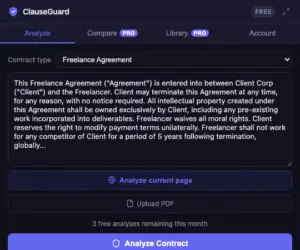
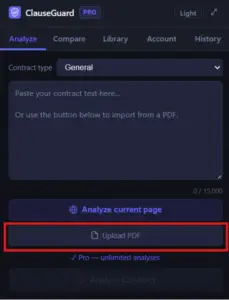
- Paste or upload your contract by dragging a PDF or clicking “Analyze current page” on any site.
- Click Analyze (or use the Ctrl+Enter shortcut) to get comprehensive results in under 30 seconds.
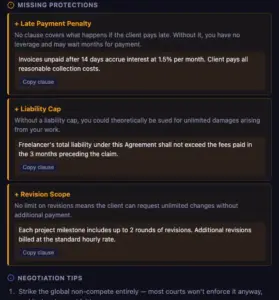
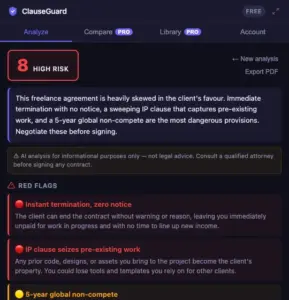
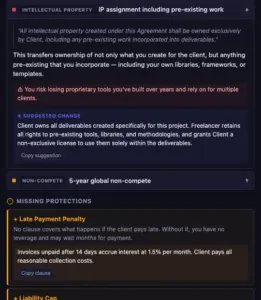
- Review and negotiate using the 1–10 risk score, plain-English red flags, and copy-ready clause rewrites.
- Access your history anytime as your results stay saved within the extension for ongoing reference.
And there it is! Professional-grade contract insight in under 30 seconds.
ClauseGuard gives you everything to dominate your negotiations. You get:
- AI-Powered Detection: To scan 8+ categories like liability, IP, and non-competes.
- Instant Risk Scoring: To know at a glance if a contract is fair or predatory.
- Suggested Rewrites: To copy-paste fairer alternatives directly into your emails.
- Privacy-First Analysis: To review documents without ever creating an account.
Features Of ClauseGuard:
Easily spot dangerous language across 8+ categories:
- Identify revision traps, IP overreach, and hidden liability waivers that traditional reading might miss.
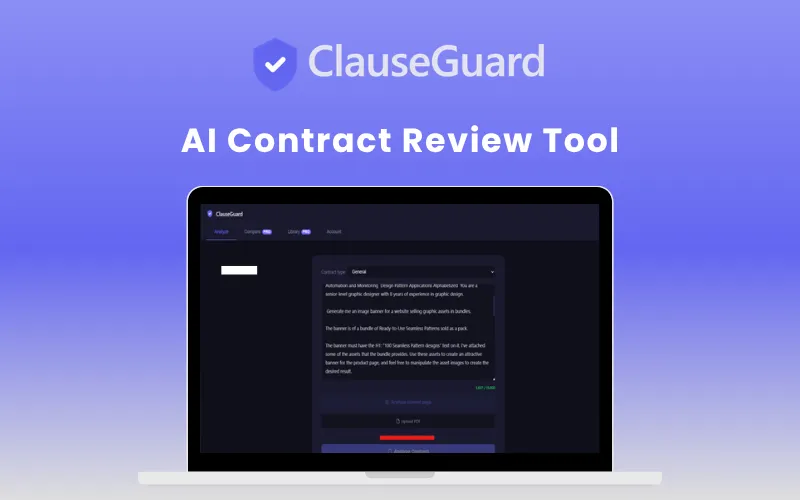
Understand exactly “what could go wrong”:
- Get a numerical risk score for every flag with a clear breakdown of the legal implications in plain English.
Review contracts comfortably and quickly:
- Use the “Ctrl+Enter” shortcut to trigger analysis and switch to dark mode for late-night document reviews.
Take your analysis anywhere:
- Copy the full risk report or specific suggested rewrites to your clipboard with a single click for easy sharing.
Analyze local documents instantly:
- Simply drop your PDF files directly into the extension popup for immediate AI processing.
Compare two versions of a contract instantly:
- Use the comparison tool to see exactly what changed between drafts during a negotiation.
Save and reuse flagged clauses:
- Build a library of specific clauses to speed up future reviews and maintain consistency across deals.
Works on any agreement type:
- Automatically detects & analyzes freelance, SaaS, employment, NDA, and client agreements.
Your privacy is guaranteed With GDPR-Security:
- ClauseGuard utilizes anonymous IDs and offers full data deletion on request to ensure your legal text remains private.
Who Is ClauseGuard For:
- Freelancers & Consultants: To ensure client contracts don’t include infinite revisions or IP theft.
- Startup Founders: To quickly vet NDAs, employment offers, and vendor agreements.
- Small Business Owners: To spot “termination gotchas” in service or lease agreements.
- Solopreneurs: To get a “first-pass” legal review without the $300/hour attorney fee.
- Agencies: To standardize the review process for incoming client MSAs.
ClauseGuard Specifications:
- Deployment: Google Chrome Extension (Manifest v3).
- Compatibility: Windows, macOS, Linux, and ChromeOS (Desktop only).
- AI Engine: Built on Claude AI (Anthropic) for nuanced language analysis.
- Security: Anonymous ID system; no login required; GDPR compliant.
- File Support: Webpage text scraping and Drag-and-drop PDF support.
Frequently Asked Questions:
What types of contracts can ClauseGuard review?
ClauseGuard reviews freelance contracts, NDAs, employment agreements, SaaS terms, leases, & more.
Is ClauseGuard a replacement for a lawyer?
No. It is a first-pass tool to help you understand risks and prepare for negotiations. For high-stakes legal matters, always consult a qualified attorney.
How fast is the analysis?
Most contracts are fully analyzed in under 15 seconds, providing a risk score, red flags, rewrites, and negotiation tips.
Deal Terms:
How to download/activate this product?
After completing your purchase, you will receive an instructions document. Follow the instructions in this document to redeem the coupon code and activate your subscription.
What is the validity of the license key/coupon code? (Within how many days the coupon code must be redeemed?)
The coupon code must be redeemed within 30 days from the date of purchase.
Is a Lifetime Subscription available for this product?
Yes, a Lifetime Subscription* is available for this product.
*LIFETIME MEANS LIFETIME OF THE PRODUCT.
We strive to provide our customers with high-quality products that offer longevity, but unfortunately, some products are acquired or go bankrupt. Many of these products are from startup companies, offering our customers a great deal. However, in an unfortunate situation where the product does not last long, there is not much DealFuel can do about it.
Are Updates available for this product?
Yes, Updates are available for FREE for this product.
Is support available for this product?
Yes, Free support is available for this product.
Is this deal exclusive to new users?
No, this deal is available to both NEW & EXISTING USERS of ClauseGuard.
How many users can use the license key/coupon code?
One coupon code can be used for one user/account.
Are the coupon codes stackable?
No, the coupon codes are NOT stackable.
Can this product be accessed on all devices?
Yes, ClauseGuard can be accessed on all devices, provided they have a stable internet connection.


Reviews
There are no reviews yet.