Do you spend hours manually hunting for business contacts, only to find outdated info or missing emails? Your sales pipeline is stalling because manual prospecting doesn’t scale.
That’s not a market problem; it’s a data bottleneck. Map Scraper Pro – Map Scraper Extension fixes that instantly.
What is Map Scraper Pro?
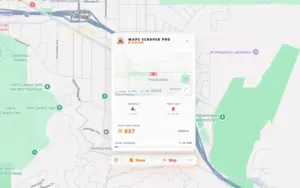
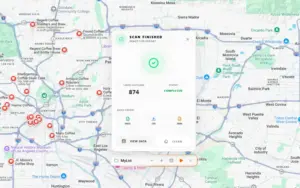
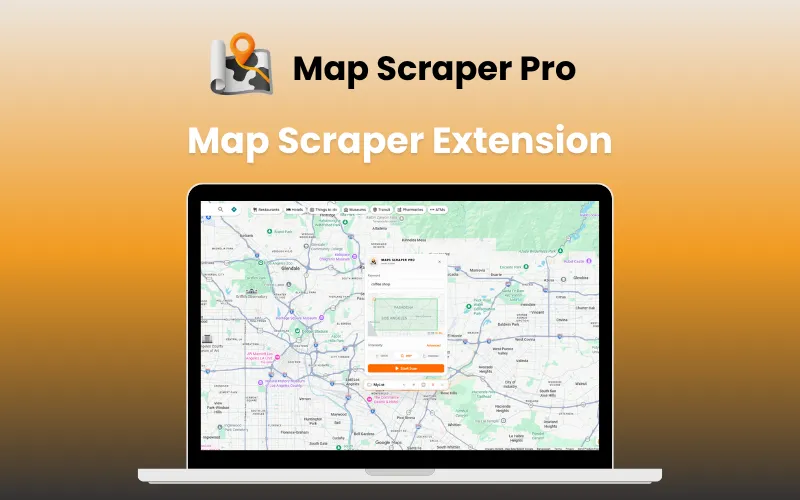
Map Scraper Pro is a powerful Map Scraper Extension that turns map locations into actionable lead lists.
It helps you collect:
- Business Names
- Phone Numbers
- Physical Addresses
- Business Ratings
Instead of just copying a phone number, you get a 360-degree view of a prospect. Using Data Sniper, you can:
- Scrape global business data from Google, Bing, & Yandex Maps
- Find verified emails on company websites
- Validate social media presence profiles (LinkedIn, Facebook, IG)
- Build high-converting outreach lists
Used by sales teams, marketers, & researchers, it helps you dominate your niche by automating the “hunt.”
It works directly within your Chromium-based browser.
No complex setup, no expensive API costs.
Here's How You Can Extract Map Data in 5 Simple steps:
- Initialize Scraper – Open the extension in your Chromium-based browser.
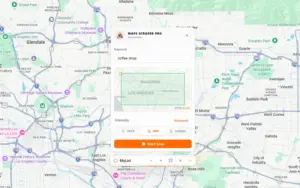
- Enter Keywords – Define your niche (e.g., “Tech Startups” or “Plumbers”).
- Select Area – Choose your target City, Country, or customized Region.
- Launch Scan – Start the automated extraction from Google, Bing, or Yandex.
- Step 05: Export Results – Download your verified leads into a clean CSV, Excel, or JSON.
Introduction To Map Scraper Pro:
Features of Map Scraper Pro:
Scrape Multiple Platforms at Once:
- Pull data from Google, Bing, and Yandex Maps.
- Reach local businesses or international markets easily.
Find “Hidden” Contact Info:
- Our Deep Search tech visits company websites for you.
- It grabs emails and social links that aren’t listed on the map.
Automate the Whole Map Data Extraction Process:
- Just enter a keyword and a location.
- Let the tool do the scanning while you grab a coffee.
Export Ready-to-Use Lists:
- Save your leads as CSV, Excel, or JSON.
- Upload them straight into your CRM or email tool.
Search with Pinpoint Accuracy:
- Use Smart Point Scanning to find hidden gems.
- Target specific cities, zip codes, or custom regions.
Stay Safe and Compliant:
- Uses Human Simulation to look like a real person browsing.
- Keeps your accounts safe while gathering data at scale.
Important Feature:
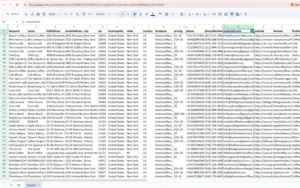
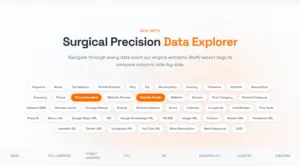
Map Scraper Pro performs a Surgical Precision Scan to give you 50+ data points for every business.
You can extract and export all of these fields:
- Identity: Keyword, Name, Subtitle, Description, Summary, UUID
- Contact: Phone, Phone Standard, Website, Domain
- Deep Search Info: Website Emails, Website Phones
- Social Media: Facebook, LinkedIn, Instagram, YouTube URLs
- Location: Full Address, Street, City, Zip, Country, Timezone
- Geography: Latitude, Longitude, Coordinates, Plus Code
- Business Details: First Category, Second Category, Business Status
- Reputation: Reviews Count, Average Rating, Review URL
- Platform Links: Google Maps URL, CID, KG MID, Menu Link
- Web Assets: Image URL, Meta Description, Meta Keywords
Who Is This Map Scraper Extension For?
- Sales Teams: To fill CRMs with verified contact details automatically.
- Lead Generation Agencies: To build and sell targeted lists for clients.
- Market Researchers: To analyze competitor density and market gaps.
- Real Estate Professionals: To identify local amenities and neighborhood data.
- Marketing Agencies: To find local businesses in need of digital services.
Specifications:
- Platform: Chrome Extension (Works on Chrome, Edge, Brave).
- Operating System: Windows, Mac, Linux.
- Data Sources: Google Maps, Bing Maps, Yandex Maps.
- Export Formats: CSV, Excel, JSON.
- Data Points: 50+ (Emails, Social Links, Ratings, Coordinates, etc.).
- Security: SSL Secure, Human Simulation Mode, GDPR Compliant.
Frequently Asked Questions:
Is this map scraper extension safe to use?
Yes, the extension operates locally on your browser and simulates human behavior to ensure safety & compliance with platform policies.
Do I need technical skills?
No. Map Scraper Pro is designed for everyone. Just search on maps as you normally would, & click one button to scrape.
What formats can I export to?
You can export your data to CSV (Excel compatible) or JSON formats, making it easy to import into any CRM or spreadsheet.
Does it extract emails?
Yes! The tool visits the business website to find public email addresses, contact pages, & social media profiles automatically.
Deal Terms:
How to download/activate this product?
After completing your purchase, you will receive an instructions document. Follow the instructions in this document to redeem the coupon code and activate your subscription.
What is the validity of the license key/coupon code? (Within how many days the coupon code must be redeemed?)
The coupon code must be redeemed within 30 days from the date of purchase.
Is a Lifetime Subscription available for this product?
Yes, a Lifetime Subscription* is available for this product.
*LIFETIME MEANS LIFETIME OF THE PRODUCT.
We strive to provide our customers with high-quality products that offer longevity, but unfortunately, some products are acquired or go bankrupt. Many of these products are from startup companies, offering our customers a great deal. However, in an unfortunate situation where the product does not last long, there is not much DealFuel can do about it.
Are Updates available for this product?
Yes, Updates are available for FREE for this product.
Is support available for this product?
Yes, Free support is available for this product.
Is this deal exclusive to new users?
Yes, this deal is available only to the NEW USERS of Map Scraper Pro.
How many users can use the license key/coupon code?
One coupon code for 1, 3, or 5 machines, depending on the plan purchased.
Are the coupon codes stackable?
No, the coupon codes are NOT stackable.
Can this product be accessed on all devices?
No, this product can be accessed only on desktop & laptop, provided they have a stable internet connection.


Reviews
There are no reviews yet.