
Home > Delete - Homepage > Best Image Resizer Tool for Mac

Best Image Resizer Tool for Mac

Vendor: DealFuel
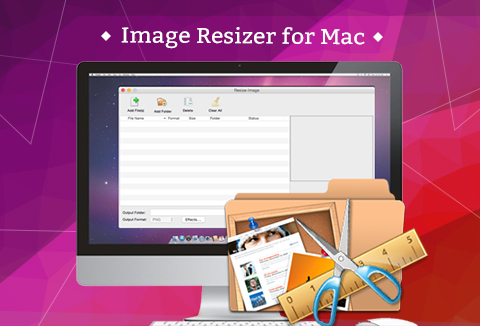
Image Resizer for Mac

Simplify your image editing tasks with the –

Image Resizer Tool for Mac!

Whether you’re prepping images for social media, e-commerce, or newsletters, this tool lets you resize, crop, rotate, and add watermarks effortlessly.

Get your digital images in the perfect size and format for any application with just a few clicks.

Why You’ll Love This Image Resizer Tool:

  • Resize, crop, or rotate images as needed
  • Add text or image watermarks effortlessly
  • Convert images between multiple formats
  • Perfect for batch processing to save time

Key Features of Image Resizer Tool:

  1. Resize and Rotate Images as Required

    • Easily adjust image size with percentage values.
    • Rotate pictures freely by setting angular values (0°–360°).
    • Customize background colors as needed.
  2. Add Watermarks with Ease

    • Add text or image watermarks and adjust size, transparency, and position.
    • Apply watermarks to multiple images in batches for quick results.
  3. Convert Image Formats Efficiently

    • Convert between JPG, PNG, GIF, and BMP formats without limitations.
    • Batch process multiple images simultaneously for increased productivity.
  4. Enhanced Image Effects

    • Preview images before finalizing changes.
    • Manage images with details like file name, size, and status for better workflow.

Additional Benefits:

  • Fast Performance: Enjoy ultra-fast processing speeds.
  • User-Friendly: Intuitive interface for smooth operations.
  • Standalone App: No need for third-party software.

System Requirements:

  • Supported OS: Mac OS X 10.6, 10.7, 10.8, 10.9 or later
  • Processor: PowerPC® G4/G5 or Intel®
  • Free Disk Space: 30MB or above
  • RAM: Super VGA (800×600) or higher resolution

Supported Formats:

  • Input: JPG, PNG, GIF, BMP
  • Output: JPG, PNG, GIF, BMP

User Reviews:

Kelly
"This Image Resizer for Mac is very easy to use. With only a few clicks, I've successfully converted dozens of pictures from JPG to GIF format."
Jay
"It is both effective and efficient. My friend recommended me to use this software to add image watermarks to photos, and I was well satisfied with it." –
Rose
"It's indeed practical! Every time I need to add watermarks to images, this software is my first choice."

Deal Terms

How to download this product?
This product is available as an instant download after completing your purchase.

Is Lifetime Access available for this product?
Yes, you get Lifetime Access to this tool.

This is a lifetime deal. So how long will I have access to this deal?
As per the terms negotiated with the vendor, you will have lifetime access to this deal. 
Lifetime means – Lifetime of the product.
We do try to get great products with longevity for our customers, but products do get acquired, or sometimes they do go bankrupt. Many of these products are startup companies and hence they give us a great deal for our customers. But in case of an unfortunate situation, where the product does not last long, there is not much DealFuel can do about it.

Can this product be used for personal projects?
Yes, the software is intended for personal use.

Can this product be accessed on all devices?
No, this product is compatible only with Mac OS X 10.6-10.9 or above.

Do I need a license key?
No, the software is a full version and doesn’t require a license key.

Reviews

  1. Rated 5 out of 5

    hstach85

    I use this software every day. Easy to use. Perfect results!

  2. Rated 5 out of 5

    grewaldigitalmarketing

    This software saves us so much time every day! Amazing Value!

Only logged in customers who have purchased this product may leave a review.

Rated 5.00 out of 5 based on 2 customer ratings
(2 customer reviews)

TL;DR

  • Perfect for resizing, rotating, watermarking, and converting images
  • Easy to use with fast performance

Simplify your image editing tasks with the –

Image Resizer Tool for Mac!

Whether you’re prepping images for social media, e-commerce, or newsletters, this tool lets you resize, crop, rotate, and add watermarks effortlessly.

Get your digital images in the perfect size and format for any application with just a few clicks.

Why You’ll Love This Image Resizer Tool:

  • Resize, crop, or rotate images as needed
  • Add text or image watermarks effortlessly
  • Convert images between multiple formats
  • Perfect for batch processing to save time

Key Features of Image Resizer Tool:

  1. Resize and Rotate Images as Required

    • Easily adjust image size with percentage values.
    • Rotate pictures freely by setting angular values (0°–360°).
    • Customize background colors as needed.
  2. Add Watermarks with Ease

    • Add text or image watermarks and adjust size, transparency, and position.
    • Apply watermarks to multiple images in batches for quick results.
  3. Convert Image Formats Efficiently

    • Convert between JPG, PNG, GIF, and BMP formats without limitations.
    • Batch process multiple images simultaneously for increased productivity.
  4. Enhanced Image Effects

    • Preview images before finalizing changes.
    • Manage images with details like file name, size, and status for better workflow.

Additional Benefits:

  • Fast Performance: Enjoy ultra-fast processing speeds.
  • User-Friendly: Intuitive interface for smooth operations.
  • Standalone App: No need for third-party software.

System Requirements:

  • Supported OS: Mac OS X 10.6, 10.7, 10.8, 10.9 or later
  • Processor: PowerPC® G4/G5 or Intel®
  • Free Disk Space: 30MB or above
  • RAM: Super VGA (800×600) or higher resolution

Supported Formats:

  • Input: JPG, PNG, GIF, BMP
  • Output: JPG, PNG, GIF, BMP

User Reviews:

Kelly
"This Image Resizer for Mac is very easy to use. With only a few clicks, I've successfully converted dozens of pictures from JPG to GIF format."
Jay
"It is both effective and efficient. My friend recommended me to use this software to add image watermarks to photos, and I was well satisfied with it." –
Rose
"It's indeed practical! Every time I need to add watermarks to images, this software is my first choice."

Deal Terms

How to download this product?
This product is available as an instant download after completing your purchase.

Is Lifetime Access available for this product?
Yes, you get Lifetime Access to this tool.

This is a lifetime deal. So how long will I have access to this deal?
As per the terms negotiated with the vendor, you will have lifetime access to this deal. 
Lifetime means – Lifetime of the product.
We do try to get great products with longevity for our customers, but products do get acquired, or sometimes they do go bankrupt. Many of these products are startup companies and hence they give us a great deal for our customers. But in case of an unfortunate situation, where the product does not last long, there is not much DealFuel can do about it.

Can this product be used for personal projects?
Yes, the software is intended for personal use.

Can this product be accessed on all devices?
No, this product is compatible only with Mac OS X 10.6-10.9 or above.

Do I need a license key?
No, the software is a full version and doesn’t require a license key.

This Deal ran out of Fuel

Don’t Miss a Deal Again.
Get the Latest Deals In your Inbox.

30 Day Refund Policy
For support contact: [email protected] 

Want to save another 25% on this deal?

Join DealClub

Plans & Features

Base Plan
$9.99 $19.99
Buy Now

    No Q&A available yet.

    Rated 5 out of 5
    This software saves us so much time every day! Amazing Value!
    Rated 5 out of 5
    I use this software every day. Easy to use. Perfect results!

    Only logged in customers who have purchased this product may leave a review.

Scroll to Top