Home > Delete - Homepage > 750+ Excellent Lightroom Presets for Vintage Style Photography

750+ Excellent Lightroom Presets for Vintage Style Photography

Vendor: DealFuel
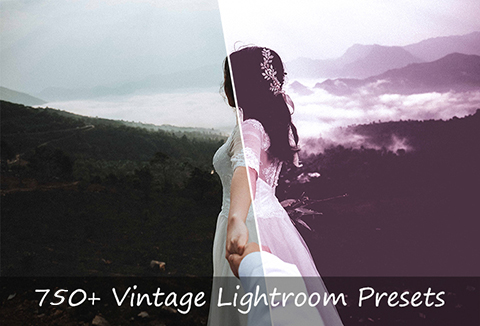
750+ vintage style lightroom preset bundle image

Want to create stunning vintage-style photos in no time? Get –

750+ Vintage Lightroom Presets

With this amazing deal, you get 750+ vintage presets designed to turn ordinary photographs into extraordinary masterpieces. Whether you’re working with RAW or JPEG files, these presets are easily adjustable to suit your images, saving you hours of editing time.

These presets are perfect for photographers looking to add vintage effects to wedding, fashion, portrait, or family photos. Easy to install and compatible with Lightroom 4, 5, 6 & CC, these presets are ready to enhance your pictures immediately!

Lightroom Presets Features:

750+ Vintage Presets

  • A handpicked selection of over 750 presets to help you achieve the perfect vintage look.

Compatible with RAW & JPEG

  • Designed to work seamlessly with both RAW and JPEG image formats.

Adjustable

  • Easily adjustable to match the look you want for your photos, no matter the lighting or style.

Multiple Lightroom Versions Supported

  • Works with Lightroom 4, 5, 6 & CC, making it versatile for all users.

Mac & PC Compatible

  • Compatible with both Mac and PC, ensuring accessibility for all.

Quick & Easy Installation

  • Simple installation process with easy-to-follow steps and clear instructions.

Customizable Settings

  • Fine-tune your photos by adjusting temperature, exposure, contrast, color, highlights, shadows, split toning, tone curve, grain, and sharpening.

Installing These Presets is Super Easy

For Lightroom 4, 5, 6 & CC Presets for Windows

  1. Open Lightroom
  2. Go to: Edit > Preferences > Presets
  3. Click on the box titled: Show Lightroom Presets Folder
  4. Double-click on Lightroom
  5. Double-click on Develop Presets
  6. Copy the folder(s) of your presets into the Develop Presets folder
  7. Restart Lightroom

For Lightroom 4, 5, 6 & CC Presets for Mac

  1. Open Lightroom
  2. Go to: Lightroom (Dialogue) > Preferences > Presets
  3. Click on the box titled: Show Lightroom Presets Folder
  4. Double-click on Lightroom
  5. Double-click on Develop Presets
  6. Copy the folder(s) of your presets into the Develop Presets folder
  7. Restart Lightroom

Deal Terms:

How to download this bundle?
This bundle is delivered as an instant download after completing your purchase.

Is Lifetime Access available for this bundle?
Yes, Lifetime Access is available for this bundle.

Which license is available for this bundle?
This bundle comes with an extended license.
Hence, they can be used for unlimited personal and commercial purposes.

What is the software compatibility of this bundle?
This bundle is compatible with PhotoShop CS4 and above.

Can this bundle be used on all devices?
This bundle can be used on all devices – Desktop, Mobile, and Tablet.
However, compatible software must be installed on these devices.

What are the terms of use for this bundle?
– The bundle must not be used or sold in a way that is directly competitive with the original item you have purchased.
– This bundle cannot be sub-licensed, resold, shared, transferred, or otherwise redistributed on its own.
– You cannot share this bundle with others.


Reviews

There are no reviews yet.

Only logged in customers who have purchased this product may leave a review.

TL;DR

  • Enjoy 750+ Perfect Vintage Presets
  • Workable on RAW and JPEG files
  • Can be easily adjusted to fit your image
  • Lightroom 4, 5, 6 & CC files formats
  • Compatible with both Mac and PC
  • Quick & easy installation. (instructions provided)

Want to create stunning vintage-style photos in no time? Get –

750+ Vintage Lightroom Presets

With this amazing deal, you get 750+ vintage presets designed to turn ordinary photographs into extraordinary masterpieces. Whether you’re working with RAW or JPEG files, these presets are easily adjustable to suit your images, saving you hours of editing time.

These presets are perfect for photographers looking to add vintage effects to wedding, fashion, portrait, or family photos. Easy to install and compatible with Lightroom 4, 5, 6 & CC, these presets are ready to enhance your pictures immediately!

Lightroom Presets Features:

750+ Vintage Presets

  • A handpicked selection of over 750 presets to help you achieve the perfect vintage look.

Compatible with RAW & JPEG

  • Designed to work seamlessly with both RAW and JPEG image formats.

Adjustable

  • Easily adjustable to match the look you want for your photos, no matter the lighting or style.

Multiple Lightroom Versions Supported

  • Works with Lightroom 4, 5, 6 & CC, making it versatile for all users.

Mac & PC Compatible

  • Compatible with both Mac and PC, ensuring accessibility for all.

Quick & Easy Installation

  • Simple installation process with easy-to-follow steps and clear instructions.

Customizable Settings

  • Fine-tune your photos by adjusting temperature, exposure, contrast, color, highlights, shadows, split toning, tone curve, grain, and sharpening.

Installing These Presets is Super Easy

For Lightroom 4, 5, 6 & CC Presets for Windows

  1. Open Lightroom
  2. Go to: Edit > Preferences > Presets
  3. Click on the box titled: Show Lightroom Presets Folder
  4. Double-click on Lightroom
  5. Double-click on Develop Presets
  6. Copy the folder(s) of your presets into the Develop Presets folder
  7. Restart Lightroom

For Lightroom 4, 5, 6 & CC Presets for Mac

  1. Open Lightroom
  2. Go to: Lightroom (Dialogue) > Preferences > Presets
  3. Click on the box titled: Show Lightroom Presets Folder
  4. Double-click on Lightroom
  5. Double-click on Develop Presets
  6. Copy the folder(s) of your presets into the Develop Presets folder
  7. Restart Lightroom

Deal Terms:

How to download this bundle?
This bundle is delivered as an instant download after completing your purchase.

Is Lifetime Access available for this bundle?
Yes, Lifetime Access is available for this bundle.

Which license is available for this bundle?
This bundle comes with an extended license.
Hence, they can be used for unlimited personal and commercial purposes.

What is the software compatibility of this bundle?
This bundle is compatible with PhotoShop CS4 and above.

Can this bundle be used on all devices?
This bundle can be used on all devices – Desktop, Mobile, and Tablet.
However, compatible software must be installed on these devices.

What are the terms of use for this bundle?
– The bundle must not be used or sold in a way that is directly competitive with the original item you have purchased.
– This bundle cannot be sub-licensed, resold, shared, transferred, or otherwise redistributed on its own.
– You cannot share this bundle with others.

This Deal ran out of Fuel

Don’t Miss a Deal Again.
Get the Latest Deals In your Inbox.

30 Day Refund Policy
For support contact: [email protected] 

Want to save another 25% on this deal?

Join DealClub

Plans & Features

Base Plan
$19 $29
  • 750+ perfect vintage presets
  • Works with RAW & JPEG files
  • Easily adjustable to fit your image
  • Compatible with Lightroom 4, 5, 6 & CC
  • Compatible with Mac and PC
  • Quick installation with provided instructions
Buy Now

    No Q&A available yet.

    No Reviews available.

    Only logged in customers who have purchased this product may leave a review.

Scroll to Top