


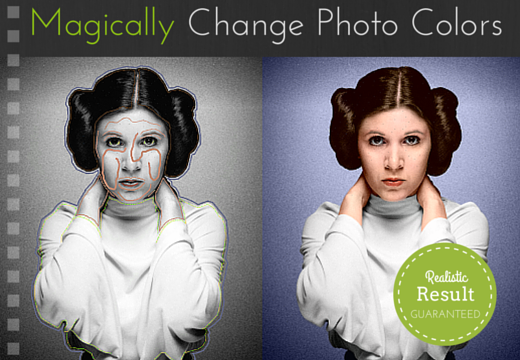
Want to take intelligent color decisions?
- Refresh stock images with new colors for your website
- Add color accents to featured images for your blog & social media posts
- Create stunning vintage illustrations by colorizing old vintage images
- Create eye-catching avatars by splashing bright colors
- Highlight objects while removing colors from rest of th eimage or some areas
- Test new color schemes for your house, car or even hairstyle
- Surprise your grandmother by coloring her youth photos
Now you can do all this and more with this excellent tool –CODIJY Pro.
With a feature-packed UI, you can easily apply colors to any black and white photos. Let the tool automatically choose for you, or take advantage of the many pen tools to outline color areas, and then let CODIJY Pro do the heavy work. You can even add gradients for a more realistic effect.
Watch Codijy Pro in action to turn black and white photos into colorful photos:
Here’s what all you can do with CODIJY Pro:
- Add colors with just a few simple strokes
- Automatically apply selected colors to objects
- Preview colorization result in real time
- Pick colors from palette, thematic libraries and color photos
- Add gradients for a more realistic effect
Examples: Colorized with CODIJY Pro

Deal Terms:
- You will receive your download and serial key instantly after completing your purchase
- Requires Windows XP or later, or Mac OXS 10.7 or later
- Licensed on a per user basis
- Prices shown on deal page are in USD
Grab this powerful tool for Win & Mac for just $29.99 (DealClub $22.50)


RLKrueger –
Well worth the money. I have only spent about 20 minutes with it and am just a beginner but, it works very well. I did learn that you want to do all your coloring first, then hit the play button. If you just color one thing, the whole picture kind of gets colored. If you color many items then you will be amazed how well it follows the lines of the picture. You can be fairly accurate, and it does a great job. You can also add more color (as I found out) by pressing the “edit” button after you hit play. I also did some partial coloring which looks awesome. You must “freeze” what you don’t want colored.
Amruta –
Thank you so much for your feedback 🙂
Sagamore –
Great soft!
Very powerful, many tools and fonctions, great tutorial to start using it right away and amazing results !
It is a really good surprise! Thank you 🙂