Home > All > Operating System > Windows > EaseUS – Windows Disk Cloning Software (1PC) | Annual & Lifetime Access

EaseUS – Windows Disk Cloning Software (1PC) | Annual & Lifetime Access

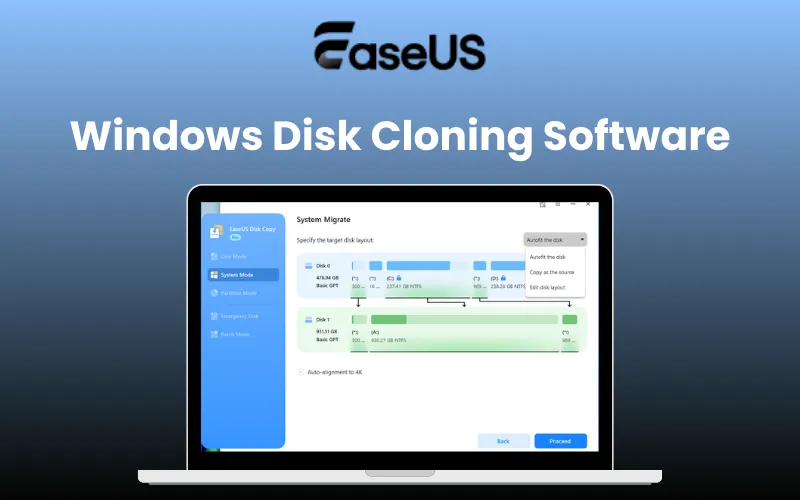
EaseUS Windows Disk Cloning Software Feature Image

Disk cloning does not have to be complicated! With a simple 3-step process and guaranteed results, Windows users can migrate safely in minutes. Presenting –

EaseUS – Windows Disk Cloning Software

This high-speed Windows disk-cloning software lets you clone entire disks, system drives, or individual partitions with precision.

It works independently of the operating system, file system, or partition structure, making it a reliable solution for all cloning scenarios.

EaseUS Disk Cloning Software is suitable for beginners and advanced users alike. It –

  • Supports sector-by-sector cloning
  • Ensures a bootable result
  • Works with all major disk brands and interfaces

It eliminates common cloning headaches by enabling seamless OS migration, HDD-to-SSD upgrades, and data backup without reinstalling Windows.

Your system settings, applications, and files remain fully intact, saving hours of setup time and reducing risk.

Designed for personal, professional, and enterprise use, this software also supports failing disk recovery, portable Windows creation, and WinPE bootable media.

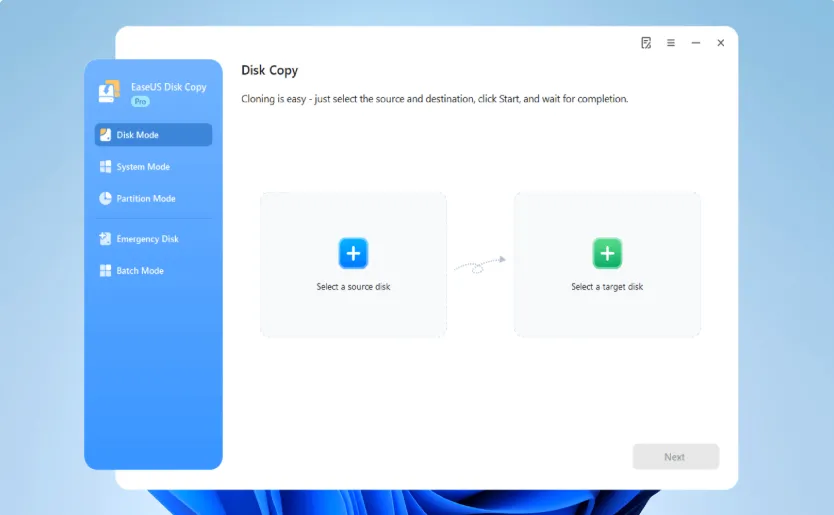
1. Choose the source disk: Launch EaseUS Disk Copy, select the source disk under the Disk Mode.

Windows Disk Cloning Step 1

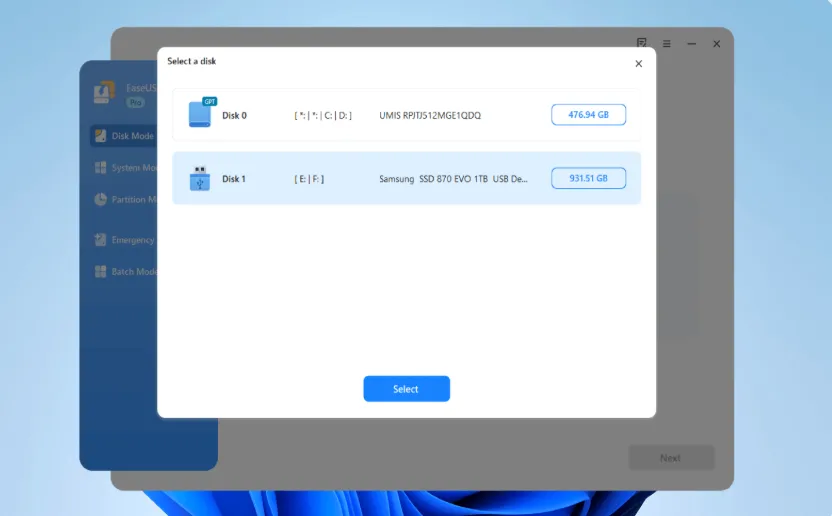
2. Select the target HDD/SSD: Choose the target disk, and ensure it has larger space than the source one.

Windows Disk Cloning Step 2

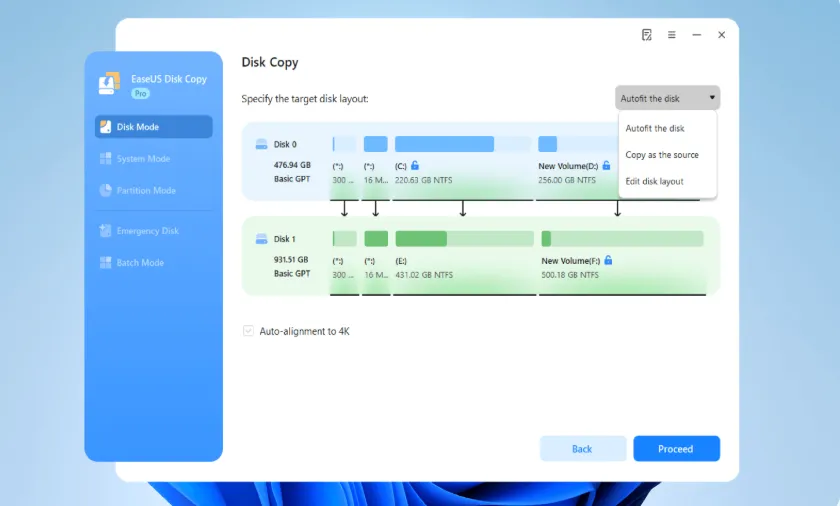
3. Adjust disk layout and clone: You can choose to ‘autofit the disk’, ‘copy as the source’, or ‘edit disk layout’ as needed. Then click Proceed to start cloning.

Windows Disk Cloning Step 3

Features Of EaseUS – Disk Cloning Software:

Core Cloning Capabilities:

  • Clone entire disks, system drives, or individual partitions to suit different upgrade and backup needs.
  • Supports disk cloning, system cloning, and partition cloning modes.

Flexible Cloning Options:

  • Migrate only the operating system or clone just the used sectors to fit smaller SSDs.
  • Ideal for upgrading to SSDs or M.2/NVMe drives without wasted space.

Sector-Level Copy Technology:

  • Performs precise, bit-by-bit cloning while automatically skipping bad or blank sectors.
  • Ensures uninterrupted cloning and safe data transfer from aging or damaged drives.

Seamless OS Migration:

  • Migrate Windows 10/11 to HDD, SSD, M.2, or NVMe without reinstalling or reactivating.
  • Preserves all system settings, applications, and personal files.

One-Click Disk & Partition Clone:

  • Duplicate HDDs, SSDs, or partitions with a single click for fast, effortless data transfer.
  • No need to reinstall Windows or applications.

Cross-Device & PC-to-PC Cloning:

  • Clone an old computer’s hard drive to a new PC, including OS, apps, and files.
  • Boot directly from the cloned drive on the new system.

Portable Windows Creation:

  • Create a portable Windows USB drive through system cloning for easy transport and use.

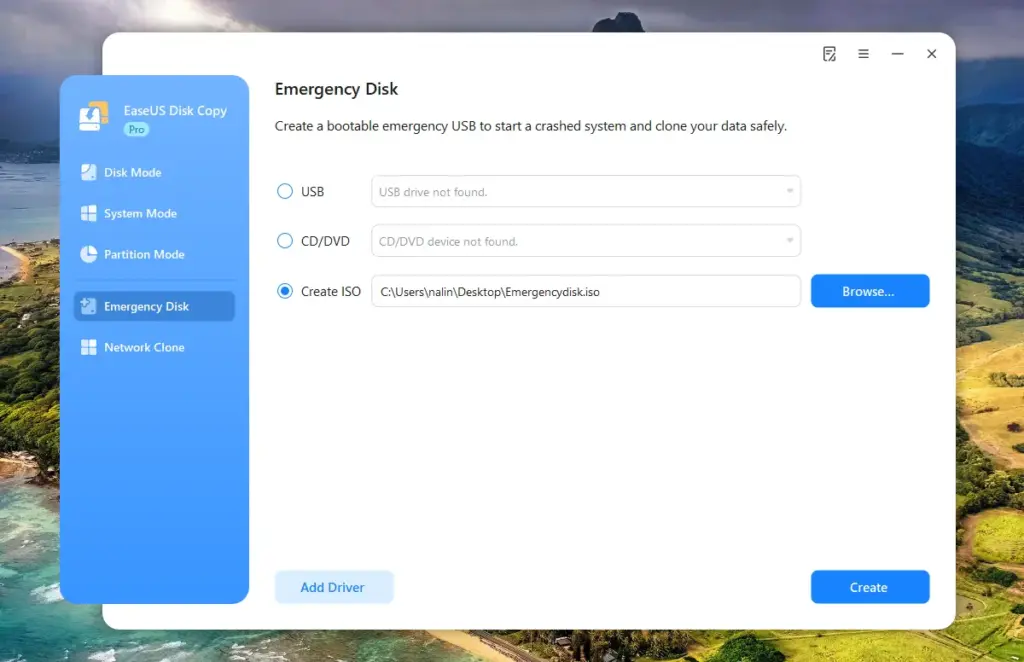
WinPE Bootable Media Creation:

  • Build bootable USB, CD, or DVD media to start unbootable systems.
  • Supports system recovery, disk cloning, data migration, and troubleshooting.

Complete Backup & Instant Recovery:

  • Clone drives as full backups.
  • If the original drive fails, replace it instantly without time-consuming data restoration.

Failing Disk Data Protection:

  • Safely clone data from failing or partially damaged hard drives to healthy storage.
  • An expert-recommended method for protecting data before total drive failure.

Disk Layout Optimization:

  • Automatically resize partitions or keep the original layout during cloning.
  • Optimized for SSD performance with manual layout editing support.

Multi-Device & System Compatibility:

  • Works with HDDs and SSDs of different brands.
  • Supports GPT disks and multiple Windows editions, including server versions.

Fast, Secure Data Transfer Anywhere:

  • Transfer data between drives quickly without data loss or OS reinstallation.
  • Perfect for portable upgrades, backups, and on-the-go storage management.

Preview Of EaseUS Windows Disk Cloning Software:

Windows Disk Cloning Step 1
Dashboard
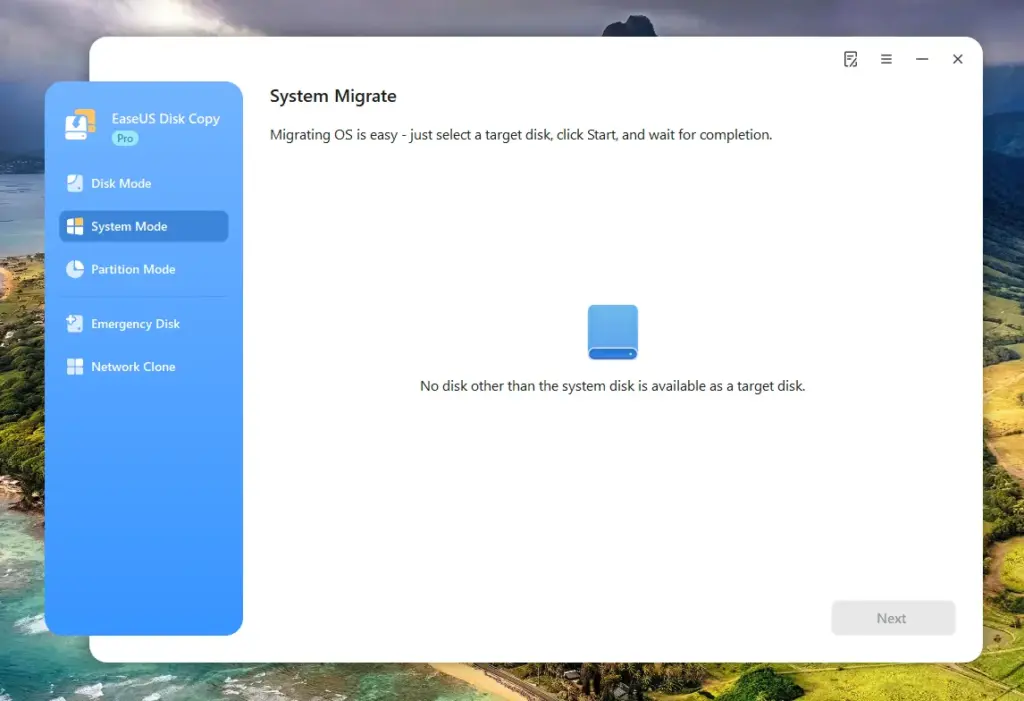
System Migration In EaseUS Windows Disk Cloning Software
System Migration
Emergency Disk Option In EaseUS Windows Disk Cloning Software
Emergency Disk
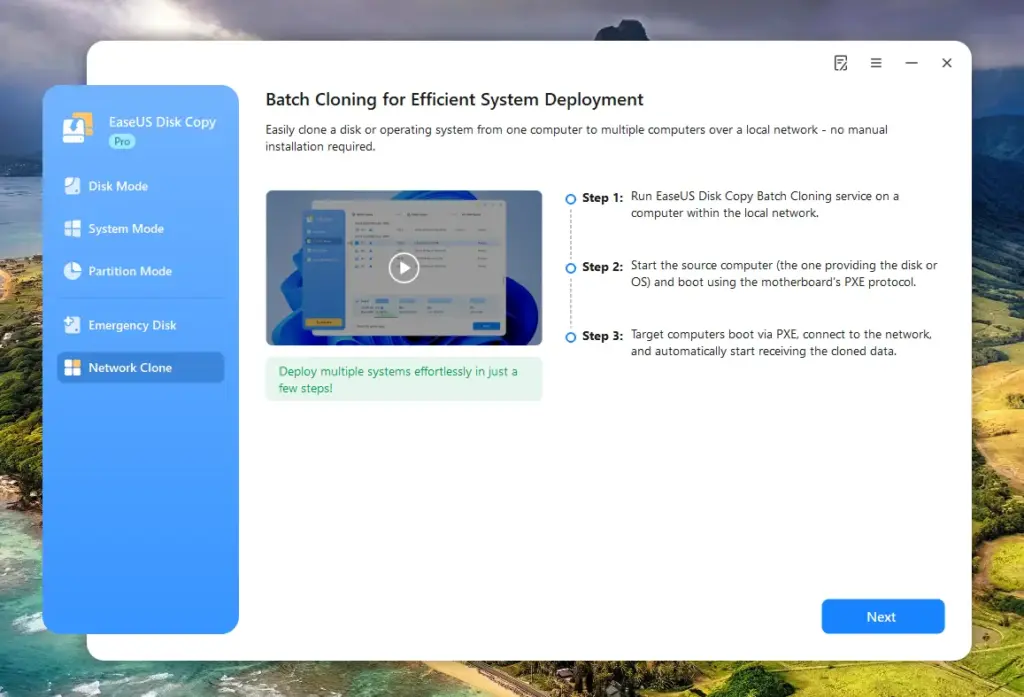
Network Cloning In EaseUS Windows Disk Cloning Software
Network Cloning

Additional Features:

  • High-speed cloning with optimized performance and reduced waiting time.
  • Safe and reliable cloning with guaranteed bootable results.
  • Broad compatibility with Windows 11, older Windows versions, Windows Server, and FAT/NTFS file systems.
  • Beginner-friendly interface with a simple 3-step cloning process.
  • All-in-one solution combining cloning, migration, backup, recovery, and bootable media creation.
  • Enterprise-friendly licensing for cloning multiple systems with a single license.
  • Designed for on-site and remote disk cloning across multiple environments.

Technical Specifications:

System Requirements:

  • CPU: at least an X86 or compatible CPU with a main frequency of 500 MHz.
  • Disk space: 1GB or higher memory.
  • CD/DVD ROM.
  • PS/2 or USB mouse.
  • PS/2 or USB keyboard.
  • RAM: at least 1GB

Supported Operating System:

  • Windows XP x86/x64
  • Windows Vista x86/x64
  • Windows 7 x86/x64
  • Windows 8 x86/x64
  • Windows 8.1 x86/x64
  • Windows 10
  • Windows 11

Supported Files System:

  • FAT12/FAT16/FAT32/NTFS

Supported Hardware:

This Disk Cloning Software can be used to copy data among the following types of devices:

  • IDE HDD, SSD, USB HDD, SCSI HDD, SATA HDD, FireWire (IEEE 1394) HDD, etc.

Testimonials:

Q&A:

How long does it take to clone a 1TB drive?
It depends on the drive type and interface. HDDs take several hours, while SSD or NVMe cloning can often finish in under an hour.

How can I clone HDD to SSD without data loss?
By cloning all partitions at the sector level, including the system and files. The SSD remains bootable with no OS reinstallation needed.

How do I upgrade to a larger SSD and keep Windows 10/11?
Clone the system, apps, and files to the new SSD. Partitions automatically resize, and Windows boots normally afterward.

Can a disk with bad sectors be cloned?
Yes. Damaged sectors are skipped while healthy data is copied, allowing cloning to complete safely.

Can Windows be migrated to a new PC with different hardware?
Yes. System settings and drivers adapt to new hardware while preserving files and installed programs.

Can I clone NVMe SSD to NVMe SSD?
Yes. NVMe-to-NVMe cloning is supported, very fast, and the new drive boots immediately after cloning.

Deal Terms:

How to download/activate this product?
After completing your purchase, you will receive an instructions document. Follow the instructions in this document to redeem the coupon code and get access to this product.

What is the validity of the license key/coupon code? (Within how many days must the coupon code be redeemed?)
The coupon code must be redeemed within 30 days of the purchase date.

Is a Lifetime Subscription available for this product?
Yes, Lifetime Access is available with the purchase of the Lifetime Pro Plan, and Annual Access is available with the purchase of the Annual Pro Plan.
*LIFETIME MEANS LIFETIME OF THE PRODUCT.

We try to get great products with longevity for our customers, but products do get acquired, or sometimes the products go bankrupt. Many of these products are from startup companies, giving us a great deal for our customers. But in case of an unfortunate situation where the product does not last long, there is not much DealFuel can do about it.

Are updates available for this product?

  • Annual Plan: Includes free updates for the subscription period.
  • Lifetime Plan: Includes lifetime free updates.

Is support available for this product?

  • Annual Plan: Includes free support for the subscription period.
  • Lifetime Plan: Includes lifetime free support.

For support, contact – [email protected] .

Is this deal for new users only?
YES, this deal is available only for the NEW USERS of this Windows Disk Cloning Software.

How many users can use the license key/coupon code?
One coupon code can be used for one user/account.

Are the coupon codes stackable?
No, the coupon codes are not stackable.

Can this product be accessed on all devices?
No, EaseUS – Windows Disk Cloning Software is accessible only on Desktops with Windows 11/10/8/7 Operating Systems.

Reviews

There are no reviews yet.

Only logged in customers who have purchased this product may leave a review.

TL;DR

  • Clone Windows disks in 3 easy steps
  • Sector-by-sector disk and partition cloning
  • Migrate OS without reinstalling
  • Upgrade HDD to SSD with zero downtime
  • Guaranteed bootable results
  • No technical skills required

Disk cloning does not have to be complicated! With a simple 3-step process and guaranteed results, Windows users can migrate safely in minutes. Presenting –

EaseUS – Windows Disk Cloning Software

This high-speed Windows disk-cloning software lets you clone entire disks, system drives, or individual partitions with precision.

It works independently of the operating system, file system, or partition structure, making it a reliable solution for all cloning scenarios.

EaseUS Disk Cloning Software is suitable for beginners and advanced users alike. It –

  • Supports sector-by-sector cloning
  • Ensures a bootable result
  • Works with all major disk brands and interfaces

It eliminates common cloning headaches by enabling seamless OS migration, HDD-to-SSD upgrades, and data backup without reinstalling Windows.

Your system settings, applications, and files remain fully intact, saving hours of setup time and reducing risk.

Designed for personal, professional, and enterprise use, this software also supports failing disk recovery, portable Windows creation, and WinPE bootable media.

1. Choose the source disk: Launch EaseUS Disk Copy, select the source disk under the Disk Mode.

Windows Disk Cloning Step 1

2. Select the target HDD/SSD: Choose the target disk, and ensure it has larger space than the source one.

Windows Disk Cloning Step 2

3. Adjust disk layout and clone: You can choose to ‘autofit the disk’, ‘copy as the source’, or ‘edit disk layout’ as needed. Then click Proceed to start cloning.

Windows Disk Cloning Step 3

Features Of EaseUS – Disk Cloning Software:

Core Cloning Capabilities:

  • Clone entire disks, system drives, or individual partitions to suit different upgrade and backup needs.
  • Supports disk cloning, system cloning, and partition cloning modes.

Flexible Cloning Options:

  • Migrate only the operating system or clone just the used sectors to fit smaller SSDs.
  • Ideal for upgrading to SSDs or M.2/NVMe drives without wasted space.

Sector-Level Copy Technology:

  • Performs precise, bit-by-bit cloning while automatically skipping bad or blank sectors.
  • Ensures uninterrupted cloning and safe data transfer from aging or damaged drives.

Seamless OS Migration:

  • Migrate Windows 10/11 to HDD, SSD, M.2, or NVMe without reinstalling or reactivating.
  • Preserves all system settings, applications, and personal files.

One-Click Disk & Partition Clone:

  • Duplicate HDDs, SSDs, or partitions with a single click for fast, effortless data transfer.
  • No need to reinstall Windows or applications.

Cross-Device & PC-to-PC Cloning:

  • Clone an old computer’s hard drive to a new PC, including OS, apps, and files.
  • Boot directly from the cloned drive on the new system.

Portable Windows Creation:

  • Create a portable Windows USB drive through system cloning for easy transport and use.

WinPE Bootable Media Creation:

  • Build bootable USB, CD, or DVD media to start unbootable systems.
  • Supports system recovery, disk cloning, data migration, and troubleshooting.

Complete Backup & Instant Recovery:

  • Clone drives as full backups.
  • If the original drive fails, replace it instantly without time-consuming data restoration.

Failing Disk Data Protection:

  • Safely clone data from failing or partially damaged hard drives to healthy storage.
  • An expert-recommended method for protecting data before total drive failure.

Disk Layout Optimization:

  • Automatically resize partitions or keep the original layout during cloning.
  • Optimized for SSD performance with manual layout editing support.

Multi-Device & System Compatibility:

  • Works with HDDs and SSDs of different brands.
  • Supports GPT disks and multiple Windows editions, including server versions.

Fast, Secure Data Transfer Anywhere:

  • Transfer data between drives quickly without data loss or OS reinstallation.
  • Perfect for portable upgrades, backups, and on-the-go storage management.

Preview Of EaseUS Windows Disk Cloning Software:

Windows Disk Cloning Step 1
Dashboard
System Migration In EaseUS Windows Disk Cloning Software
System Migration
Emergency Disk Option In EaseUS Windows Disk Cloning Software
Emergency Disk
Network Cloning In EaseUS Windows Disk Cloning Software
Network Cloning

Additional Features:

  • High-speed cloning with optimized performance and reduced waiting time.
  • Safe and reliable cloning with guaranteed bootable results.
  • Broad compatibility with Windows 11, older Windows versions, Windows Server, and FAT/NTFS file systems.
  • Beginner-friendly interface with a simple 3-step cloning process.
  • All-in-one solution combining cloning, migration, backup, recovery, and bootable media creation.
  • Enterprise-friendly licensing for cloning multiple systems with a single license.
  • Designed for on-site and remote disk cloning across multiple environments.

Technical Specifications:

System Requirements:

  • CPU: at least an X86 or compatible CPU with a main frequency of 500 MHz.
  • Disk space: 1GB or higher memory.
  • CD/DVD ROM.
  • PS/2 or USB mouse.
  • PS/2 or USB keyboard.
  • RAM: at least 1GB

Supported Operating System:

  • Windows XP x86/x64
  • Windows Vista x86/x64
  • Windows 7 x86/x64
  • Windows 8 x86/x64
  • Windows 8.1 x86/x64
  • Windows 10
  • Windows 11

Supported Files System:

  • FAT12/FAT16/FAT32/NTFS

Supported Hardware:

This Disk Cloning Software can be used to copy data among the following types of devices:

  • IDE HDD, SSD, USB HDD, SCSI HDD, SATA HDD, FireWire (IEEE 1394) HDD, etc.

Testimonials:

Q&A:

How long does it take to clone a 1TB drive?
It depends on the drive type and interface. HDDs take several hours, while SSD or NVMe cloning can often finish in under an hour.

How can I clone HDD to SSD without data loss?
By cloning all partitions at the sector level, including the system and files. The SSD remains bootable with no OS reinstallation needed.

How do I upgrade to a larger SSD and keep Windows 10/11?
Clone the system, apps, and files to the new SSD. Partitions automatically resize, and Windows boots normally afterward.

Can a disk with bad sectors be cloned?
Yes. Damaged sectors are skipped while healthy data is copied, allowing cloning to complete safely.

Can Windows be migrated to a new PC with different hardware?
Yes. System settings and drivers adapt to new hardware while preserving files and installed programs.

Can I clone NVMe SSD to NVMe SSD?
Yes. NVMe-to-NVMe cloning is supported, very fast, and the new drive boots immediately after cloning.

Deal Terms:

How to download/activate this product?
After completing your purchase, you will receive an instructions document. Follow the instructions in this document to redeem the coupon code and get access to this product.

What is the validity of the license key/coupon code? (Within how many days must the coupon code be redeemed?)
The coupon code must be redeemed within 30 days of the purchase date.

Is a Lifetime Subscription available for this product?
Yes, Lifetime Access is available with the purchase of the Lifetime Pro Plan, and Annual Access is available with the purchase of the Annual Pro Plan.
*LIFETIME MEANS LIFETIME OF THE PRODUCT.

We try to get great products with longevity for our customers, but products do get acquired, or sometimes the products go bankrupt. Many of these products are from startup companies, giving us a great deal for our customers. But in case of an unfortunate situation where the product does not last long, there is not much DealFuel can do about it.

Are updates available for this product?

  • Annual Plan: Includes free updates for the subscription period.
  • Lifetime Plan: Includes lifetime free updates.

Is support available for this product?

  • Annual Plan: Includes free support for the subscription period.
  • Lifetime Plan: Includes lifetime free support.

For support, contact – [email protected] .

Is this deal for new users only?
YES, this deal is available only for the NEW USERS of this Windows Disk Cloning Software.

How many users can use the license key/coupon code?
One coupon code can be used for one user/account.

Are the coupon codes stackable?
No, the coupon codes are not stackable.

Can this product be accessed on all devices?
No, EaseUS – Windows Disk Cloning Software is accessible only on Desktops with Windows 11/10/8/7 Operating Systems.

Clear
30 Day Refund Policy
For support contact: [email protected] 

Want to save another 25% on this deal?

Join DealClub

Plans & Features

Pro Plan - Annual Access
$19.98 $39.95
  • Sector level cloning;
  • One-click OS migrate;
  • Resize partition when copying disks;
  • Support GPT disk;
  • Create WinPE bootable disk;
  • Support Windows 11/10/8/8.1/7/Vista/XP;
  • Local disk copy;
  • 30-day money-back guarantee, 100% security assurance, free technical support;
  • One license for one computer;
  • 1-year free upgrades;
Buy Now
Pro Plan - Lifetime Access
$29.98 $59.95
  • Sector level cloning;
  • One-click OS migrate;
  • Resize partition when copying disks;
  • Support GPT disk;
  • Create WinPE bootable disk;
  • Support Windows 11/10/8/8.1/7/Vista/XP;
  • Local disk copy;
  • 30-day money-back guarantee, 100% security assurance, free technical support;
  • One license for one computer;
  • Lifetime free upgrades;
Buy Now

    No Q&A available yet.

    No Reviews available.

    Only logged in customers who have purchased this product may leave a review.

$16.98$39.95
$19.98$39.95
Scroll to Top