12 Free Grunge Texture Effects To Add Vintage Drama to Your Designs

TL;DR

  • Get 12 free high-resolution grunge textures (4500×4500 px, 300 DPI).
  • Add dramatic vintage effects to photos, portraits, landscapes, and designs.
  • Use as overlays or backgrounds to create antique, distressed looks.
  • Customize with blending modes, opacity, and color adjustments.

Quick Overview

Best for:

  • Brand Designers
  • Design agencies
  • Freelance Designers
  • Logo Designers
  • Packaging Designers
  • Print Designers
  • Social Media Designers

Compatibility:

  • Operating Systems:
    Android, iOS, Linux, MacOS, Windows
  • Integrations:
    Adobe Illustrator, Adobe InDesign, Adobe Photoshop, Affinity Designer, Affinity Publisher, Canva, ChatGPT, CorelDRAW, Figma

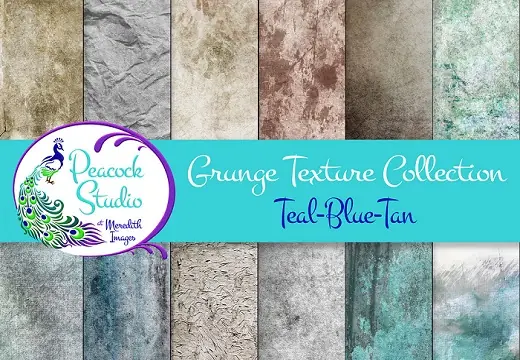
Free Grunge Texture Collection


This Grunge Texture Collection will add drama to a “ho-hum” image.


They can be used as overlays on top of your photo or used to replace a distracting background and placed behind your subject.


These Grunge Textures are great for portraits as well as landscape and scenic images. They are especially attractive on old buildings, barns, and cars (and other old items) to bring out the antique feeling.


You can use these Grunge textures individually or in combination. By adjusting Blending Modes and Opacity, you can create your own look and vary it to fit your image.


The Teal, blue, and Tan color palette adds to the antique feeling. You can also vary the textures by applying a hue/saturation adjustment in post-processing, thereby expanding their versatility. If you wish to have the texture without the color, you can use a Black & White adjustment.


This collection includes 12 different textures. These are large textures (4500 x 4500 pixels) at 300 dpi. They were created from original photographs and modified in post-processing.


Thanks to Meredith Images for this awesome work and for sharing it with other graphic designers. So, if you like this grunge texture collection, make sure to check out her page for other stunning designs!

Simple steps to add the grunge texture to your images –

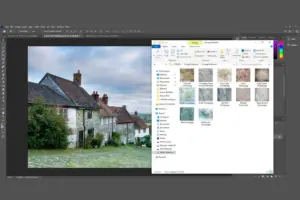
Step 1- To begin with, you will need an image to apply the effect.
Step 2 - Open the grunge texture folder on your mac or window.
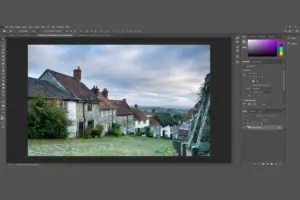
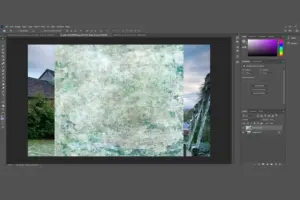
Step 3 - Select the texture you want to add to the image and drag it as seen in the picture. You can also open these textures in Photoshop and apply them to the image.
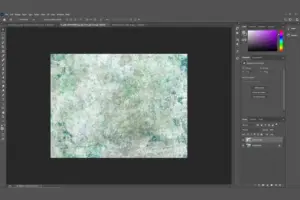
Step 4 - Use the transform tool in Photoshop to extend the selected texture to match the size of the image.
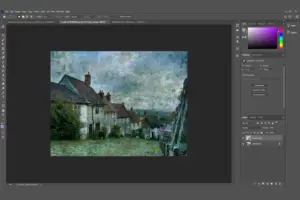
Step 5 - Change the “Blending Mode” to “Multiply”.
Step 6 - In the adjustment panel, open curves to change the light or dark effect on the image.
Step 7 - In the Adjustment panel, open brightness/contrast tool and make the changes as required.
Step 8 - That’s how easy it is to add drama with these grunge textures to any image.

Why Do You Need This Free Grunge Texture Collection?

  • Add a bold, distressed look to designs with authentic grunge-style textures.
  • Create unique backgrounds for posters, flyers, branding, and digital artwork.
  • Transform simple designs into edgy, vintage-inspired visuals.
  • Enhance photos, illustrations, and graphics with creative texture effects.
  • Save time with ready-to-use textures instead of creating effects from scratch.
  • Experiment with different styles for modern, retro, and artistic projects.
  • Add depth and character to designs with layered texture elements.
  • Create professional-looking visuals for print and digital platforms.
  • Customize textures easily to match your creative vision.
  • Expand your design toolkit with versatile assets for multiple projects.

This Free Grunge Texture Collection Is Best For:

  • Brand Designers
  • Design agencies
  • Freelance Designers
  • Logo Designers
  • Packaging Designers
  • Print Designers
  • Social Media Designers
Download Now
Limited Time Deal

Deal Terms

  • Available as instant download after completing your purchase
  • Can be used for unlimited Personal and Commercial Purposes
  • End products must not be used or sold in a way that is directly competitive with the original item
  • Cannot be sublicensed, resold, shared, transferred, or otherwise redistributed on their own

Frequently Asked Questions

Find answers to commonly asked questions about this Free Grunge Texture Collection

What can I create with these grunge textures?

Design posters, social posts, covers, branding, and artistic visuals.

Can these textures improve my designs?

Yes, add depth, character, and a bold creative style instantly.

Are these textures easy to use?

Yes, simply apply and customize them in your editing workflow.

Can I use these textures for different styles?

Yes, create vintage, edgy, retro, and modern designs.

Customer Feedback

Customer Reviews (0) Customer Q&A (0)

No Reviews Yet

Be the first to try this deal and share your experience.

You must purchase this product to leave a review.

Be The First To Ask

Get clarity before you buy—your question might help others too.

×

You Might Also Like

Enhance Your Visuals With 5 Free Cute Handmade Patterns
10 Free Kawaii Backgrounds Collection | Extended License
20 Colourful Backgrounds - Freebie | Extended License
5 Reasons to use this Free Lead Capture Plugin
5.0 (1)
Download Now
Scroll to Top