ImageConvertIt – Edit Ecommerce Product Photos in Bulk

TL;DR

  • Prepare ecommerce product photos without editing each image separately.
  • Remove backgrounds and add watermarks, shadows, and reflections in bulk.
  • Compress, convert, and redact files with Core processing on your computer.
  • Process up to 50 files per queue and download completed batches.

Quick Overview

Alternative to:

  • Adobe Photoshop
  • Canva
  • PhotoRoom
  • Remove.bg

Best for:

  • Digital Agencies
  • E-commerce Brands
  • Graphic Designers
  • Legal Teams
  • Photographers
  • Small Business Owners

Compatibility:

  • Browser Support:
    Brave, Chrome, Edge, Firefox, Safari
  • Operating Systems:
    Browser Based

Preparing product photos one by one takes time away from managing your store.

Edit your catalog in batches and reduce repetitive work with ImageConvertIt.

What Is ImageConvertIt?

ImageConvertIt is an ecommerce image editor. It helps sellers & agencies prepare product photos in bulk.

It allows you to –

  • Remove backgrounds
  • Add watermarks
  • Compress images
  • Convert files

All without uploading them for Core processing.

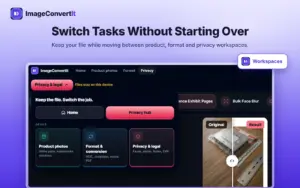
Its dedicated workspace brings three types of tasks together:

  • Product Photos: Prepare backgrounds, watermarks, shadows, and reflections.
  • Format: Compress images and convert WebP, HEIC, PNG, and JPG files.
  • Privacy & Legal: Redact details, number documents, and remove image metadata.

It lets you keep your file open while switching between tasks.

With ImageConvertIt, You Can:

  • REMOVE backgrounds and create transparent product images
  • PREPARE white-background photos for ecommerce listings
  • ADD watermarks, shadows, and reflections across batches
  • COMPRESS and convert images into supported formats
  • REDACT sensitive details and remove location metadata
  • DOWNLOAD finished batches together as ZIP files

How ImageConvertIt Works

Step 1 – Choose Your Workspace:

Open Product Photos, Format, or Privacy & Legal.

Step 2 – Add Your Files:

Add up to 50 files and choose your processing settings.

Step 3 – Process & Download:

Run the task on your computer and download your completed batch.

Stay online for the first Process action to load the local engine; Core tools can work offline afterward.

ImageConvertIt Features

Prepare Product Photos for Your Online Store
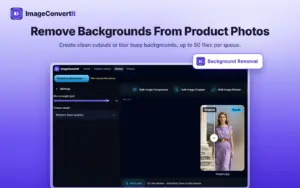
Remove Backgrounds From Product Photos

Prepare Product Photos for Your Online Store:

  • Remove backgrounds to create transparent product cutouts
  • Add pure white backgrounds for Amazon and Shopify listing photos
  • Process up to 50 files per queue
Give Your Product Catalog a Consistent Look
Add Reflections That Make Products Stand Out
Watermark Your Product Catalog in Bulk

Give Your Product Catalog a Consistent Look:

  • Add watermarks across batches of product photos
  • Apply shadows and reflections to highlight your products
  • Repeat the same edits across multiple listing images
Compress & Convert Images in Bulk
Resize Batches and Download Them as a ZIP

Compress & Convert Images in Bulk:

  • Reduce file sizes for easier storage and sharing
  • Convert images between WebP, HEIC, PNG, and JPG
  • Download completed files together as a ZIP archive
Remove Sensitive Details Before Sharing
Strip EXIF Metadata and GPS Locations

Remove Sensitive Details Before Sharing:

  • Blur faces and redact license plates
  • Remove EXIF metadata and embedded GPS locations
  • Process files locally without uploading them for Core tasks
Keep Documents & Evidence Organized
Create Evidence Exhibit Pages From Photos

Keep Documents & Evidence Organized:

  • Add Bates numbering to identify document pages
  • Redact sensitive document information
  • Create Evidence Exhibit Pages from photos for easier review
Switch Tasks Without Starting Over

Switch Tasks Without Starting Over:

  • Keep your file while moving between the three workspaces
  • Combine product-photo edits, conversion, and privacy tasks
  • Continue Core processing offline after the local engine loads

Why Choose ImageConvertIt?

  • Spend less time repeating edits across your catalog.
  • Prepare consistent images for your online listings.
  • Budget for editing without per-image Core charges.
  • Handle seasonal work without monthly Core subscriptions.
  • Keep unreleased product and client files on your computer.
  • Reduce file transfers between separate editing tools.
 

Specifications:

Specification Details
Software Type Ecommerce image editor with conversion and document privacy tools
Platform Browser-based application
Supported Systems Windows, macOS, and Linux
Supported Browsers Modern versions of Brave, Chrome, Edge, Firefox, and Safari
Supported Devices Desktops and laptops
Workspaces Product Photos, Format, and Privacy & Legal
Batch Capacity Up to 50 files per queue
Image Conversion Formats WebP, HEIC, PNG, and JPG
Batch Export ZIP download
Core Processing Files are processed on your computer without uploading
Internet & Offline Use Stay online for the first Process action to load the local engine; Core processing works offline afterward
Note: Cloud AI tools are optional and require separately purchased credit packs.

ImageConvertIt is Best For:

  • Digital Agencies
  • E-commerce Brands
  • Graphic Designers
  • Legal Teams
  • Photographers
  • Small Business Owners

Choose Your Plan

Solo Lifetime Core
Solo Lifetime Core
Original price was: $89.00.Current price is: $39.99.
Team Lifetime Core
Original price was: $199.00.Current price is: $119.99.
With DealClub
$33.99
$89.00
Without DealClub
$39.99
$89.00
Buy Now
Limited Time Deal

Deal Terms

  • Access via redemption of coupon code
  • 30-Day Coupon Code Validity
  • One Coupon Code for one user/account
  • Coupon Codes are not stackable
  • For Both New & Existing Users
  • Free Updates
  • Free Support
  • Accessible on all devices - Desktop, Mobile and Tablet

Plans & Features

Choose the perfect plan for your needs.

Plans & Features
Solo Lifetime Core
Team Lifetime Core
$89 $39.99
Buy Now
$199 $119.99
Buy Now
Browser Activations

1

3

Core Processing Volume

Unlimited

Unlimited

Workfows

Unlimited (Up to 50 per batch)

Unlimited (Up to 50 per batch)

Dedicated Workspace
Bulk Background Removal
Transparent & White Backgrounds
Catalog Watermarking
Product Shadows & Reflections
Bulk Image Compression
WebP, HEIC, PNG & JPG Conversion
Bates Numbering
Document Redaction
Evidence Exhibit Pages From Photos
Face Blurring & License Plate Redaction
EXIF & GPS Metadata Removal
ZIP Downloads

Unlimited

Unlimited

Offline Core Processing After Initial Load
Core Bug Fixes & Maintenance Updates
Cloud AI Tools

Not included; credit packs sold separately

Not included; credit packs sold separately

Plan 1 of 2

Solo Lifetime Core

$89.00 $39.99
Buy Now
30-Day Refund | Lifetime Access | One-Time Payment
  • Browser Activations: 1
  • Core Processing Volume: Unlimited
  • Workfows: Unlimited (Up to 50 per batch)
  • Dedicated Workspace
  • Bulk Background Removal
  • Transparent & White Backgrounds
  • Catalog Watermarking
  • Product Shadows & Reflections
  • Bulk Image Compression
  • WebP, HEIC, PNG & JPG Conversion
  • Bates Numbering
  • Document Redaction
  • Evidence Exhibit Pages From Photos
  • Face Blurring & License Plate Redaction
  • EXIF & GPS Metadata Removal
  • ZIP Downloads: Unlimited
  • Offline Core Processing After Initial Load
  • Core Bug Fixes & Maintenance Updates
  • Cloud AI Tools: Not included; credit packs sold separately

Frequently Asked Questions

Find Answers to common questions about ImageConvertIt

Can I Edit Multiple Product Photos Together?

Yes, you can process up to 50 files in each queue.

Can I Use ImageConvertIt Offline?

Yes, Core works offline after the initial online processing loads its engine.

Are My Files Uploaded for Core Processing?

No, Core tasks process your files locally on your own computer.

Customer Feedback

Customer Reviews (0) Customer Q&A (0)

No Reviews Yet

Be the first to try this deal and share your experience.

You must purchase this product to leave a review.

Be The First To Ask

Get clarity before you buy—your question might help others too.

×

You Might Also Like

Voice Summarizer - AI Content Summarizer Plugin | Lifetime Access

Voice Summarizer - AI Content Summarizer Plugin | Lifetime Access

, , , , , , , ,

GPTImage Magic - Image Generation WP Plugin | Lifetime Access

GPTImage Magic - Image Generation WP Plugin | Lifetime Access

, , , , , , , ,

AiAppz - All-in-One AI Marketing Platform | Lifetime Access
SoftOrbits - AI Photo Editor For Windows | Lifetime Access

SoftOrbits - AI Photo Editor For Windows | Lifetime Access

, , , , , , ,

Choose Plan
Solo Lifetime Core
Solo Lifetime Core
Original price was: $89.00.Current price is: $39.99.
Team Lifetime Core
Original price was: $199.00.Current price is: $119.99.
Buy with DealClub
$33.99 $89.00
Buy without DealClub
$39.99 $89.00

Deal Terms

  • ✓ Access via redemption of coupon code
  • ✓ 30-Day Coupon Code Validity
  • ✓ One Coupon Code for one user/account
  • ✓ Coupon Codes are not stackable
  • ✓ For Both New & Existing Users
  • ✓ Free Updates
  • ✓ Free Support
  • ✓ Accessible on all devices - Desktop, Mobile and Tablet
Scroll to Top