Home > All > Subscription Type > Lifetime > Watermark Your Images | Mass Watermark | Lifetime

Watermark Your Images | Mass Watermark | Lifetime

Vendor: DealFuel
Mass Watermark

Got amazing new pictures to share but don’t know how to stop photo theft? Watermark your images now in bulk within a minute.

Yess… It’s a no brainer with

Mass Watermark – Watermark Images

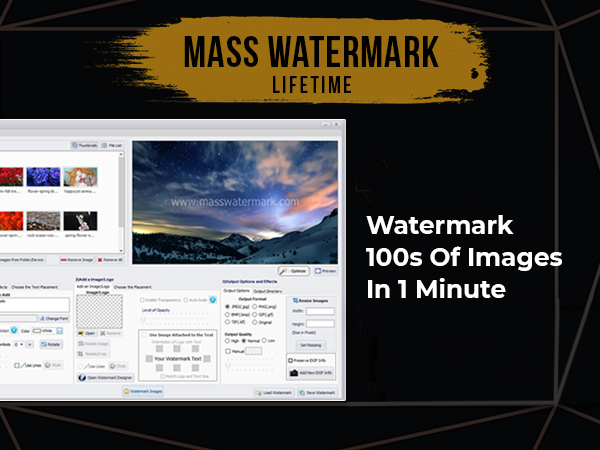
An intelligent software designed to protect your photos and make post-processing workflow easy and efficient.

The powerful and easy to use user interface allows you to quickly watermark 100s of photos with minimal effort.

Not just watermark, it allows you to

  • Crop/Rotate/Resize images,
  • Optimize images,
  • Design the watermark,
  • Add EXIF info,
  • Direct upload images to Picasa & Flickr
  • Create Zip file

Mass Watermark is an all-in-one Photo Watermark Software to protect, resize and optimize effortlessly.

Major Highlights Of The Mass Watermark Software:

  • Watermark 100s of photos in less than 1 minute.
  • Resize images individually or in bulk.
  • Optionally add EXIF data to your photos.
  • Optimize your images by adjusting contrast, brightness, etc.
  • Improve image quality by applying effects like mean removal, sharpening, etc.
  • Create your own branding with the inbuilt watermark designer.
  • Direct upload to Flickr or Picasa.


Know-How To Add Watermark To Protect Your Images!


Why Do You Need Mass Watermark??

1. Intelligent Watermark Placement

Uses automated watermark size calculation techniques to scale the watermarks to match selected placement.

2. Image Resizing

Set a common size for all output images or set the size of images individually. Easily meet web standards.

3. Inbuilt Watermark Designer

Design your own stylish watermark with Custom Text & Custom Logo and apply to your images with a Click. Brand your Photos easily.

4. Image Optimization

Improve the quality of your photos before they are watermarked by using various Image Optimization effects provided. The effects can be applied to your images individually before watermarking.

5. Add EXIF Info

Optionally add EXIF information like copyright, comments, author etc to all watermarked images.

6. Crop/Rotate/Resize

Crop out the desired portion from an image and use it as the watermark. Also allows you to resize and rotate images.

7. Direct upload to Picasa

Direct connectivity to Picasa so that you can directly upload watermarked images to your Picasa web album after watermarking. You can add photos to existing albums or create new albums with custom properties.

8. Direct Upload to Flickr

Upload images directly to your Flickr galleries after watermarking with few clicks. You just need to authorize Mass Watermark once. This allows easy and seamless protection of your Flickr photos.

9. Create Zip file

Packs all processed images to a single Zip file. The images will be the final output which may be resized/optimized. Ideal for upload to websites via FTP and unzipping at the website side.

Do more than just watermarking. Secure your photos before sharing…


Deal Terms

How to activate/download this product?
This product is delivered as an instant download after completing your purchase on DealFuel. 

Which license do you get access to with this deal?
This deal comes with an Extended Commercial License. 

Is support available for this product?
Yes, support is available for this product. Contact: [email protected]

What are the terms of usage for this product?
All these assets can be used for both personal and commercial projects, as mentioned below:

  • The end products must not be used or sold in a way that is directly competitive with the original item you have purchased.
  • These resources cannot be sub-licensed, resold, shared, transferred, or otherwise redistributed on its own.
  • You cannot share the resources with others.
Reviews

  1. Rated 1 out of 5

    artistikAdamy

    Looks great but it’s intended only for PCs.

  2. Rated 5 out of 5

    Elizabeth

    It fast, easy and fun to use!
    I recommend Mass Watermark!

  3. Rated 5 out of 5

    suyonga

    very easy n nice

  4. Rated 3 out of 5

    yr ho

    This Watermark software only for Window users only. It will be good if there is any watermark for Macbook users.

  5. Rated 4 out of 5

    Phil K

    May favorite part of the program is inserting batch watermarks. This allowed me to make and then apply a watermark to thousands of my photos at the same time. You can vary the transparency so it is not obtrusive.

  6. Rated 5 out of 5

    [email protected]

    Great Program ! i use this for Pictures on my website and for my clients!

  7. Rated 5 out of 5

    garhts

    Charmed! Works like a charm, saves a lot of time and effort to protect your work.

  8. Rated 5 out of 5

    [email protected]

    Great product and a time saver when it comes to working with volumes of photos. Highly recommended.

  9. Rated 5 out of 5

    [email protected]

    Very handy tool! Watermark one image or a folder full of images. Lots of options like text effects, adding a logo, opacity, and watermark placement options.

  10. Rated 5 out of 5

    jsweeney88

    Tried PhotoShop. Couldn’t get it to work. Bought this app and 5 minutes later I was done.

Only logged in customers who have purchased this product may leave a review.

Rated 4.30 out of 5 based on 10 customer ratings
(10 customer reviews)

TL;DR

  • Watermark 100s of images
  • Crop/Rotate/Resize images,
  • Optimize images,
  • Design your own watermark,
  • Add EXIF info & more
Join DealClub To Grab It For Just $5

Got amazing new pictures to share but don’t know how to stop photo theft? Watermark your images now in bulk within a minute.

Yess… It’s a no brainer with

Mass Watermark – Watermark Images

An intelligent software designed to protect your photos and make post-processing workflow easy and efficient.

The powerful and easy to use user interface allows you to quickly watermark 100s of photos with minimal effort.

Not just watermark, it allows you to

  • Crop/Rotate/Resize images,
  • Optimize images,
  • Design the watermark,
  • Add EXIF info,
  • Direct upload images to Picasa & Flickr
  • Create Zip file

Mass Watermark is an all-in-one Photo Watermark Software to protect, resize and optimize effortlessly.

Major Highlights Of The Mass Watermark Software:

  • Watermark 100s of photos in less than 1 minute.
  • Resize images individually or in bulk.
  • Optionally add EXIF data to your photos.
  • Optimize your images by adjusting contrast, brightness, etc.
  • Improve image quality by applying effects like mean removal, sharpening, etc.
  • Create your own branding with the inbuilt watermark designer.
  • Direct upload to Flickr or Picasa.


Know-How To Add Watermark To Protect Your Images!


Why Do You Need Mass Watermark??

1. Intelligent Watermark Placement

Uses automated watermark size calculation techniques to scale the watermarks to match selected placement.

2. Image Resizing

Set a common size for all output images or set the size of images individually. Easily meet web standards.

3. Inbuilt Watermark Designer

Design your own stylish watermark with Custom Text & Custom Logo and apply to your images with a Click. Brand your Photos easily.

4. Image Optimization

Improve the quality of your photos before they are watermarked by using various Image Optimization effects provided. The effects can be applied to your images individually before watermarking.

5. Add EXIF Info

Optionally add EXIF information like copyright, comments, author etc to all watermarked images.

6. Crop/Rotate/Resize

Crop out the desired portion from an image and use it as the watermark. Also allows you to resize and rotate images.

7. Direct upload to Picasa

Direct connectivity to Picasa so that you can directly upload watermarked images to your Picasa web album after watermarking. You can add photos to existing albums or create new albums with custom properties.

8. Direct Upload to Flickr

Upload images directly to your Flickr galleries after watermarking with few clicks. You just need to authorize Mass Watermark once. This allows easy and seamless protection of your Flickr photos.

9. Create Zip file

Packs all processed images to a single Zip file. The images will be the final output which may be resized/optimized. Ideal for upload to websites via FTP and unzipping at the website side.

Do more than just watermarking. Secure your photos before sharing…


Deal Terms

How to activate/download this product?
This product is delivered as an instant download after completing your purchase on DealFuel. 

Which license do you get access to with this deal?
This deal comes with an Extended Commercial License. 

Is support available for this product?
Yes, support is available for this product. Contact: [email protected]

What are the terms of usage for this product?
All these assets can be used for both personal and commercial projects, as mentioned below:

  • The end products must not be used or sold in a way that is directly competitive with the original item you have purchased.
  • These resources cannot be sub-licensed, resold, shared, transferred, or otherwise redistributed on its own.
  • You cannot share the resources with others.

This Deal ran out of Fuel

Don’t Miss a Deal Again.
Get the Latest Deals In your Inbox.

30 Day Refund Policy
For support contact: [email protected] 

Want to save another 25% on this deal?

Join DealClub

Plans & Features

Base Plan
$25 $30
  • Watermark 100s of photos in less than 1 minute
  • Resize images individually or in bulk
  • Add EXIF data to photos
  • Optimize images (contrast, brightness, effects)
  • Inbuilt watermark designer (custom text & logo)
  • Direct upload to Picasa and Flickr
  • Create Zip file for easy uploads
  • Crop, rotate, and resize images
  • Image quality improvements through various effects
  • Lifetime access to the software
Buy Now

    No Q&A available yet.

    Rated 5 out of 5
    Tried PhotoShop. Couldn't get it to work. Bought this app and 5 minutes later I was done.
    Rated 5 out of 5
    Very handy tool! Watermark one image or a folder full of images. Lots of options like text effects, adding a logo, opacity, and watermark placement options.
    Rated 5 out of 5
    Great product and a time saver when it comes to working with volumes of photos. Highly recommended.
    Rated 5 out of 5
    Charmed! Works like a charm, saves a lot of time and effort to protect your work.
    Rated 5 out of 5
    Great Program ! i use this for Pictures on my website and for my clients!
    Rated 4 out of 5
    May favorite part of the program is inserting batch watermarks. This allowed me to make and then apply a watermark to thousands of my photos at the same time. You can vary the transparency so it is not obtrusive.
    Rated 3 out of 5
    This Watermark software only for Window users only. It will be good if there is any watermark for Macbook users.
    Rated 5 out of 5
    very easy n nice
    Rated 5 out of 5
    It fast, easy and fun to use! I recommend Mass Watermark!
    Rated 1 out of 5
    Looks great but it's intended only for PCs.

    Only logged in customers who have purchased this product may leave a review.

Scroll to Top