Screentell – Screen Recorder And Video Editor | Lifetime Access

TL;DR

  • Screen recording and video editing
  • Cinematic 3D motion effects
  • Flexible post-record face-cam
  • Customizable rich sticker annotations
  • Browser-based, zero installation
  • Privacy-first local processing

Quick Overview

Alternative to:

  • Camtasia
  • Cursorful
  • Loom
  • OBS Studio
  • Screen Studio
  • ScreenPal

Best for:

  • Content Creators
  • Educators
  • Freelancers
  • SaaS Companies
  • Startups
  • YouTubers

Compatibility:

  • Browser Support:
    Brave, Chrome, Edge, Firefox, Safari
  • Operating Systems:
    Browser Based
  • Integrations:
    YouTube

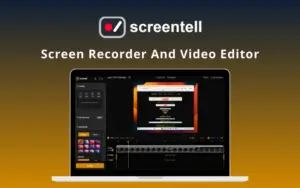
Creating professional product demos doesn’t require complex desktop software. Transform plain screen recordings into studio-quality videos in minutes with –


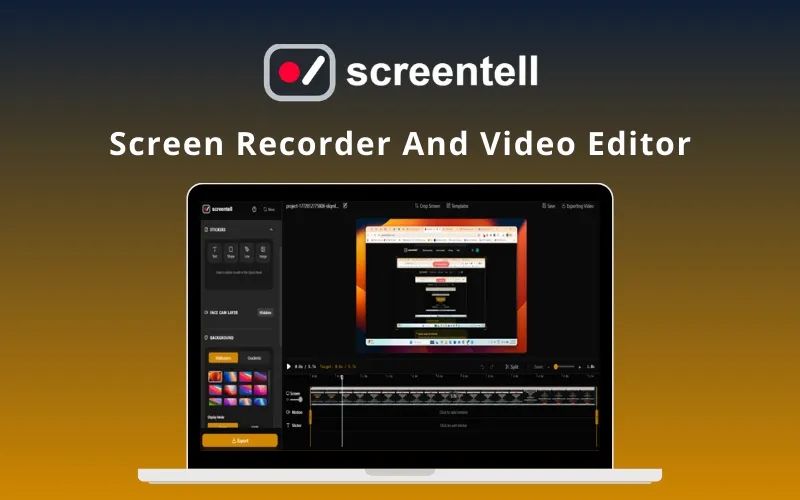
Screentell – Screen Recorder & Video Editor


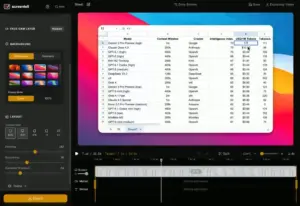
Screentell is an all-in-one screen recording and video editing tool that transforms standard screen captures into visually stunning demos.


It is a complete video editing & enhancement suite, complete with dynamic 3D effects & smart annotations.


It provides a seamless web-based workflow for everyone who needs conversion-ready videos fast.


It automates the polish of your recordings, ensures high-quality exports, & generates professional results instantly.

Introduction To Screentell:

Youtube video

Features of Screentell:

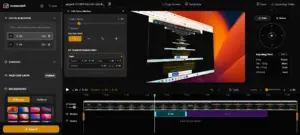
Focus-and-motion-Feature

Cinematic Motion & Focus:

  • 3D Transforms: Adds depth, rotation, and perspective to guide viewer focus.
  • Smart Zoom & Pan: Manually apply 2D/3D focal points to highlight key features.
  • Professional Polish: Creates smooth camera movements that mimic high-end cinematography.
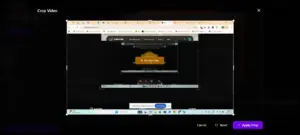
Edit, Cut, Crop Video & Screen with Screentell

Advanced Video Editing:

  • Clip Management: Split, cut, and remove unwanted segments with precision.
  • Speed Control: Adjust playback speeds for different segments to keep viewers engaged.
  • Screen Cropping: Easily hide sensitive information or distracting system menus.
Screen Layout In Screentell

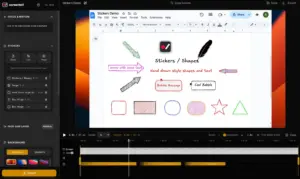
Visual Annotations & Layouts:

  • Rich Stickers: Use arrows, bubbles, and shapes with full color and border control.
  • Hand-Drawn Styles: Add personality with sketchy-style text and icons.
  • Custom Backgrounds: Apply professional gradients, wallpapers, and shadows behind your video.
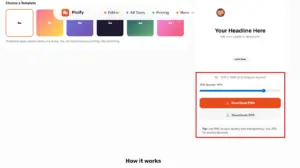
Screentell Export Options

Flexible Camera & Media:

  • Dynamic Face-Cam: Treat your webcam as a layer to move, resize, or hide at any point.
  • External Imports: Upload and edit existing video files using the full suite of tools.
  • Multi-Format Export: Download your final result in MP4, WebM, or GIF formats.

Additional Key Features Include:

  • High-Quality Recording: Capture screen, camera, & audio.
  • Focus Zoom: Guide viewers with smooth, precise zooms & pans.
  • Cinematic 3D Transform: Add depth with 3D rotation & scaling.
  • Annotation Stickers: Use customizable images & hand-drawn style .
  • Face Camera Layer: Move, resize, or hide your webcam after recording.
  • Clip Cut & Speed Control: Split clips & adjust playback speeds.
  • Screen Cropping: Hide distracting UI elements & browser bars.
  • Beautiful Layouts: Add professional wallpapers, padding, & shadows.
  • External Video Editing: Import & edit existing video files.
  • Preview Player: Verify your clips instantly with real-time playback.
  • Export Options: Full control over resolutions for MP4, WebM, & GIF.
  • Privacy First: All processing happens locally in your browser.
  • Content Creators
  • Educators
  • Freelancers
  • SaaS Companies
  • Startups
  • YouTubers

Choose Your Plan

With DealClub
$67.15
$99.99
Without DealClub
$79.00
$99.99
Buy Now
Limited Time Deal

Deal Terms

  • Access via redemption of coupon code
  • 30-Day Coupon Code Validity
  • One Coupon Code for one user/account
  • Coupon Codes are not stackable
  • For both - New & Existing Users
  • Free Updates
  • Free Support
  • Accessible on all devices - Desktop, Mobile and Tablet

Customer Testimonials

This is an impressive 3D effect—truly remarkable! Great job on achieving such a stunning visual. At last, we have an outstanding screen recording that showcases creativity and skill.

-Giovambattista Fazioli

The “record → edit → export in one browser tab” + cinematic 3D camera moves is a clever differentiator vs the usual zoom/pan.

-Ryan Thill

Plans & Features

Choose the perfect plan for your needs.

Plans & Features
Standard
$99.99 $79
Buy Now
Unlimited recordings
High-Quality Recording
HD quality export
Unlimited Export video length
Basic editing tools
Focus Motion, 2D zoom / Cinematic 3D Transform
Rich Annotation Stickers
Clip Cut & Speed Control
Screen Cropping
Beautiful Layouts
Face Camera Layer
Preview Player
External Video Editing
No watermark
Privacy First

Standard Plan

$99.99 $79.00
Buy Now
30-Day Refund | Lifetime Access | One-Time Payment
  • Unlimited recordings
  • High-Quality Recording
  • HD quality export
  • Unlimited Export video length
  • Basic editing tools
  • Focus Motion, 2D zoom / Cinematic 3D Transform
  • Rich Annotation Stickers
  • Clip Cut & Speed Control
  • Screen Cropping
  • Beautiful Layouts
  • Face Camera Layer
  • Preview Player
  • External Video Editing
  • No watermark
  • Privacy First

Frequently Asked Questions

Commonly Asked Questions for Screentell

Do I need to install this software?

No. Screentell runs entirely in your browser (Chrome, Edge, Brave) using modern Web APIs for capture and processing.

Does Screentell work on Windows?

Yes. It is a cross-platform solution compatible with all modern desktop browsers. Chromium-based browsers (Chrome, Edge) are recommended for the best experience.

Can I edit videos recorded with other tools using Screentell?

Yes. You can import and edit any existing video file by uploading it to your Projects page.

Can I export multiple clips from one recording?

Yes. Use the timeline handles to trim and export specific segments individually.

Is my data private?

Absolutely. All video processing and storage happen 100% locally on your computer. Your recordings are never uploaded to external servers.

Customer Feedback

Customer Reviews (0) Customer Q&A (0)

No Reviews Yet

Be the first to try this deal and share your experience.

You must purchase this product to leave a review.

Be The First To Ask

Get clarity before you buy—your question might help others too.

×

You Might Also Like

All In One Smart Extractor - Data Extraction Software | Lifetime Access

All In One Smart Extractor - Data Extraction Software | Lifetime Access

, , , , , , ,

Zumie - Screen Recording Extension | Lifetime Access

Zumie - Screen Recording Extension | Lifetime Access

, , , , , , ,

StackVault - SaaS Management Platform | Lifetime Access

StackVault - SaaS Management Platform | Lifetime Access

, , , , , , ,

5.0 (1)
LightPDF - All-In-One AI PDF Tool | Lifetime Access
Buy with DealClub
$67.15 $99.99
Buy without DealClub
$79.00 $99.99

Deal Terms

  • Access via redemption of coupon code
  • 30-Day Coupon Code Validity
  • One Coupon Code for one user/account
  • Coupon Codes are not stackable
  • For both - New & Existing Users
  • Free Updates
  • Free Support
  • Accessible on all devices - Desktop, Mobile and Tablet
Scroll to Top