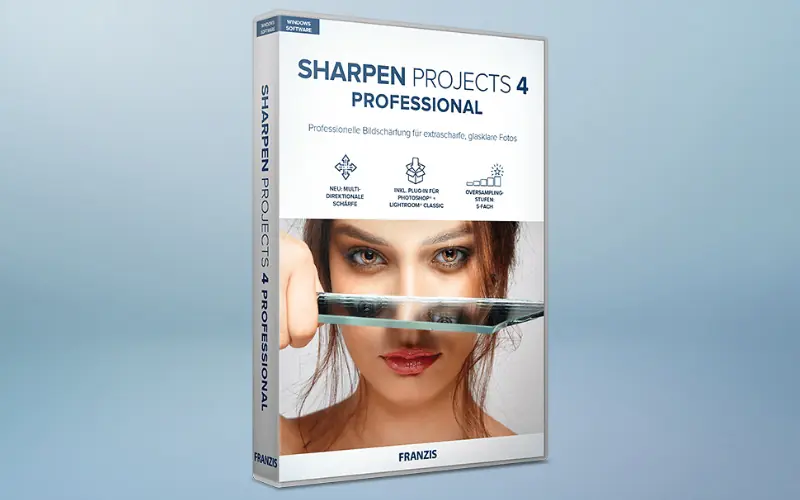
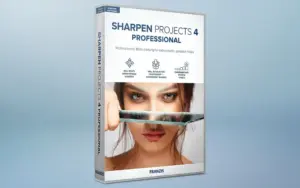
Sharpen Projects 4 Pro – Photo Sharpening Software | Lifetime Access

TL;DR

  • Enhance image sharpness and recover fine details to make photos look clearer and more professional.
  • Improve soft or slightly blurred images with automated sharpening tools that reduce the need for complex manual editing.
  • Bring out greater detail in landscapes, portraits, and other photographs while maintaining a natural-looking result.
  • Save time on photo enhancement with a streamlined workflow for creating sharper, more polished images.

Quick Overview

Alternative to:

  • Adobe Lightroom
  • Adobe Photoshop
  • Topaz Photo AI

Best for:

  • Agencies
  • Content Creators
  • Freelancers
  • Graphic Designers
  • Photographers
  • Small Business Owners

Compatibility:

  • Operating Systems:
    Windows

Whether you’re a seasoned photographer or a casual snapper, blurry images are always annoying. That’s why we bring you Sharpen Projects 4 Pro Photo Sharpening Software.

What is Sharpen Projects 4 Pro?

Sharpen Projects 4 Pro is the go-to software for powerful and professional resharpening to rescue out-of-focus or blurry shots, remove sensor errors, and bring out fine details & sharpen blurry images.

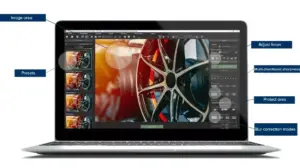
Sharpen Projects offers 46 different and intelligent masking functions to protect image elements you do not want to sharpen.

This image sharpener analyses your images and creates useful suggestions, including all facets of modern photography.

Note: It requires image editing software that integrates third-party plug-ins 

Introduction To Sharpen Projects 4 Pro – Photo Sharpening Software:

Youtube video

Sharpen Projects 4 Pro Features:

Sharpen-Projects-Pro

Access Photo Sharpening Tools:

  • Smart Image Sharpening: Improve blurry and out-of-focus photos.
  • 45 Sharpness Presets: Apply ready-to-use sharpening settings.
  • RAW Development: Edit RAW images before sharpening.
  • Multi-Directional Sharpening: Correct camera shake and lens blur.
  • Intelligent Masking: Protect areas you don’t want to sharpen.
  • 3-Level Oversampling: Upscale images before sharpening.
  • 4 Quality Modes: Choose Balanced, Pro, Pro+, or Pro Infinity.
  • Lightroom & Photoshop: Integrate sharpening into your existing workflow.
Why Choose Sharpen Projects 4 Pro?
  • Improve images affected by blur and lack of sharpness.
  • Enhance fine details that can get lost in soft images.
  • Use intelligent masking to protect areas that should not be sharpened.
  • Process unprocessed images with more available image data.
  • Work locally instead of uploading images to a cloud application.
  • Integrate sharpening with Lightroom Classic and Photoshop

Sharpen Projects 4 Pro is best for:

  • Agencies
  • Content Creators
  • Freelancers
  • Graphic Designers
  • Photographers
  • Small Business Owners

Choose Your Plan

With DealClub
$33.15
$99.00
Without DealClub
$39.00
$99.00
Buy Now
Limited Time Deal

Deal Terms

  • Access via redemption of coupon code
  • 30-Day Coupon Code Validity
  • One Coupon Code for one user/account
  • Coupon Codes are not stackable
  • For both - New & Existing Users
  • Free Updates
  • Free Support
  • Accessible only on Windows - Desktop & Laptop

Plans & Features

Choose the perfect plan for your needs.

Plans & Features
Standard
$99 $39
Buy Now
PSF Blur Function with Comparison Display
Presets

33

Sharpness Presets

45

RAW Development Module
Oversampling with 3 Levels
Sharpness Quality Modes

4

Integration

Lightroom Classic & Photoshop

Full Control

No Cloud Dependency

Standard

$99.00 $39.00
Buy Now
30-Day Refund | Lifetime Access | One-Time Payment
  • PSF Blur Function with Comparison Display
  • Presets: 33
  • Sharpness Presets: 45
  • RAW Development Module
  • Oversampling with 3 Levels
  • Sharpness Quality Modes: 4
  • Integration: Lightroom Classic & Photoshop
  • Full Control: No Cloud Dependency

Frequently Asked Questions

Find Answers to common questions about Sharpen Projects 4 Pro

How many sharpness presets are included?

The software includes 45 sharpness presets.

How many blur presets are included?

It includes 33 pre-made blur presets.

Can I protect parts of an image from sharpening?

Yes. Sharpen Projects 4 Pro provides 46 intelligent masking functions to protect selected image elements.

Customer Feedback

Customer Reviews (0) Customer Q&A (0)

No Reviews Yet

Be the first to try this deal and share your experience.

You must purchase this product to leave a review.

Be The First To Ask

Get clarity before you buy—your question might help others too.

×

You Might Also Like

EaseUS - Online Video Downloader For Windows & MacOS | Annual & Lifetime Plans

EaseUS - Online Video Downloader For Windows & MacOS | Annual & Lifetime Plans

, , , , , , , ,

1000 Business Videos Bundle | Extended Commercial License

1000 Business Videos Bundle | Extended Commercial License

, , , , , , , , , ,

Screen Bolt - Mac Screen Recorder with Audio

Screen Bolt - Mac Screen Recorder with Audio

, , , , , , , ,

Buy with DealClub
$33.15 $99.00
Buy without DealClub
$39.00 $99.00

Deal Terms

  • ✓ Access via redemption of coupon code
  • ✓ 30-Day Coupon Code Validity
  • ✓ One Coupon Code for one user/account
  • ✓ Coupon Codes are not stackable
  • ✓ For both - New & Existing Users
  • ✓ Free Updates
  • ✓ Free Support
  • ✓ Accessible only on Windows - Desktop & Laptop
Scroll to Top