
NEAT Projects 3 Pro – Professional Photo Editing Tool | Lifetime Access
Vendor: FRANZIS Verlag GmbH
TL;DR
- Reduce unwanted noise and grain in your photos to create cleaner, smoother, and more professional-looking images.
- Improve image quality in low-light or high-ISO photos while preserving important details.
- Save editing time with automated noise-reduction tools instead of relying on complex manual adjustments.
- Enhance the overall clarity and visual quality of your photographs for sharper, more polished results.
Quick Overview
Alternative to:
- Adobe Lightroom
- Adobe Photoshop
- Canva
- Topaz Photo AI
Best for:
- Agencies
- Content Creators
- Freelancers
- Graphic Designers
- Marketers
- Photographers
- Small Business Owners
- UI/UX Designers
Compatibility:
-
Operating Systems:
Windows
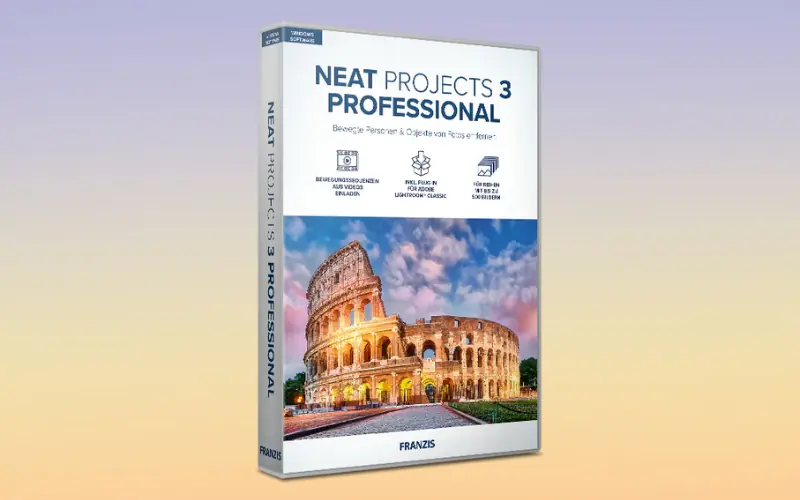
Are you tired of capturing stunning cityscapes and being frustrated by the presence of distracting tourists in your photos? you need – NEAT Projects 3 Pro – Professional Photo Editing Software.
What is NEAT Projects 3 Pro?
NEAT Projects 3 Pro is a professional photo editing program that guarantees pristine results despite the challenges of editing crowded city scenes.
This program brings out the best in your city photography, delivering images that match the quality of seasoned professionals.
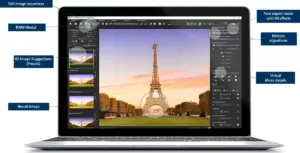
After loading the program with appropriate motion algorithms, it combines the images into a single shot.
Through multiple exposures, moving people are removed from the image without a hassle!
Introduction To NEAT Projects 3 Pro –Professional Photo Editing Software:

NEAT Projects 3 Pro Features:

System Requirements for This Photo Editor:
- Recommended – Windows 11 (64-bit), Intel i7 processor, 8 GB RAM, resolution of 1.920 x 1.080 px, graphics card: DirectX-compatible
- Minimum – Windows 10/8.1/7 (64 Bit), Prozessor Intel I3, 4 GB RAM, resolution of 1.600 x 900 px, graphics card: DirectX-compatible
Why Choose NEAT Projects 3 Pro?
- Remove moving people and distractions from city scenes.
- Combine multiple images into one cleaner result.
- Turn video sequences into usable still imagery.
- Apply effects, presets, colors, and layer mappings.
- Use extensive area-protection controls during editing.
- Access advanced RAW processing and sensor-error correction.
NEAT Projects 3 Pro is best for:
- Agencies
- Content Creators
- Freelancers
- Graphic Designers
- Marketers
- Photographers
- Small Business Owners
- UI/UX Designers
Choose Your Plan
With DealClub
$33.15
$99.00
Without DealClub
$39.00
$99.00
Buy Now
30-Day Refund | Lifetime Access | One-Time Payment
Limited Time Deal
Deal Terms
- Access via redemption of coupon code
- 30-Day Coupon Code Validity
- One Coupon Code for one user/account
- Coupon Codes are not stackable
- For both - New & Existing Users
- Free Updates
- Free Support
- Accessible only on Windows - Desktop & Laptop
Plans & Features
Choose the perfect plan for your needs.
| Plans & Features |
Standard
|
|---|---|
|
$99
$39
Buy Now
|
|
| Creative Effects & Advanced Editing Tools |
90 |
| Process Image Sequences |
Up to 500 Images |
| Optimized for Ultra-HD displays. | |
| Adds micro details | |
| Import sequences directly | |
| Improved RAW editing. | |
| New presets |
for landscape and architecture. |
| Creative layer mappings. |
31 |
| Supports HSV/HSL in the grain module | |
| Fixes sensor errors. | |
| Compatibility |
Windows 7–11, 4–8 GB RAM. |
Standard
$99.00
$39.00
30-Day Refund | Lifetime Access | One-Time Payment
- Creative Effects & Advanced Editing Tools: 90
- Process Image Sequences : Up to 500 Images
- Optimized for Ultra-HD displays.
- Adds micro details
- Import sequences directly
- Improved RAW editing.
- New presets : for landscape and architecture.
- Creative layer mappings.: 31
- Supports HSV/HSL in the grain module
- Fixes sensor errors.
- Compatibility: Windows 7–11, 4–8 GB RAM.
Frequently Asked Questions
Find Answers to common questions about Neat Projects 3 Pro
Can NEAT Projects 3 Pro remove people from photos?
Yes. It can automatically remove moving objects such as people by combining multiple exposures.
How does it remove moving objects?
The software aligns images with pixel accuracy and combines the exposures to create a cleaner final image.
Customer Feedback
Customer Reviews (0)
Customer Q&A (0)
No Reviews Yet
Be the first to try this deal and share your experience.
You must purchase this product to leave a review.
Be The First To Ask
Get clarity before you buy—your question might help others too.
×
You Might Also Like
EasySpeak - Teleprompter Application | Lifetime Access
All, Android, iOS, Lifetime, Marketplace, Multimedia, Operating System, Subscription Type, Tools & Software
$29.00
$49.00
-40% OFF
View Deal
StudioMagic - Image Composite Editor For Windows & Mac | Lifetime Access
All, Lifetime, Mac-OS, Marketplace, Multimedia, Operating System, Subscription Type, Tools & Software, Windows
$49.99
$245.00
-79% OFF
View Deal

Pazu YouTube Music Converter | Annual & Lifetime Plans
All, Annual Subscription, Lifetime, Mac-OS, Marketplace, Multimedia, Operating System, Subscription Type, Tools & Software, Windows
$12.50
$24.99
-49% OFF
View Deal
Filmage Screen - The Best Screen Recorder & Video Editor For Mac
All, iOS, Lifetime, Mac-OS, Marketplace, Multimedia, Operating System, Subscription Type, Tools & Software
$24.99
$29.99
-16% OFF
View Deal
Buy with DealClub
$33.15
$99.00
Buy without DealClub
$39.00
$99.00
Deal Terms
- ✓ Access via redemption of coupon code
- ✓ 30-Day Coupon Code Validity
- ✓ One Coupon Code for one user/account
- ✓ Coupon Codes are not stackable
- ✓ For both - New & Existing Users
- ✓ Free Updates
- ✓ Free Support
- ✓ Accessible only on Windows - Desktop & Laptop
30-Day Refund | Lifetime Access | One-Time Payment
Deal Terms