

Wondering which is the best privacy policy generator for your website?
Wonder no more! This article will walk you through the best privacy policy generators you can use to build a privacy policy page.
A privacy policy page is a legal compliance that every website must adhere to. It outlines the information your website gathers from users, how you maintain the data, and its purpose of use.
A privacy policy generator is a quick, affordable, and convenient solution for building a privacy policy page for your website. Additionally, it eliminates the headache of meeting legal requirements and saves you a lot of money.
So, without further ado, let’s dive into the privacy policy generators you might consider using to build a privacy policy page.
Table of Contents
Why Does Your E-Commerce Website Need a Privacy Policy?
Any company conducting online sales of goods or services should have a privacy policy, which helps to understand why privacy is so crucial.
For the following reasons, Your online eCommerce website needs a privacy policy.
1. It’s a Legal Obligation:
- A privacy policy is legally required for your app or website. Therefore, having one protects your company from needless risks and even legal action.
- The law does not mandate a Terms and Conditions agreement for eCommerce stores but requires an eCommerce privacy policy statement. However, having this formal agreement would also be very beneficial.
- Digital privacy and data protection have become increasingly important for governments and nations worldwide.
Some of the essential laws worldwide are:
- GDPR- EU’s General Data Protection Regulation
- CCPA- California Consumer Privacy Act
- CalOPPA- California Online Privacy Protection Act
- PIPEDA- Canada’s Personal Information Protection and Electronic Documents Act
- LGPD- Brazil’s Lei Geral de Proteção de Dados
These rules require a privacy policy that is easily readable and accessible to the public to inform customers about matters related to their personal information.
2. If You Collect Data:
- If your company gathers customer data, you gain access to information that can be used against the client.
- Because of this reason, you are required to create a privacy policy that tells customers about the data you collect and how you use it. You and your customers need to know how much data your online store gathers.
3. To Build Trust With Customers:
- One of the most crucial reasons your eCommerce website should have a privacy policy is to earn the trust of your customers.
- Customers who trusted their online retailers stayed with them for over a year. Building customer trust is crucial for a company’s ability to retain repeat business.
4. Third-Party Requirements:
- Your company may use other services for payment processing and monitoring. These third parties frequently have their specifications for your online store’s privacy statement.
- For instance, if Google Analytics is tracking consumer data on your website, Google mandates that you offer an accurate, complete, and up-to-date privacy policy on your online store.
What to Include in Your eCommerce Website Privacy Policy?
Your ecommerce privacy policy should have the following sections to ensure its effectiveness.
- Introduction: This section briefly outlines the privacy policy’s goals.
- Types of Information Collected: Details on the various categories of personally identifiable information obtained (e.g., address, phone number, email, name).
- Information Gathering Methods: Data gathering strategies (such as cookies, online forms, and analytics software).
- Purpose of Data Collection: Indicate the reasons (such as marketing, improving services, or getting in touch with consumers) for which data is being collected.
- Data Usage and Sharing: How information that has been collected is used and shared with other parties.
- Cookie Policy: The cookie policy on your website explains how cookies are used.
- Data Security: Information about the security precautions needed to safeguard user data.
- User Rights: These describe the user’s rights regarding data, such as access, rectification, and deletion.
- Third-Party Links: This website’s third-party links are accompanied by disclaimers.
- Policy Updates: An outline of the steps involved and the timetable for privacy policy updates.
- Legal Compliance: Ensure all applicable data protection laws, such as the CCPA and GDPR, are followed. Implementing robust cloud compliance solutions can help streamline this process and maintain continuous adherence to these regulatory standards.


By including these components in your eCommerce privacy policy, you can adhere to all international privacy regulations.
Things to Consider When Choosing a Privacy Policy Generator
While there are a lot of options available among website privacy policy generators, you must consider these critical factors for best results.
- Customization Settings: Look for a privacy policy generator that allows you to have full access to customize your privacy policy pages to match your business requirements.
- Legal Compliance: Choose a privacy policy generator that complies with global laws and regulations like GDPR (General Data Protection Regulation) and CCPA (California Consumer Privacy Act). For example, businesses operating in the European Union must adhere to GDPR; similarly, businesses dealing with California residents must follow CCPA.
- Ease of Use: Choose a policy generator that is easy to navigate, even for users without legal expertise. The policy generator must provide clear instructions and straightforward options to customize the policy.
- Features: Compare the features and functionalities offered by different privacy policy generators. These include language options, customizable elements, privacy policy templates, and convenience when creating a privacy policy page.
- Cost: Cost can be a major factor in choosing the best privacy policy generator. Different plugins offer different privacy policy statement templates at varied costs, so you must carefully consider the value for money before choosing one.
- Customer Support: Framing a privacy policy page requires legal technicalities, and even with an easy privacy policy generator, you might encounter issues. Hence, choosing a provider that offers prompt customer support is necessary.
Top Privacy Policy Generators
Well, now that you know the factors to consider, let’s explore the best privacy policy generators:
WP Legal Pages is a popular WordPress plugin that automatically generates 30+ legal policy pages for a website. It offers fully customizable privacy policies, T&Cs, cookie policies, and DMCA compliance templates, allowing users to save time and ensure legal compliance without manual intervention.
One of its important features is the Privacy Policy Generator, which allows users to establish a standard privacy policy that is compliant with GDPR and CCPA laws. Further, the plugin is compatible with ad networks, analytics, and marketing technologies.
Moreover, WP Legal Pages offers a guided wizard that helps customers create complex legal documents that comply with GDPR and CCPA rules.
The plugin is very flexible, allowing you to tailor legal pages to different types of websites, such as eCommerce and SaaS platforms. Installation is simple, making it a useful tool for ensuring legal compliance on your website.
Pros
- Intuitive interface that is easy to use
- Fully customizable to meet individual needs
- Offers various free templates
- Adheres to all legal standards and regulations
- More than 30 ready-to-use templates
- Multilingual support
Cons
- Relies on WordPress Environment
WP Legal Pages Pricing
WP Legal Pages plugin is available in both free and paid versions. The free version offers various templates, including a privacy policy template, while the pro version provides additional premium templates.
The pro version comes with three pricing plans: Single Site at $39 per year, 5 Sites at $79 per year, and 10 Sites at $99 per year.
PrivacyPolicies.com is a robust privacy policy generator that streamlines legal compliance for websites and apps. Its user-friendly interface quickly generates personalized privacy policies, terms of service, cookie policies, disclaimers, and return policies.
Aside from privacy policies, it includes important legal documents. The created rules are tailored to comply with important global privacy legislation such as GDPR, CPRA, CCPA, and CalOPPA.
Pros
- Custom privacy policy generator
- Fully compliant with GDPR and CalOPPA
- Free policy templates
- All agreement tools
- Website/mobile app/eCommerce/SaaS
Cons
- Limited features in the free version
PrivacyPolicies Pricing
PivacyPolicies privacy policy generators are available in both free and paid versions. While the free version has limited offerings, the premium version is available at a one-time cost.
GetTerms.io is a user-friendly online policy generator designed to create custom privacy policies, cookie policies, and T&Cs for websites and apps. It offers a seamless and intuitive interface, allowing users to create legally compliant documents tailored to their specific needs easily.
The tool provides customizable templates that adhere to legal compliance updates and offers multilingual support. Additionally, it simplifies the process of creating legal documents with its user-centric approach and comprehensive features.
Pros
- Easy to customize
- User-friendly and intuitive interface
- Clear differentiation between free and paid plans
- The paid version includes specific legal compliance
Cons
- No complex features are included
- Suitable only for small businesses
Get Terms Pricing
GetTerms.io offers free and paid plans. The free plan allows you to generate a basic ToS and privacy policy. The paid plans are available in two different plans, at $49 per year and $69 per year, depending on the offering. The paid plans provide additional features and are suitable for different customer bases.
Usercentrics offers a privacy policy generator that helps businesses create transparent, privacy-regulation-aligned privacy policies for websites and apps. The tool enables users to generate GDPR- and CCPA-aligned privacy policies tailored to their business, producing ready-to-use documents that can be downloaded or embedded directly on a website.
It provides customizable policy templates, multilingual support, and ongoing updates aligned with evolving privacy requirements. With an intuitive interface and guided setup, Usercentrics simplifies privacy policy creation for organizations of all sizes while supporting broader consent management and compliance workflows.
Pros
- Customizable privacy policy templates
- Supports major global privacy regulations
- Multilingual policy generation
- User-friendly guided setup
- Part of a broader privacy & consent ecosystem
Cons
- Advanced customization may require higher-tier plans
- Final legal compliance may require legal counsel review
- Some features are gated behind paid plans
Usercentric Pricing
Usercentrics offers a free plan for generating basic privacy policies. Paid plans unlock additional customization, multilingual features, and expanded compliance capabilities. Pricing varies based on business size, regulatory scope, and selected modules.
iubenda is a comprehensive platform that enables businesses to comply with worldwide data privacy standards. Its privacy policy generator provides a consistent user experience while simplifying legal compliance for websites and apps. It develops customizable privacy policies, terms of service, and cookie policies using more than 2000 pre-crafted clauses in 14 languages.
The plugin’s user-friendly interface enables simple control of several sites from a single dashboard. iubenda ensures GDPR and CCPA compliance, is app store compatible, and includes site scanning features.
Pros
- Tailor-made privacy policies, terms of use, and cookie policies
- Optimized for both web and mobile apps
- Available in 14 languages
- It has an integrated site scanner that identifies areas of improvement.
Cons
- A complex payment process varies based on country.
- Comparatively more expensive than peers with a limited basic plan.
iubenda Pricing
iubenda offers several pricing plans to suit different budgets. The plugin offers a free plan that offers very basic legal page templates. It also offers other different premium plans: Essentials plan at $5.99 per month, Advanced plan at $24.99 per month, and Ultimate plan at $99.99. Each of these plans offers different functionalities.
Termly’s Privacy Policy Generator assists businesses, websites, apps, and e-commerce stores draft comprehensive and legally compliant privacy policies. It ensures adherence to privacy laws such as GDPR, CCPA, PIPEDA, and CalOPPA, making it ideal for global outreach.
The generator simplifies the process by guiding users through a series of questions to create a customized privacy policy. Whether you run a website, mobile app, e-commerce site, or SaaS business, Termly’s intuitive builder, customization tools, and automatic updates make creating a privacy policy hassle-free.
Pros
- Automatic Legal Updates
- Simplified Policy Generations
- Cookie Consent Management
Cons
- Termly Logo on Free Policy Pages
Termly Pricing
Termly offers a free basic plan with limited features and two paid plans with additional features for $10 to $15 per month.
WP Auto Terms Privacy Policy Generator is invaluable for crafting thorough privacy policies tailored to websites. It offers customizable policy templates that come along with automatic updates to reflect legal changes and support for multiple languages.
The generator ensures adherence to global privacy regulations like GDPR and CCPA. In addition, the platform provides an intuitive interface and comprehensive coverage of privacy requirements.
Pros
- Customizable policy templates
- Automatic updates to reflect legal changes
- Multi-language support
- Ensures compliance with global privacy regulations
Cons
- Limited customization options for extremely unique privacy policy needs
WP Auto Terms Pricing
WP Auto Terms is available in both free and premium versions. While the free version offers very limited features, the premium version offers advanced features on a cost-per-website basis.
FreePrivacyPolicy.com offers a convenient and free Privacy Policy Generator that helps you create comprehensive privacy policies. It allows you to tailor your privacy policy to unique requirements while ensuring global compliance with global laws.
The tool offers a user-friendly interface that simplifies the process of generating privacy policy statements. Additionally, it allows you to establish a personalized privacy policy in under a minute. Once finished, you can easily download the Privacy Policy for your site or app, reducing liability and safeguarding user privacy.
Pros
- User-friendly and easy to use
- Unlimited number of site usage
- Allows you to generate multiple privacy policy statements
Cons
- No automatic compliance update
FreePrivacyPolicy Pricing
FreePrivacyPolicy is generally free to use. However, it might charge you to add some specific clauses to your tailored privacy policy page. The charges are based on the information you collect from your users.
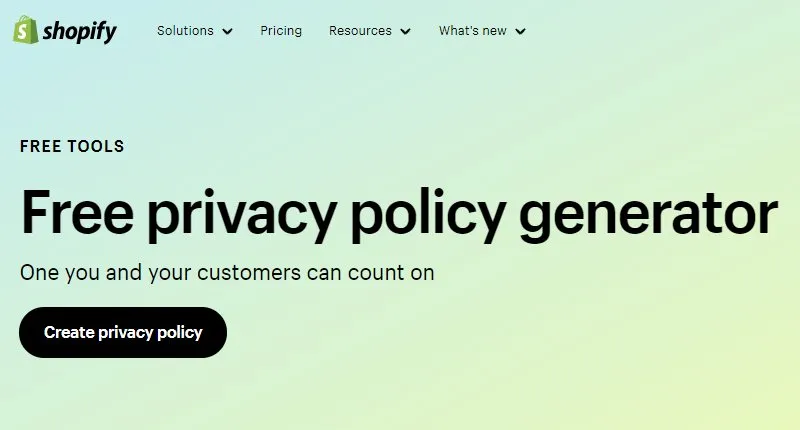
Shopify Privacy Policy Generator is a user-friendly tool that simplifies the process of creating a privacy policy for your website or app. This tool allows you to customize your privacy policy to meet specific requirements while ensuring global law compliance.
It offers a user-friendly interface that streamlines the process. In just a minute, you can create a tailored privacy policy. Once completed, you can easily download the Policy for your site or app, minimizing liability and protecting user privacy.
Pros
- Easy and free to use.
- Complaint with all global laws
Cons
- No automatic updates
Shopify Privacy Policy Generator Pricing
Shopify Privacy Policy Generator is free to use. It offers basic templates, which can be downloaded after customization.
10. TermsFeed
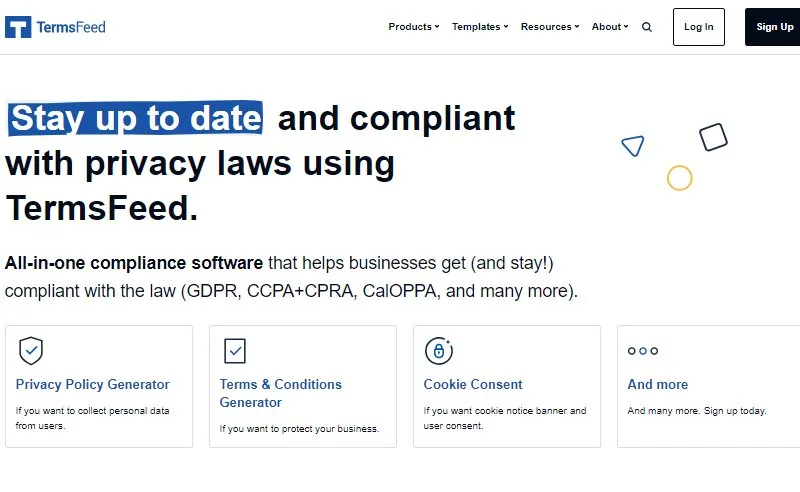
TermsFeed offers a simple alternative for drafting important legal documents, particularly privacy policies. Its user-friendly interface makes it easier to create customized privacy policy declarations. One of its most notable features is the inclusion of thorough clauses addressing data privacy issues such as GDPR compliance, cookie usage, and third-party services.
The platform offers a straightforward interface that includes drag-and-drop capabilities, making policy drafting simple. In addition, before publishing, you can preview the generated policy to guarantee accuracy. TermsFeed also provides automatic updates to ensure continuing compliance with changes in applicable laws or regulations.
Pros
- Intuitive, user-friendly interface
- Easy template customization
- No recurring costs
Cons
- The free privacy policy template doesn’t cover entire clauses
TermsFeed Pricing
You can generate basic free privacy policy pages with the TermsFeed privacy policy generator with a one-time payment.
11. CookieYes
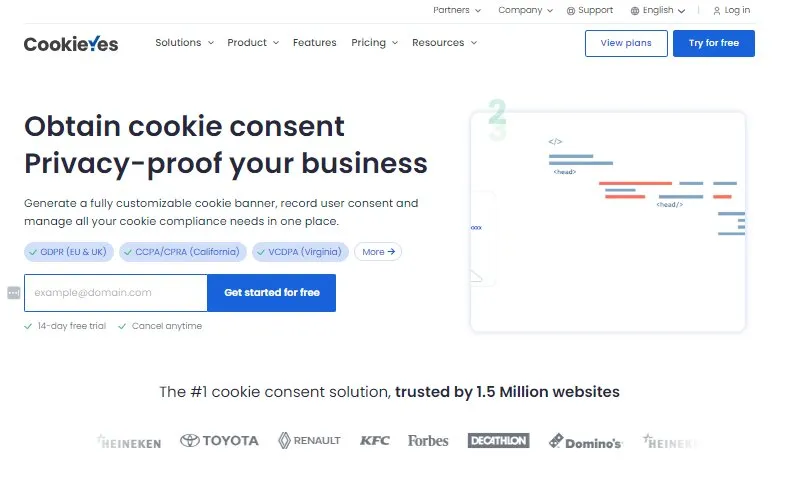
CookieYes is a free privacy policy generator that streamlines the process of creating a customized privacy policy for websites. With no sign-up required, you can swiftly generate a comprehensive policy by answering a brief questionnaire.
Additionally, CookieYes offers a cookie consent banner that informs users about cookie usage and ensures legal compliance. Notably, it auto-blocks third-party cookie scripts until visitors provide consent. For a hassle-free compliance journey, explore CookieYes’s suite of tools, including a cookie policy generator and historical consent logs.
Pros
- Easy to Implement & Use
- Customizable Consent Banner
- Automated Cookie Checking
Cons
- Limited advanced customization
CookieYes Pricing
The CookieYes Privacy Policy Generator is completely free to use. It allows you to create a customized privacy policy for your business for free.
12. WebsitePolicies
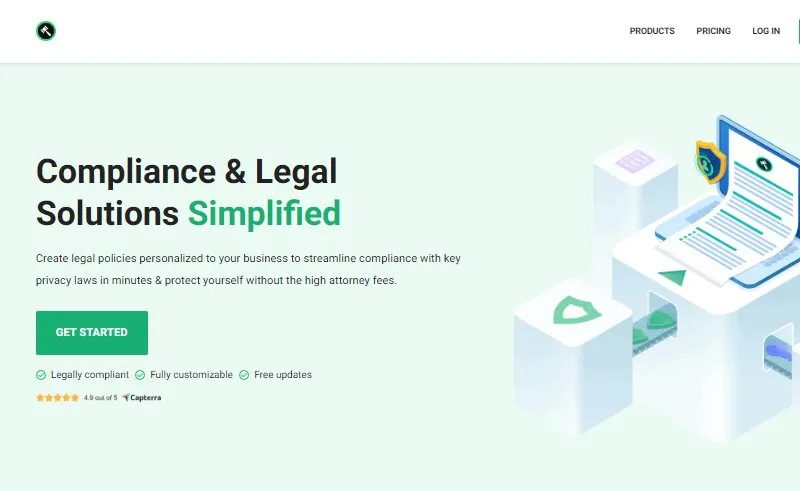
WebsitePolicies.com provides a free Privacy Policy Generator that simplifies the process of creating personalized privacy policies. It generates legal documents for websites, apps, eCommerce stores, SaaS platforms, and small businesses.
It is a user-friendly tool that tailors your privacy policy to specific needs while ensuring global compliance. In addition, it seamlessly integrates the generated policy with WordPress, Shopify, Wix, and Squarespace platforms.
Pros
- Integrates with major platforms
- Enabled with automatic updates
- Compliant with all global privacy policy laws
Cons
- Separate services are required for tailoring templates
WebsitePolicies Pricing
WebsitePolicies.com’s privacy policy generator is available in both free and premium versions. The free version hardly provides few features, whereas the paid plans are available in the range of $59 to $139 per month with additional features in each plan.
13. Cookiebot

Cookiebot by Usercentrics is a leading consent management platform trusted by more than 2 million websites worldwide. It automatically scans, controls, and manages cookies and tracking technologies, helping businesses protect ad revenue, reduce legal risk, and build stronger user trust.
As part of Usercentrics – a compliance infrastructure provider processing 8.8 billion user consents every month across 195 countries – Cookiebot CMP is designed to make cookie consent management simple while supporting compliance with global privacy regulations.
Pros
- Automatic cookie scanning and categorization
- Helps support compliance with global privacy requirements
- Easy-to-use interface suitable for businesses of all sizes
Cons
- Advanced customization may require technical setup
Cookiebot Pricing
Cookiebot offers both free and paid plans, with pricing based on the number of subpages and consent management needs. Businesses can choose a plan that matches their website size and compliance requirements.
Which is the Best Privacy Policy Generator?
All the privacy policy generators mentioned in the article enable you to build a privacy policy page. However, we recommend using the WP Legal Pages to create a free privacy policy page.
The WP Legal Pages plugin is not only easy to use but also offers intuitive wizard support that helps you create a privacy policy template from start to finish.
Furthermore, It allows you to create policy templates in various languages, including English, French, German, Portuguese, Italian, and more.
Given the pricing, this generator is undoubtedly an excellent value-for-money option.
How to Create Your Privacy Policy with WP Legal Pages (Step-by-Step)
Step 1: Installing WP Legal Pages Plugin
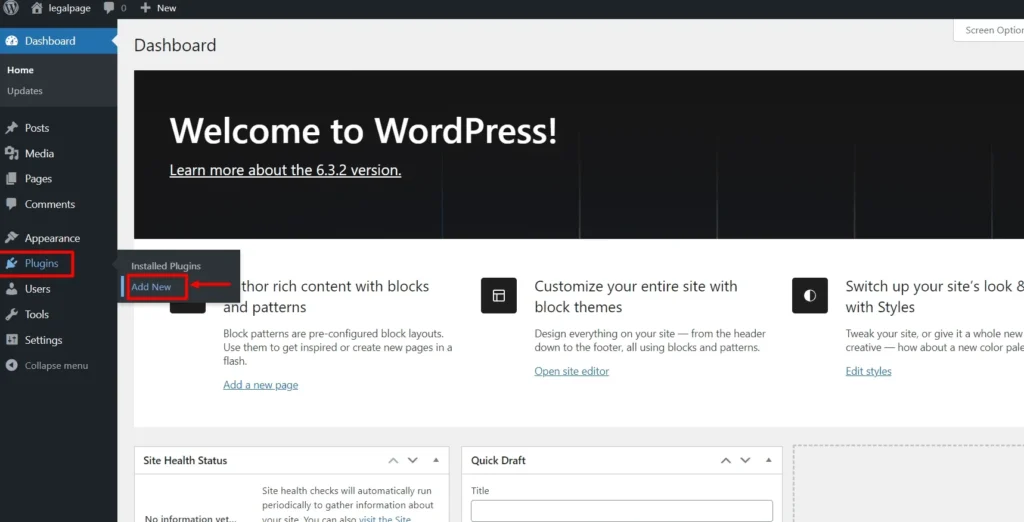
From your WordPress Dashboard, click on Plugins > Add New.
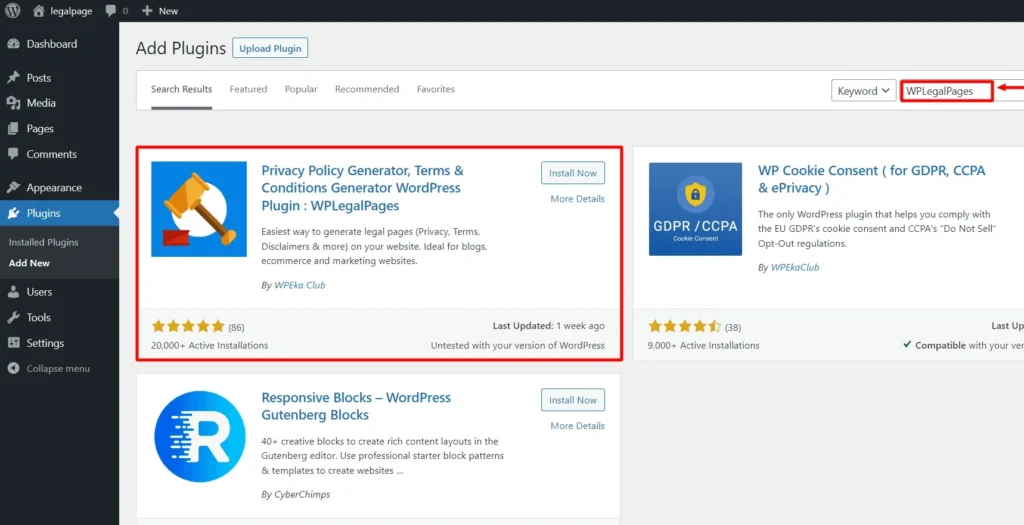
- Search for WPLegalPages in the search bar.
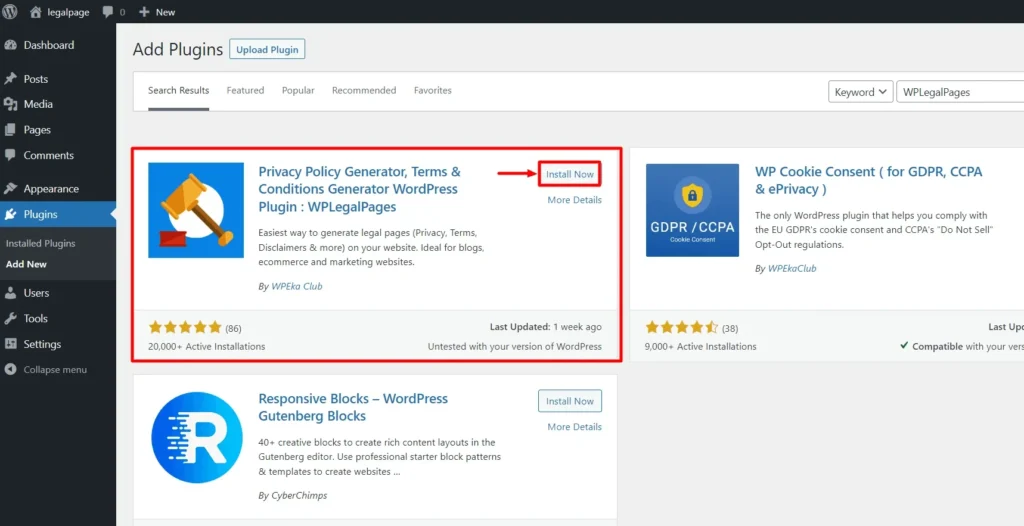
- Click on the Install Now Button.
- Activate the WP Legal Pages plugin by clicking the Activate button.
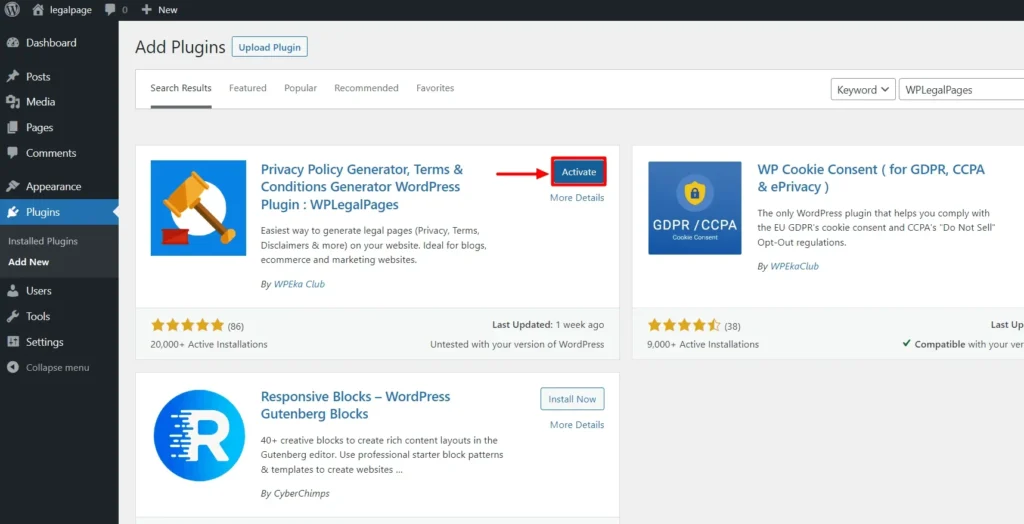
That’s it! You’ve successfully installed and activated the WP Legal Pages plugin. Next, we move to creating a privacy policy for your website.
Step 2: Configuring WP Legal Pages Plugin
Once you have activated the plugin, you can access it directly from the Dashboard.
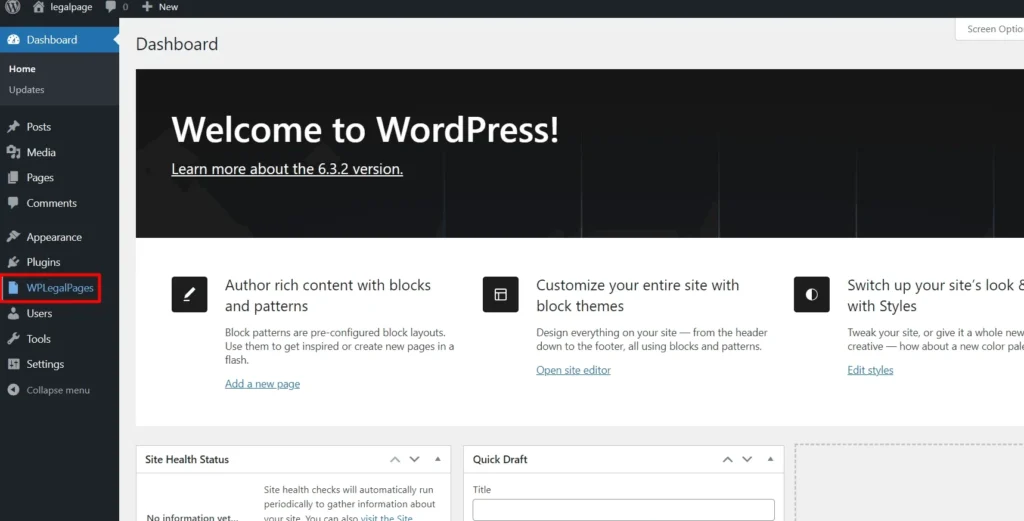
From your Dashboard, click WPLegalPages and click Accept to create your legal pages.
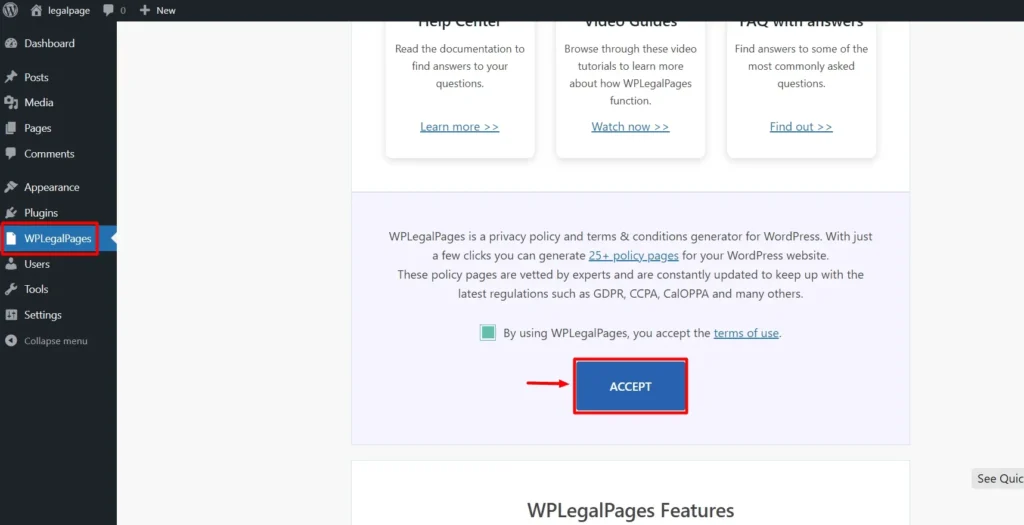
Step 3: Making a Privacy Policy for Your Website
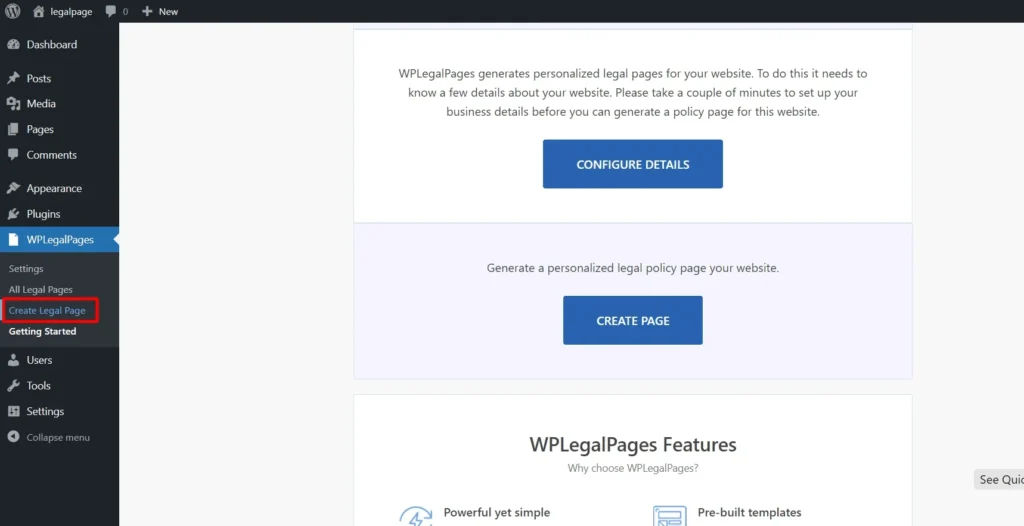
To create a Privacy Policy for your website, click Create Legal Page from the WP Legal Pages menu.
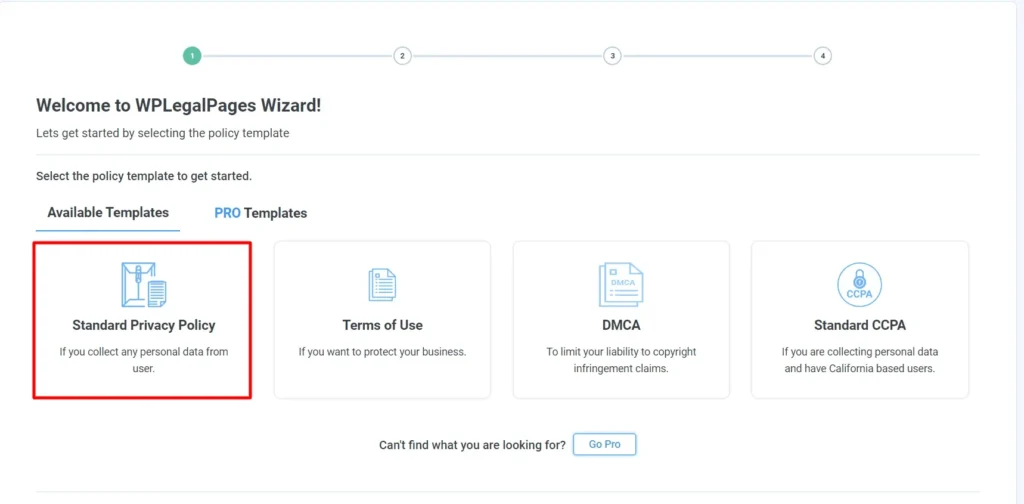
You will now be able to see four templates available in the free version. Click on the Standard Privacy Policy option to create a Privacy statement for your website.
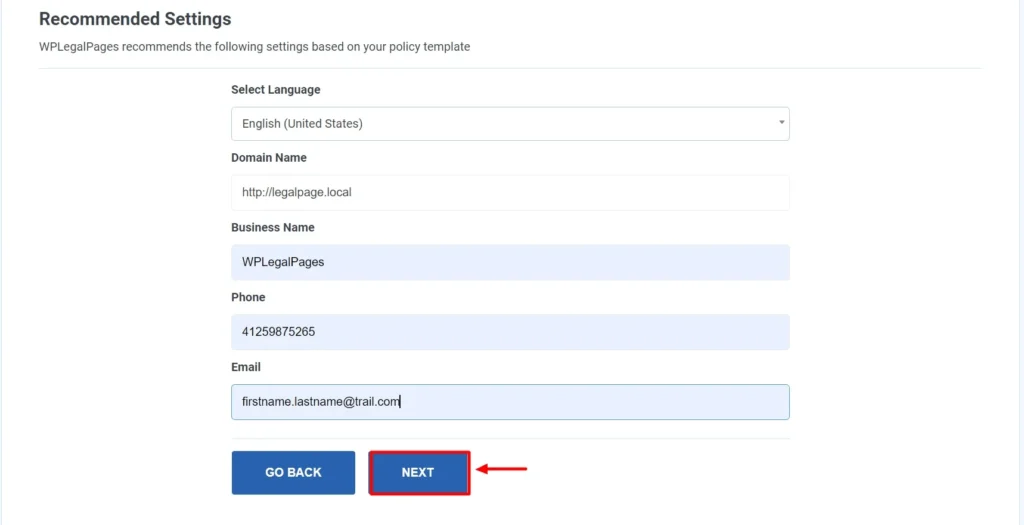
Fill in the Basic Details and click Next.
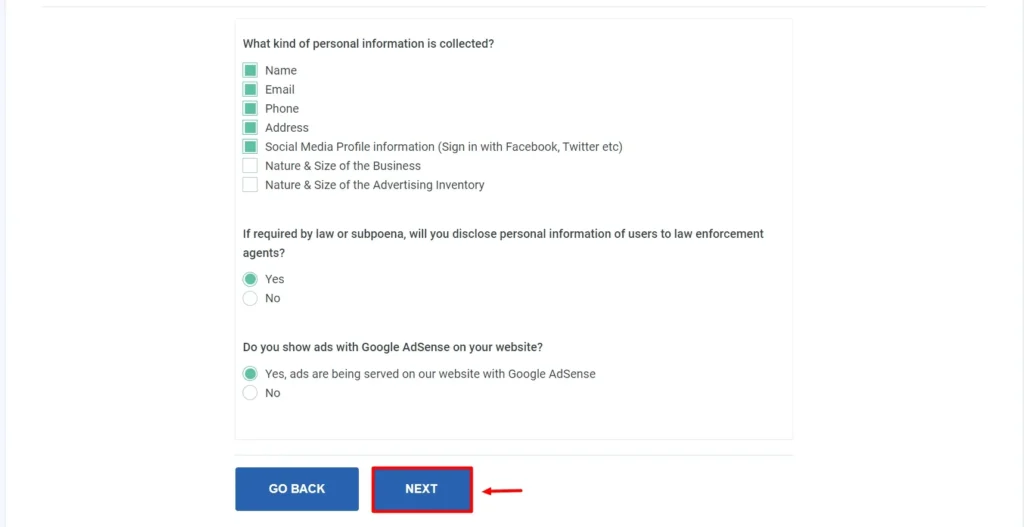
- Select the appropriate section for your legal policy, then click Next.
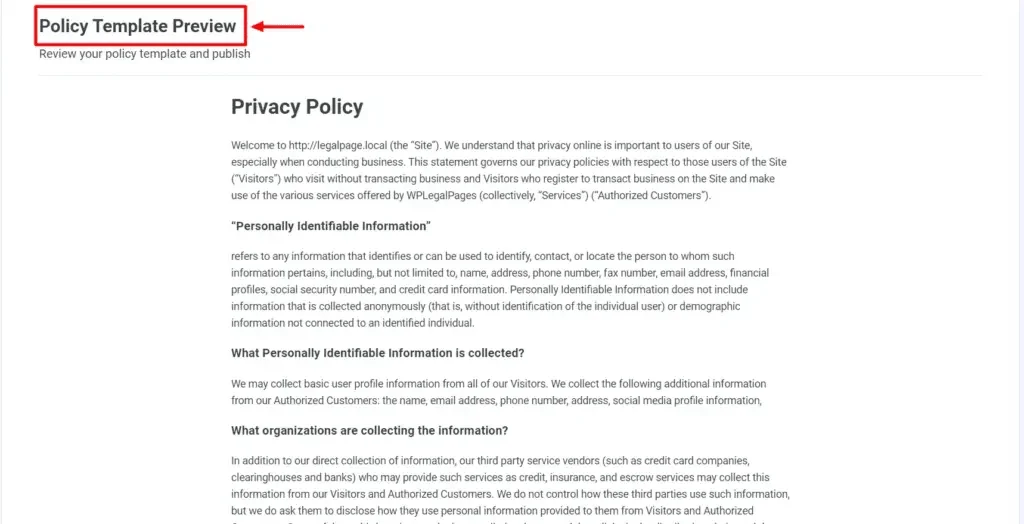
Your Privacy Policy Template Preview is ready.
Step 4: Customize Your Privacy Policy
- Click on the Create and Edit option to edit or add any additional information to your privacy policy.
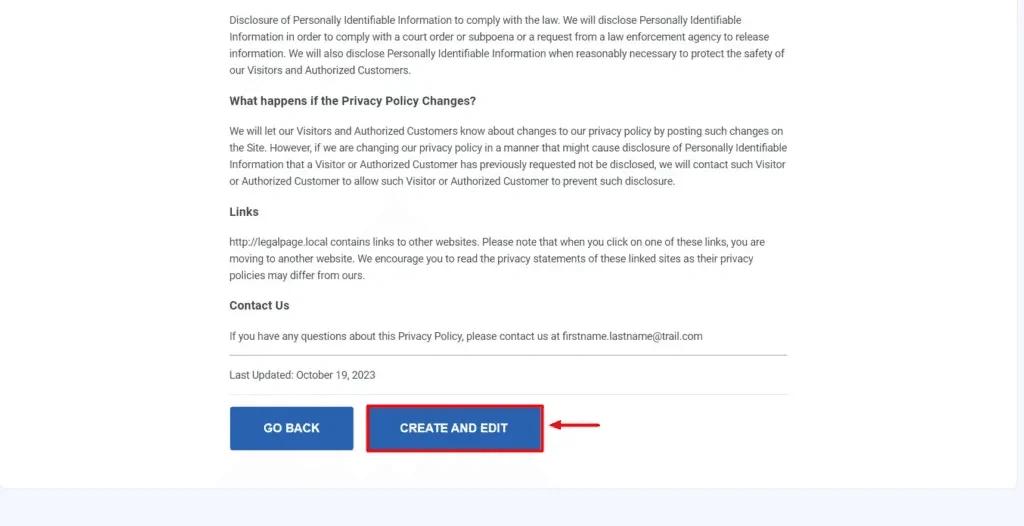
- After you have made the necessary changes, click on Publish
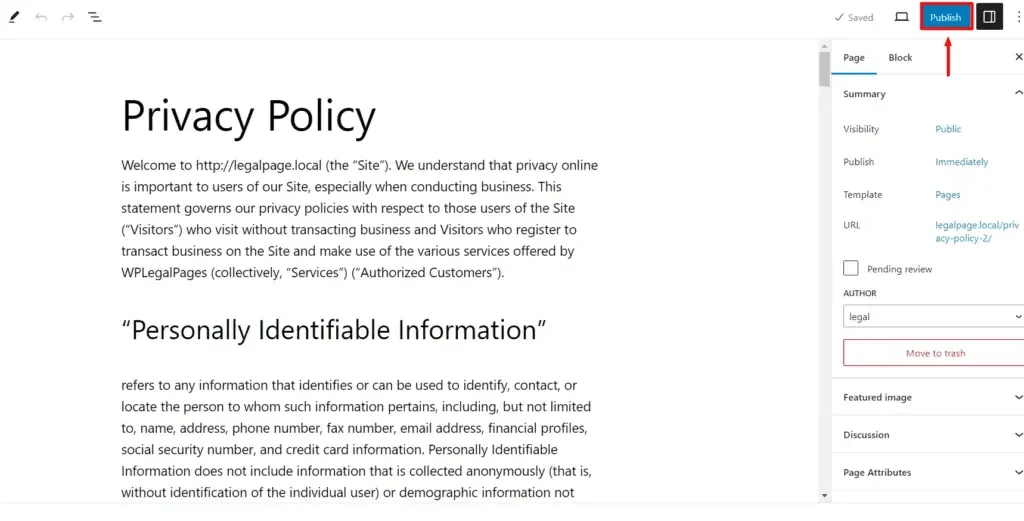
- That’s all! With just a few clicks, your data privacy statement is ready.
Where Should You Display Your eCommerce Website’s Privacy Policy?
Your website’s footer is a good location to post your eCommerce privacy policy since it’s always visible and easy to discover. It should also be visible on pages where you actively gather personal data, like account registration forms.
Remember that using a cookie banner approach is the best practice for verifying that customers have read and agreed to your privacy policy. This way, you can be sure you have their express consent and can keep documentation of it.
Some of the key places where you can include your privacy policy are:
1. Sign-up Page
The sign-up or account registration page on your app/website is a reasonable location to link your Privacy Policy agreement. Before they register for an account on your website, customers should be allowed to read over and agree to your privacy policy.
2. Website Footers
One of the most common locations on websites for legal agreements, such as privacy policies, to be displayed is the footer. In some cases, using an online notary service can further support document validation and ensure agreements are properly authenticated.
3. Checkout Forms
Including your eCommerce privacy policy on your final checkout page is a dependable strategy to make sure your clients don’t miss it if you run an e-commerce website. In this manner, clients are constantly informed of your policies and procedures before they confirm their orders.
4. Email Newsletter Sign-up Forms
If you provide email newsletters to your customers, you can display your eCommerce privacy policy by including a link to it on the sign-up form.
FAQ’s
What Is A Privacy Policy?
A privacy policy page is one of the most important legal page for your website. It outlines the information your website gathers from users, how you maintain the data, and its purpose of use.
How To Create A Privacy Policy Page?
To create a privacy policy page, you can hire a legal professional to draft a customized page for your website or use popular privacy policy generators.
What Is A Privacy Policy Generator?
A privacy policy generator is a quick, affordable, and convenient solution for building a privacy policy page for your website.
What Are The Benefits Of Using Privacy Policy Generator?
Privacy policy generators –
- help you to generate a privacy policy instantly and save time.
- It is cost-efficient.
- It can be tailored to your business needs.
Conclusion
Hiring a legal professional or lawyer to draft the legal pages for your website can be expensive and time-consuming.
This article attempts to provide you with the best possible solution for complying with any legal requirements you might encounter. The privacy policy generators mentioned throughout provide you with free or affordable solutions to create legal templates for your website.
While choosing the privacy policy generator to generate your website’s policy page, keep in mind the factors that will help you choose the best.
We recommend using the WP Legal Pages plugin, which provides an end-to-end solution for creating a privacy policy page and other legal templates.
If you liked this article, you can also consider reading: