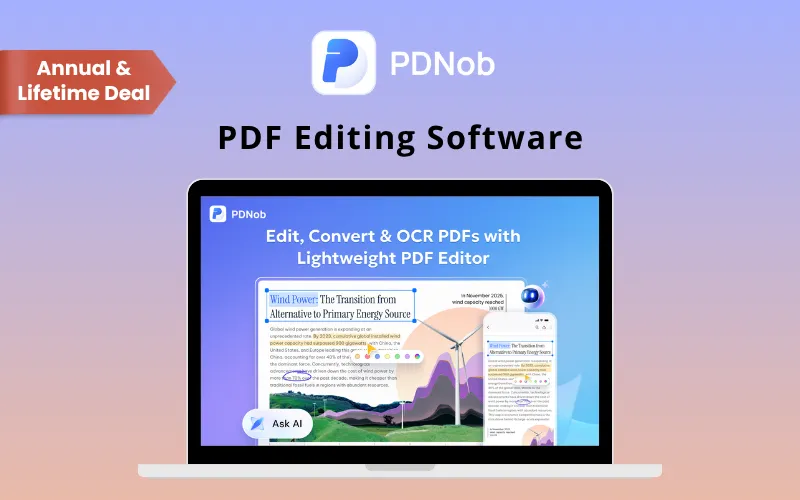
Tenorshare PDNob – Edit, Convert & Manage PDFs With AI

TL;DR

  • Edit, convert, OCR, compress, and organize PDFs in one app.
  • Turn scanned PDFs into searchable and editable documents.
  • Convert PDFs to Word, Excel, PowerPoint, images, TXT, and PDF/A.
  • Summarize, chat with, rewrite, and translate PDFs using AI.
  • Fill forms, sign documents, add watermarks, and protect sensitive files.

Quick Overview

Alternative to:

  • Adobe Acrobat Pro
  • Foxit PDF Editor
  • ILovePDF
  • Nitro PDF Pro
  • PDF-XChange Editor
  • PDFShift
  • Smallpdf
  • Wondershare PDFelement

Best for:

  • Content Creators
  • Researchers
  • Small Business Owners
  • Students

Compatibility:

  • Browser Support:
    Brave, Chrome, Edge, Firefox, Safari
  • Operating Systems:
    MacOS, Windows

Working with PDFs often means switching between different tools for editing, conversion, OCR, compression, & document management.

That’s why DealFuel brings you PDNob – All-in-One PDF Editor.

What is PDNob?

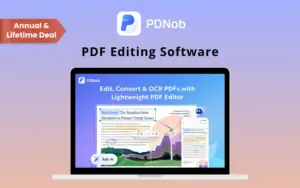
Tenorshare PDNob is a lightweight PDF editor that brings everyday document tasks into one application.

With this PDF editor, you can –

  • Edit PDF text & images
  • Convert files
  • Recognize scanned documents
  • Compress PDFs
  • Organize pages
  • Manage forms & signatures

It also includes AI-powered tools that help you –

  • Summarize documents
  • Ask questions
  • Rewrite content
  • Translate text

Whether you’re managing business documents, scanned files, forms, or everyday PDFs.

It helps you handle more from one place.

Introduction to PDNob

Youtube video

Tenorshare PDNob Features:

1-edit-pdf-pro

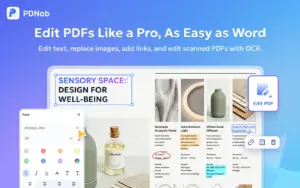
Edit PDFs Like a Pro:

Edit PDF text, images, and elements directly without rebuilding your document.

  • Edit text, fonts, sizes, and colors.
  • Replace and resize images.
  • Add links, shapes, and other elements.
  • Highlight, underline, comment, stamp, and draw.
  • Customize documents directly inside the PDF.
2-ocr-scanned-pdf

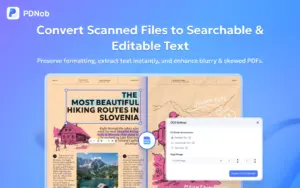
Turn Scanned PDFs Into Editable Files:

Make scanned and image-based PDFs searchable and editable with OCR.

  • Recognize text from scanned documents.
  • Make PDFs searchable.
  • Convert scanned content into editable text.
  • Preserve document structure and formatting as closely as possible.
  • Process selected pages or documents with OCR.
3-convert-pdf-formats

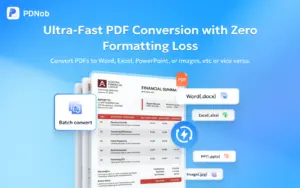
Convert PDFs to the Formats You Need:

Convert PDFs and other files while keeping your content organized.

  • Convert PDFs to Word, Excel, PowerPoint, JPG, PNG, TXT, and PDF/A.
  • Convert Word, Excel, PowerPoint, JPG, PNG, BMP, and TIFF files to PDF.
  • Preserve text, images, tables, fonts, and document structure as closely as possible.
  • Batch convert multiple files to save time.
4-compress-pdf-files

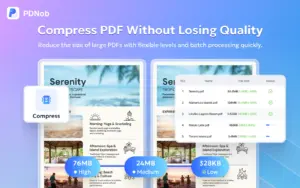
Compress PDFs for Easier Sharing:

Reduce large PDF file sizes while keeping your documents readable.

  • Choose from different compression levels.
  • Reduce storage requirements.
  • Keep text readable and visual content clear.
  • Prepare large PDFs for email, uploads, and online sharing.
  • Compress multiple PDFs with batch processing.
5-ai-pdf-assistant

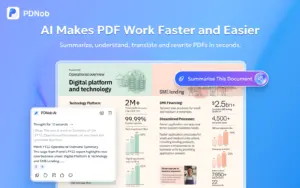
Work Smarter With AI:

Understand and work with lengthy PDF documents faster using AI.

  • Summarize lengthy PDFs and extract key points.
  • Chat with PDFs and ask questions about their content.
  • Rewrite and simplify document content.
  • Expand or translate PDF content.
  • Get quick insights without reading every page manually.

AI Features of PDNob:

  • PDF Chat: Ask questions about your documents.
  • PDF Summary: Summarize lengthy PDFs quickly.
  • AI Rewrite: Simplify and rewrite PDF text.
  • Translation: Translate PDF content.
  • Key Insights: Extract important information.
 

Why Choose PDNob?

  • Merge, split, reorder, rotate, crop, and extract pages.
  • Highlight, comment, stamp, and sign PDFs.
  • Protect PDFs with passwords and encryption.
  • Store files with 20 GB of cloud space.
  • Use on up to 2 devices.
  • Get lifetime free updates.
 

Specifications:

  • OCR: Advanced OCR
  • Conversion: Word, Excel, PowerPoint, images, TXT & PDF/A
  • Security: Password protection & encryption
  • Cloud Storage: 20 GB
  • AI Credits: 50 trial credits
  • Devices: 2 simultaneous devices
  • Watermark: No watermark
  • Windows: Windows 10+
  • macOS: 10.15–26
  • Security Standards: CMMI Level 5, PCI DSS & ISO

Tenorshare PDNob is Best For:

  • Content Creators
  • Researchers
  • Small Business Owners
  • Students

Choose Your Plan

Annual Plan
Annual Plan
Original price was: $159.98.Current price is: $35.99.
Lifetime Plan
Original price was: $349.95.Current price is: $49.99.
With DealClub
$30.59
$159.98
Without DealClub
$35.99
$159.98
Buy Now
Limited Time Deal

Deal Terms

  • Access via redemption of coupon code
  • 30 Day Coupon Code Validity
  • One Coupon Code for one user/account
  • Coupon Codes are stackable
  • For New Users Only
  • Free Updates
  • Free Support
  • Accessible only on Windows & Mac - Desktops & Laptops

Customer Testimonials

Timesaver! I needed to deconstruct a PDF of a PowerPoint to an editable PowerPoint, and it works. The best timesaver I have found. If you are using NotebookLM, you know my pain! Wonderful output, but all images. Now you can add your personal touch with ease.

-Mark C.

Good app for all pdf uses

-Abhilash S

Plans & Features

Choose the perfect plan for your needs.

Plans & Features
Annual Plan
Lifetime Plan
$159.98 $35.99
Buy Now
$349.95 $49.99
Buy Now
Users

2 (simultaneous use on 2 Windows, 2 Macs, or 1 of each)

2 (simultaneous use on 2 Windows, 2 Macs, or 1 of each)

AI PDF Tools
PDF Editing
PDF Conversion
OCR
PDF Compression
PDF Organization
PDF Annotation & Reading
PDF Protection
PDF Creation & Forms
Cloud Storage

20 GB

20 GB

Watermark

No

No

Plan 1 of 2

Annual Plan

$159.98 $35.99
Buy Now
30-Day Refund | Annual & Lifetime Access
  • Users: 2 (simultaneous use on 2 Windows, 2 Macs, or 1 of each)
  • AI PDF Tools
  • PDF Editing
  • PDF Conversion
  • OCR
  • PDF Compression
  • PDF Organization
  • PDF Annotation & Reading
  • PDF Protection
  • PDF Creation & Forms
  • Cloud Storage: 20 GB
  • Watermark: No

Frequently Asked Questions

Find Answers to common questions about Tenorshare PDNob

Does PDNob support OCR?

Yes. OCR can recognize text from scanned and image-based PDFs and make them searchable and editable.

Can I convert PDFs to Word and Excel?

Yes. PDNob supports conversion to Word, Excel, PowerPoint, JPG, PNG, TXT, and PDF/A.

Can I convert other files into PDFs?

Yes. Supported formats include Word, Excel, PowerPoint, JPG, PNG, BMP, and TIFF.

What AI features are included?

PDNob includes AI tools for summarizing, chatting with, rewriting, simplifying, expanding, and translating PDF content.

Can I merge and split PDFs?

Yes. You can merge multiple PDFs and split large PDF documents.

Can I compress PDF files?

Yes. PDNob can reduce PDF file sizes while keeping documents readable.

Customer Feedback

Customer Reviews (0) Customer Q&A (1)

No Reviews Yet

Be the first to try this deal and share your experience.

You must purchase this product to leave a review.

Have a Question?

Get answers from our community and support team.

Login to Ask a Question
May 4, 2025

Q: Numero de dispositivos

A: Hola, puedes iniciar sesión en Tenorshare PDNob PDF Editor en 2 computadoras al mismo tiempo con una sola cuenta.

×

You Might Also Like

Checker - Email Spam Checker API | Lifetime Access

Checker - Email Spam Checker API | Lifetime Access

, , , , , , ,

Truly Office Student - Office Suite  | Lifetime Access

Truly Office Student - Office Suite | Lifetime Access

, , , , , , , ,

PROFIN SUITE 2.0 - All-in-One Management Software (Windows)

PROFIN SUITE 2.0 - All-in-One Management Software (Windows)

, , , , , , , ,

Choose Plan
Annual Plan
Annual Plan
Original price was: $159.98.Current price is: $35.99.
Lifetime Plan
Original price was: $349.95.Current price is: $49.99.
Buy with DealClub
$30.59 $159.98
Buy without DealClub
$35.99 $159.98

Deal Terms

  • ✓ Access via redemption of coupon code
  • ✓ 30 Day Coupon Code Validity
  • ✓ One Coupon Code for one user/account
  • ✓ Coupon Codes are stackable
  • ✓ For New Users Only
  • ✓ Free Updates
  • ✓ Free Support
  • ✓ Accessible only on Windows & Mac - Desktops & Laptops
Scroll to Top