Home > All > Operating System > Windows > EaseUS Todo Backup Home – Windows Backup Software | Annual & Lifetime Access

EaseUS Todo Backup Home – Windows Backup Software | Annual & Lifetime Access

Vendor: EaseUS
EaseUS Todo Backup Windows Backup Software Feature Image

Ransomware threats and unexpected failures are more common than ever—yet many users are still unprotected. That’s why DealFuel brings you –

EaseUS Todo Backup Home – Windows Backup Software

What is EaseUS Todo backup? EaseUS Todo Backup Home is a user-friendly Windows backup software that backs up your PC system and critical files to multiple network paths. These networks include –

  • Shared locations
  • USB drives
  • Different Clouds

It provides multiple backup solutions like –

  • Disk/Partition Backup and Recovery
  • System Backup and Recovery
  • Files Backup and Recovery
  • App Data Backup and Recovery

Whether you’re dealing with accidental deletion, hardware failure, or a virus, EaseUS Todo Backup makes recovery fast and painless.

With system cloning and smart backup scheduling, it also ensures smooth upgrades, migrations, and consistent protection without manual effort.

Introduction to EaseUS Todo Backup Home & Its Working:

How To Backup Data With EaseUS Todo Backup Home Software (4 Easy Steps)?

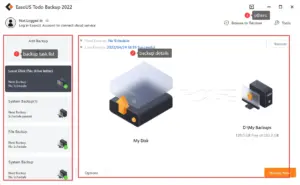
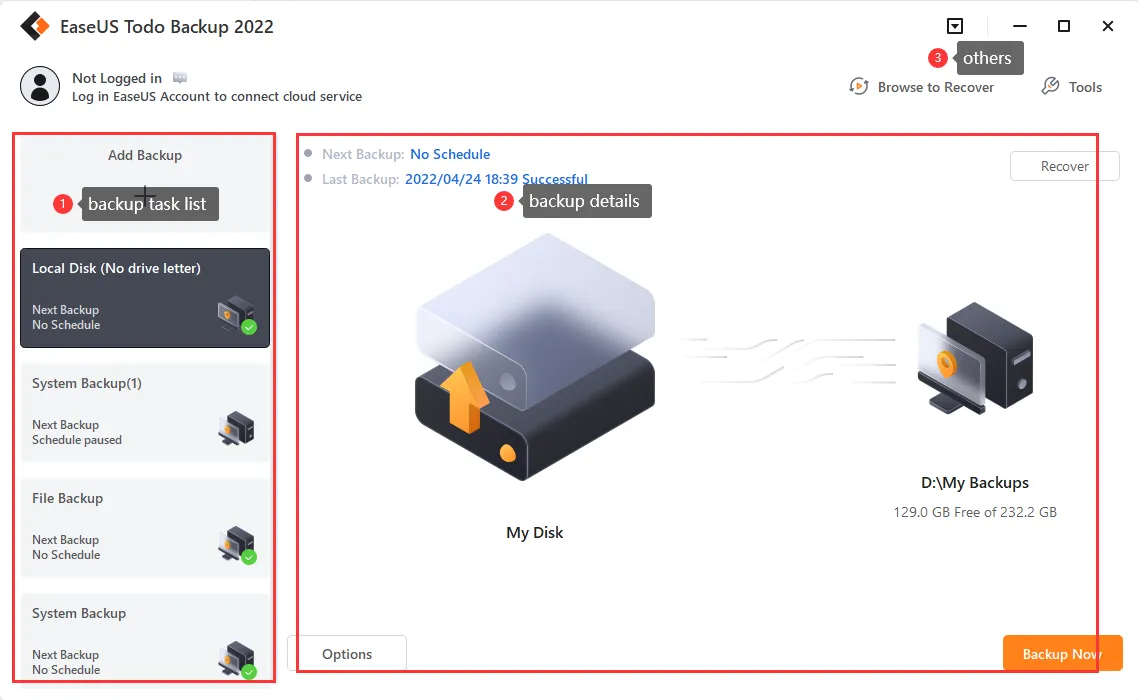
  1. Open the Program: Launch EaseUS Todo Backup on your computer.
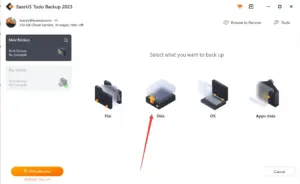
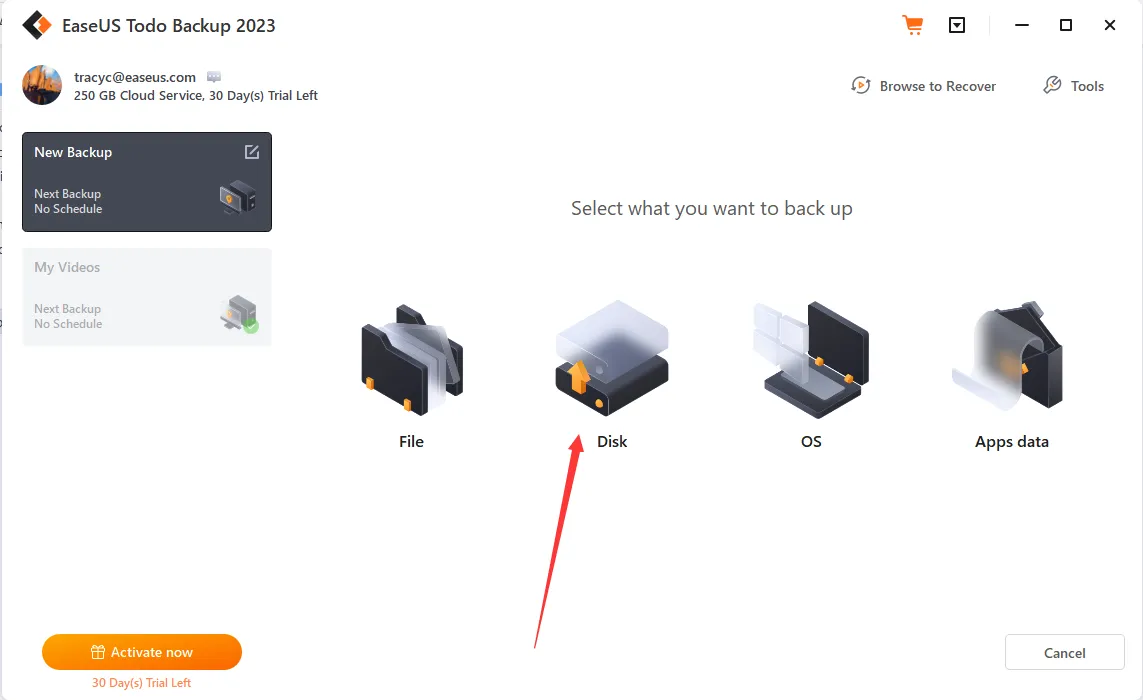
  2. Choose a Feature from the Interface: Click on the backup feature you want to use (e.g., File Backup, Disk Backup, etc.).
  3. Follow On-Screen Prompts: Complete the steps shown in the operations area.
  4. Set a Backup Schedule (Optional): Click ‘Schedule’ to set up automatic backups.

Features of EaseUS Todo Backup Home – 

Disk/Partition Backup and Recovery:

  • To back up all data and settings of a folder/file or all folders and files (disk), in case data is corrupted.

System Backup and Recovery:

  • To backup systems, boot folders or files, and program files to have an easy, efficient, and secure way to restore your system.

Files Backup and Recovery:

  • To backup files to separate folders or files on local drives or to external storage devices for full-scale protection.

App Data Backup and Recovery:

  • To backup Outlook emails, Chrome settings (including browsing history, bookmarks, passwords, extensions, and cookies), and game files.

Additional Features of EaseUS Todo Backup Home:

  • AI Smart Backup
  • Security Zone Backup
  • Protection From Ransomware
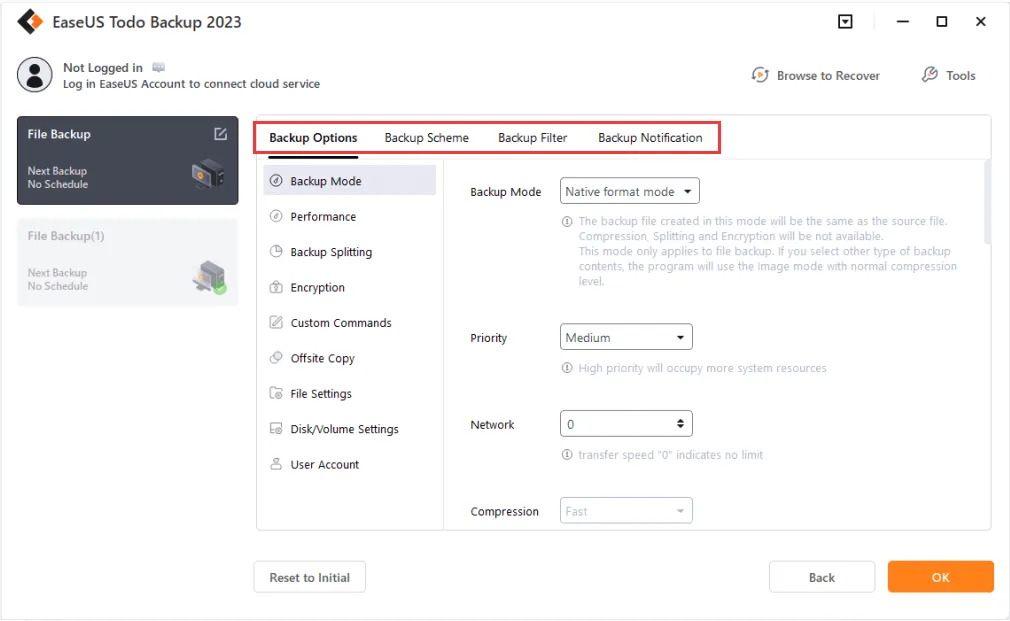
  • Backup Notification
  • Hot Backup
  • Mount Backup Image
  • WinPE Bootable Disk 
  • Offsite Copy 

Types of Windows Data Backup & Recovery included:

  • Disk/Partition Backup: Entire disks, especially the system drive (C drive), or partitions.
  • File Backup: Specific files/folders or file types: documents, pictures, music, emails, applications, videos, financial files, etc.
  • System Backup: Everything your current system requires to operate. 
  • Disk/Partition Clone: Migration or copying of all the data on a hard disk/partition to another one in order to upgrade or replace a hard drive. 
  • System Clone: Cloning or migration of your system to a new hard drive or computer without reinstalling the system and applications. 
  • Mail Backup: Emails – including inbox, outbox, deleted mail, drafts, calendar events, contacts, and notes in Microsoft Outlook or Outlook Express.
  • And more.

Available Cloning Options with EaseUS Todo Backup Home:

  • System Cloning: To migrate OS to SSD or upgrade to a larger disk.
  • Disk Cloning: To clone a hard drive to an SSD or create a bootable USB or CD/DVD drive.
  • Options in Cloning: To clone a smaller drive to a larger one and vice versa, or to clone an active Windows system directly to a new drive.

System Requirements:

  • Operating Systems: Windows 11/10/8/8.1/7/Vista/XP
  • CPU: 500 MHz processor or faster
  • RAM: Equal to or larger than 1GB
  • Disk Space: A minimum of 1GB of available space on the hard disk
  • File Systems: NTFS, FAT32, FAT16, FAT12

Supported Device Types:

  • HDD: Parallel ATA (IDE), EIDE, ATA, Serial ATA (SATA), External SATA (eSATA), SCSI, iSCSI, IEEE 1394 (FireWire)
  • SSD
  • RAIDed Configurations (Hardware RAIDs)
  • Large Capacity Hard Disk (GPT and MBR Disk): 16TB disk and up to 32 disks
  • Removable Devices: USB 1.0/2.0/3.0, flash drive, etc.

Languages Supported:

  • English
  • German
  • Spanish
  • French
  • Italian
  • Portuguese
  • Polish
  • Japanese
  • Chinese (Traditional)
  • Chinese (Simplified)
  • Korean

A Sneak Peek Into EaseUS Todo Backup Home – Windows Backup Software:

EaseUS Todo Backup Reviews

Deal Terms:

How to download/activate this product?
After completing your purchase, you will receive an instructions document. Follow the instructions in this document to redeem the coupon code and get access to this product.

What is the validity of the license key/coupon code? (Within how many days must the coupon code be redeemed?)
The coupon code must be redeemed within 15 days from the date of purchase.

Do you get Lifetime Access to this deal?
Yes, Lifetime Access is available with the purchase of the Perpetual Plan (only for this version of EaseUS Todo Backup Home), and Annual Access is available with the purchase of the Yearly Plan.
Lifetime means the lifetime of the product.
We try to get great products with longevity for our customers, but products do get acquired, or sometimes the products go bankrupt. Many of these products are from startup companies, giving us a great deal for our customers. But in case of an unfortunate situation where the product does not last long, there is not much DealFuel can do about it.

Are Updates available for this product?

  • Yearly Plan – Updates are available for free during the subscription period. 
  • Perpetual Plan – No, free updates are not available. All major updates are charged. 

Is support available for this product?
Yes, support is available for this product.
For support, contact – [email protected].

Is this deal for new users only?
Yes, this deal is available only for the new users of EaseUS Todo Backup Home.

How many users can use the license key/coupon code?
1 coupon code can be used for 1 user/account.

Are the coupon codes stackable?
No, the coupon codes are not stackable.

Can this product be accessed on all devices?
No, EaseUS Todo Backup Home – Windows Backup Software is accessible only on desktops with Windows 11/10/8/8.1/7/Vista/XP operating systems.

Reviews

There are no reviews yet.

Only logged in customers who have purchased this product may leave a review.

TL;DR

  • Backup your system, files, apps, and disk drives easily.
  • Protect your data from crashes, viruses, and ransomware.
  • Clone your system or hard drive to an SSD with a few clicks.
  • Get support for Outlook, Chrome, and game data backup.
  • AI Smart Backup, Hot Backup, and WinPE Boot Disk Included.

Ransomware threats and unexpected failures are more common than ever—yet many users are still unprotected. That’s why DealFuel brings you –

EaseUS Todo Backup Home – Windows Backup Software

What is EaseUS Todo backup? EaseUS Todo Backup Home is a user-friendly Windows backup software that backs up your PC system and critical files to multiple network paths. These networks include –

  • Shared locations
  • USB drives
  • Different Clouds

It provides multiple backup solutions like –

  • Disk/Partition Backup and Recovery
  • System Backup and Recovery
  • Files Backup and Recovery
  • App Data Backup and Recovery

Whether you’re dealing with accidental deletion, hardware failure, or a virus, EaseUS Todo Backup makes recovery fast and painless.

With system cloning and smart backup scheduling, it also ensures smooth upgrades, migrations, and consistent protection without manual effort.

Introduction to EaseUS Todo Backup Home & Its Working:

How To Backup Data With EaseUS Todo Backup Home Software (4 Easy Steps)?

  1. Open the Program: Launch EaseUS Todo Backup on your computer.
  2. Choose a Feature from the Interface: Click on the backup feature you want to use (e.g., File Backup, Disk Backup, etc.).
  3. Follow On-Screen Prompts: Complete the steps shown in the operations area.
  4. Set a Backup Schedule (Optional): Click ‘Schedule’ to set up automatic backups.

Features of EaseUS Todo Backup Home – 

Disk/Partition Backup and Recovery:

  • To back up all data and settings of a folder/file or all folders and files (disk), in case data is corrupted.

System Backup and Recovery:

  • To backup systems, boot folders or files, and program files to have an easy, efficient, and secure way to restore your system.

Files Backup and Recovery:

  • To backup files to separate folders or files on local drives or to external storage devices for full-scale protection.

App Data Backup and Recovery:

  • To backup Outlook emails, Chrome settings (including browsing history, bookmarks, passwords, extensions, and cookies), and game files.

Additional Features of EaseUS Todo Backup Home:

  • AI Smart Backup
  • Security Zone Backup
  • Protection From Ransomware
  • Backup Notification
  • Hot Backup
  • Mount Backup Image
  • WinPE Bootable Disk 
  • Offsite Copy 

Types of Windows Data Backup & Recovery included:

  • Disk/Partition Backup: Entire disks, especially the system drive (C drive), or partitions.
  • File Backup: Specific files/folders or file types: documents, pictures, music, emails, applications, videos, financial files, etc.
  • System Backup: Everything your current system requires to operate. 
  • Disk/Partition Clone: Migration or copying of all the data on a hard disk/partition to another one in order to upgrade or replace a hard drive. 
  • System Clone: Cloning or migration of your system to a new hard drive or computer without reinstalling the system and applications. 
  • Mail Backup: Emails – including inbox, outbox, deleted mail, drafts, calendar events, contacts, and notes in Microsoft Outlook or Outlook Express.
  • And more.

Available Cloning Options with EaseUS Todo Backup Home:

  • System Cloning: To migrate OS to SSD or upgrade to a larger disk.
  • Disk Cloning: To clone a hard drive to an SSD or create a bootable USB or CD/DVD drive.
  • Options in Cloning: To clone a smaller drive to a larger one and vice versa, or to clone an active Windows system directly to a new drive.

System Requirements:

  • Operating Systems: Windows 11/10/8/8.1/7/Vista/XP
  • CPU: 500 MHz processor or faster
  • RAM: Equal to or larger than 1GB
  • Disk Space: A minimum of 1GB of available space on the hard disk
  • File Systems: NTFS, FAT32, FAT16, FAT12

Supported Device Types:

  • HDD: Parallel ATA (IDE), EIDE, ATA, Serial ATA (SATA), External SATA (eSATA), SCSI, iSCSI, IEEE 1394 (FireWire)
  • SSD
  • RAIDed Configurations (Hardware RAIDs)
  • Large Capacity Hard Disk (GPT and MBR Disk): 16TB disk and up to 32 disks
  • Removable Devices: USB 1.0/2.0/3.0, flash drive, etc.

Languages Supported:

  • English
  • German
  • Spanish
  • French
  • Italian
  • Portuguese
  • Polish
  • Japanese
  • Chinese (Traditional)
  • Chinese (Simplified)
  • Korean

A Sneak Peek Into EaseUS Todo Backup Home – Windows Backup Software:

EaseUS Todo Backup Reviews

Deal Terms:

How to download/activate this product?
After completing your purchase, you will receive an instructions document. Follow the instructions in this document to redeem the coupon code and get access to this product.

What is the validity of the license key/coupon code? (Within how many days must the coupon code be redeemed?)
The coupon code must be redeemed within 15 days from the date of purchase.

Do you get Lifetime Access to this deal?
Yes, Lifetime Access is available with the purchase of the Perpetual Plan (only for this version of EaseUS Todo Backup Home), and Annual Access is available with the purchase of the Yearly Plan.
Lifetime means the lifetime of the product.
We try to get great products with longevity for our customers, but products do get acquired, or sometimes the products go bankrupt. Many of these products are from startup companies, giving us a great deal for our customers. But in case of an unfortunate situation where the product does not last long, there is not much DealFuel can do about it.

Are Updates available for this product?

  • Yearly Plan – Updates are available for free during the subscription period. 
  • Perpetual Plan – No, free updates are not available. All major updates are charged. 

Is support available for this product?
Yes, support is available for this product.
For support, contact – [email protected].

Is this deal for new users only?
Yes, this deal is available only for the new users of EaseUS Todo Backup Home.

How many users can use the license key/coupon code?
1 coupon code can be used for 1 user/account.

Are the coupon codes stackable?
No, the coupon codes are not stackable.

Can this product be accessed on all devices?
No, EaseUS Todo Backup Home – Windows Backup Software is accessible only on desktops with Windows 11/10/8/8.1/7/Vista/XP operating systems.

Clear
15 Day Refund Policy
For support contact: [email protected] 

Want to save another 25% on this deal?

Join DealClub

Plans & Features

Yearly
$27 $39.95
  • 1 Computer
  • One-year free upgrade
  • Standard technical support
Buy Now
Perpetual
$41 $59.95
  • 1 Computer
  • Lifetime free upgrade
  • Premium technical support
Buy Now

    No Q&A available yet.

    No Reviews available.

    Only logged in customers who have purchased this product may leave a review.

$22.95$39.95
$27.00$39.95
Scroll to Top