
- AI Perfect Memory: Provides AI memory that automatically remembers everything.
- Fewer Debug Cycles: Helps see what changed, not just what’s broken; fixes bugs right the first time.
- Instant Debugging: Helps find bugs by tracking code changes.
- Fearless Experimentation: Helps restore in 1 click; AI suggests boldly, you act fearlessly.
- Zero Setup Time: Allows you to work with any AI tool instantly, no configuration needed.
- 100% Local: Ensures code history never leaves your machine; no cloud, uploads, or AI training on your work.
ShadowGit – AI Code Assistant
Vendor: Gheorghe Alexandru Afloarei
4.5
(2 reviews)
TL;DR
- Auto-save every 15 seconds.
- One-click code restore anytime.
- Works with top AI assistants.
- 100% local and private.
- Cross-platform compatibility: Mac, Windows, Linux.
- Saves tokens, faster debugging.
- Clean repo with shadow folder.
Quick Overview
Alternative to:
- Aider
- Amazon Q Developer
- Claude Code
- Cline
- Codeium
- Continue
- Cursor
- GitHub Copilot
- Tabnine
- Windsurf
Best for:
- Designers
- DevOps teams
- Full-Stack Developers
- Software Developers
- Startups
- Freelance Developers
- QA & Test Engineers
- AI/ML Engineers
- Software Engineering Students
- Technical Entrepreneurs
Compatibility:
-
Operating Systems:
Linux, MacOS, Windows -
Integrations:
Cline, Claude Code, Cursor, GitHub Copilot, Windsurf, Aider, Codex CLI, Any MCP (Model Context Protocol)-compatible AI coding assistant
Git commits show where you saved your code. But what about everything that happens between them?
Lost changes, unexpected bugs, and hours spent retracing your steps can slow down development.
ShadowGit changes that by automatically capturing your code evolution every 15 seconds, giving you a complete history of your work and AI-powered memory to debug smarter.
What Is ShadowGit?
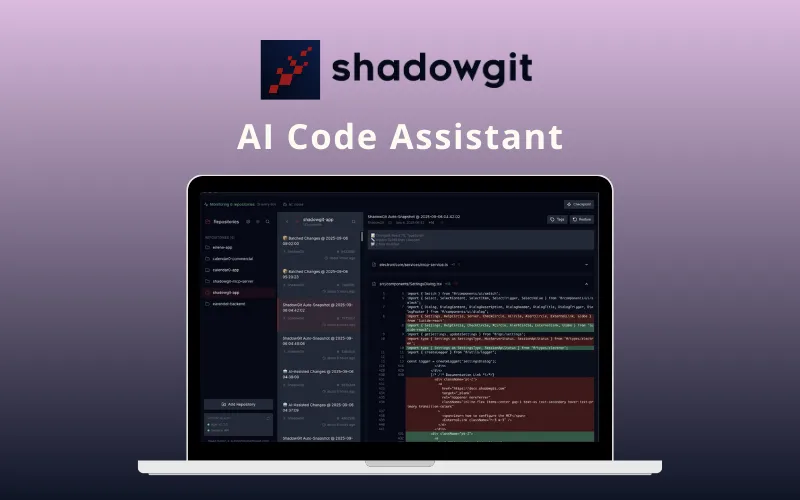
ShadowGit is an AI code assistant for debugging & memory. It automatically tracks every change in your codebase and gives AI assistants memory of your code’s evolution.
ShadowGit –
- captures every modification,
- creates a searchable timeline, and
- helps you debug faster,
- restores previous versions instantly, and
- keeps your main repository clean.
This AI Code History Tool has features like:
- Automatic save every 15 seconds
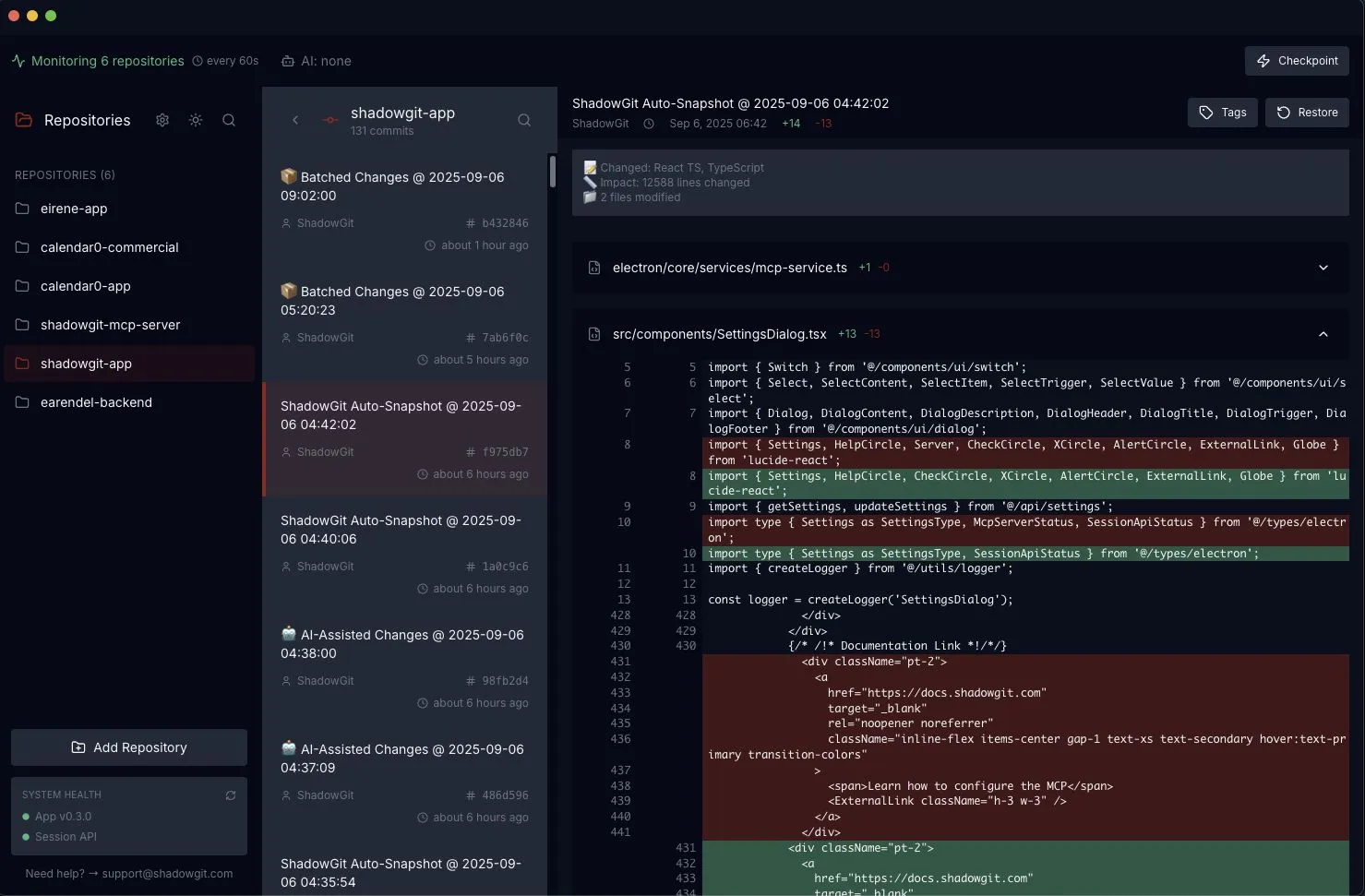
- One-click restore to any previous version
- The hidden shadow repository keeps the main repo clean
- AI integration for faster debugging and clean commits
Whether you are a developer, freelancer, or AI tool user, ShadowGit helps you code fearlessly, debug smarter, and save time and effort.
Introduction To ShadowGit – AI Code Assistant:

Features of ShadowGit:
Additional Features:
- Automatic Save: Captures every code change every 15 seconds
- Instant Restore: One-click rollback to any previous version
- Hidden Repository: Keeps .shadowgit folder separate to protect the main repo
- Smart Tracking: Automatically respects .gitignore patterns
- MCP Server: Works with Claude, Cursor, Codex, Windsurf
- History Search: AI runs git commands to find bugs quickly
- Session API: AI creates clean commits instead of micro-spam commits
- Context Memory: AI remembers entire code evolution
- Background Operation: Runs invisibly without interrupting workflow
- Universal Compatibility: Mac, Windows, Linux support
- Selective Repos: Track only the projects you want
- Custom Intervals: Adjust capture frequency (default 15 seconds)
- No Token Waste: AI searches efficiently, saving resources
- Clean Git History: Main repo remains untouched
- No Cloud Storage: Everything stays on your computer
- Read-Only AI Access: AI can search but not modify history
- Sandboxed Commands: Blocks dangerous git operations
Why Choose ShadowGit?
- Never lose AI-generated code with automatic code snapshots.
- Roll back to any previous version instantly without relying on Git commits.
- Track every AI code change across your development workflow.
- Recover deleted or overwritten code in just a few clicks.
- Works seamlessly with popular AI coding assistants using MCP.
- Keep your source code private with 100% local storage.
- Compare code versions to identify changes faster.
- Improve debugging by tracing exactly when and where code changed.
- Add AI-powered version history without changing your existing workflow.
- Build confidently knowing every coding session is automatically backed up.
Specifications:
System Requirements:
- OS: macOS 10.15+, Windows 10+, Linux (Ubuntu 20.04+)
- Storage: 50 MB for the app + additional space for code history
- Memory: Minimum 256 MB RAM
- Dependencies: Git 2.0+ and Node.js 18+ (for MCP server)
Integrations/AI Compatibility:
- An AI tool (Claude Code, Cursor, etc.)
Platform Access:
- Desktop only (Mac, Windows, Linux)
- Cross-platform compatible
Best For:
- Designers
- DevOps teams
- Full-Stack Developers
- Software Developers
- Startups
- Freelance Developers
- QA & Test Engineers
- AI/ML Engineers
- Software Engineering Students
- Technical Entrepreneurs
Choose Your Plan
With DealClub
$12.75
$19.00
Without DealClub
$15.00
$19.00
Buy Now
30-Day Refund | Lifetime Access | One-time Payment
Limited Time Deal
Deal Terms
- Access via redemption of coupon code
- 30 Day Coupon Code Validity
- One Coupon Code for one user/account
- Coupon Codes are not stackable
- For both - New & Existing Users
- Free Updates
- Free Support
- Accessible only on Desktops
Plans & Features
Choose the perfect plan for your needs.
| Plans & Features |
Standard
|
|---|---|
|
$19
$15
Buy Now
|
|
| Bugs fixed in seconds | |
| Get the working code back instantly | |
| Works on Windows, Mac & Linux | |
| Your code stays private |
Standard
$19.00
$15.00
30-Day Refund | Lifetime Access | One-time Payment
- Bugs fixed in seconds
- Get the working code back instantly
- Works on Windows, Mac & Linux
- Your code stays private
Frequently Asked Questions
Find answers to common questions about ShadowGit
Do I need to commit code to use it?
No. ShadowGit captures code snapshots automatically without requiring Git commits.
Can I restore previous versions of my code?
Yes. You can browse and roll back to earlier snapshots in seconds.
Is my code stored in the cloud?
No. ShadowGit keeps your code history on your local machine for maximum privacy.
Does it work with multiple AI coding tools?
Yes. It supports MCP-compatible AI coding assistants.
Can ShadowGit help recover lost AI-generated code?
Yes. It lets you restore deleted or overwritten code from saved snapshots.
Why use ShadowGit instead of Git alone?
ShadowGit captures every AI-assisted change automatically, even between commits.
Customer Feedback
Customer Reviews (2)
Customer Q&A (1)
4.5
Based on 2 reviews
You must purchase this product to leave a review.
mperenzdealfuel mperenzdealfuel
Verified Buyer
Really a pretty good tool that saved me a ton of time. Basic functions: I, as a developer sometimes work on a task for a longer period until the code is working as i would expect it to. Sometimes, no matter how defensive you are, you broke something else afterwards. ShadowGIT makes it easier for me to find out when it broke and which changes where built on top of that. MCP: The MCP is incredibly useful so my agents can set snapshots at times without polluting my "real" repository. The software may provide some more features here and there, but seeing a v2 on the short term roadmap shows me an optimistic outlook. Woth the money without a doubt!
David seagat
Verified Buyer
A wonderful tool. Great tool works well with cursor. It does the job and restores well; great UI and it's smooth. Installation was fine, and I had zero issues. I have been using all week, and it just works. I am hoping this can work with void and Pear AI soon. I hope this could work with msty.app and other clients too. I will likely buy another license; I hope a license will come out for three computers. Must have app.
Q: Straico integration
A: Hello, ShadowGit uses standard MCP protocol. Unfortunately, I do not see Straico as part of this list of supported clients: https://modelcontextprotocol.io/clients However, the MCP integration is open source and you can find it here: https://github.com/blade47/shadowgit-mcp Therefore you can test the integration before buying the product. Please let me know if this answer helps. Thank you!
×
You Might Also Like

7 Different Bootstrap Admin Templates For A Responsive Dashboard
All, Android, Instant Download, iOS, Linux, Mac-OS, Marketplace, Operating System, Subscription Type, Tools & Software, Web Development, Windows
$49.00
$999.00
-95% OFF
View Deal

Updowntime - Advanced Website Monitoring Service | Lifetime Access
All, Browser Based, Lifetime, Operating System, Subscription Type, Tools & Software, Web Development
$49.00
$199.00
-75% OFF
View Deal

KamuStores - Start Your Online Store | Lifetime Access
All, Browser Based, Business Management, Lifetime, Marketplace, Operating System, Subscription Type, Tools & Software, Web Development
$49.00
$500.00
-90% OFF
View Deal
Popupular - Easy-To-Use Popup Builder | Lifetime Access
All, Browser Based, Lifetime, Marketplace, Operating System, Subscription Type, Tools & Software, Web Development
$99.00
$420.00
-76% OFF
View Deal
Buy with DealClub
$12.75
$19.00
Buy without DealClub
$15.00
$19.00
Deal Terms
- ✓ Access via redemption of coupon code
- ✓ 30 Day Coupon Code Validity
- ✓ One Coupon Code for one user/account
- ✓ Coupon Codes are not stackable
- ✓ For both - New & Existing Users
- ✓ Free Updates
- ✓ Free Support
- ✓ Accessible only on Desktops
30-Day Refund | Lifetime Access | One-time Payment
Deal Terms