
Free Budget Template For Excel & Google Sheets

TL;DR

  • Free, ready-to-use monthly budget planner template
  • Compatible with Excel, Google Sheets, and most spreadsheet applications
  • Track income, expenses, savings goals, and monthly cash flow
  • Compare planned vs actual spending with automatic calculations
  • Includes visual charts and budgeting summaries
  • Start tracking your finances in minutes

Quick Overview

Best for:

  • Accountants
  • Business Owners
  • Entrepreneurs
  • Freelancers
  • Small Business Owners
  • Students

Compatibility:

  • Browser Support:
    Brave, Chrome, Edge, Firefox, Safari
  • Operating Systems:
    Android, Browser Based, iOS, MacOS, Windows
  • Integrations:
    Google Sheets, LibreOffice Calc, Microsoft Excel

Managing monthly finances can become overwhelming when income, bills, subscriptions, savings goals, and daily expenses are spread across multiple apps or documents.

But now you can simplify your budgeting process with the –

Free Budget Planner Template for Excel & Google Sheets

A clean, easy-to-use budget spreadsheet that helps you track income, expenses, savings, and spending habits from one centralized dashboard.

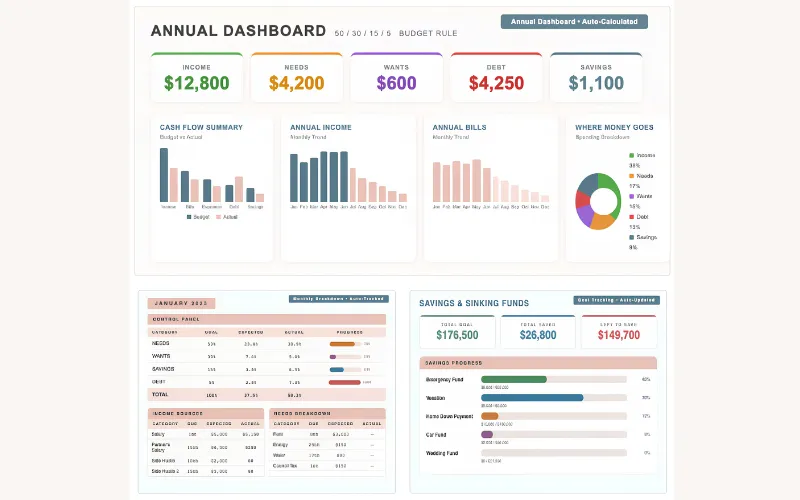
The template includes everything needed for monthly budgeting –

  • Monthly income tracker with planned vs actual columns
  • Fixed expense categories, including rent, utilities, insurance, & loans
  • Variable expense categories such as groceries, transportation, dining, shopping, and entertainment
  • Savings goal tracker
  • Auto-calculated income and expense totals
  • Net balance calculations
  • Savings rate calculations
  • Visual comparison chart for planned vs actual spending
  • Conditional formatting that highlights positive and negative balances

Instead of relying on multiple budgeting apps or manually calculating expenses each month, this template provides a structured system that automatically organizes your financial information.

It works seamlessly with Microsoft Excel, Google Sheets, and most spreadsheet applications.

All you have to do is –

  • DOWNLOAD the budget planner template
  • ENTER your monthly income and planned expenses
  • UPDATE actual spending throughout the month
  • REVIEW your financial summary and savings progress

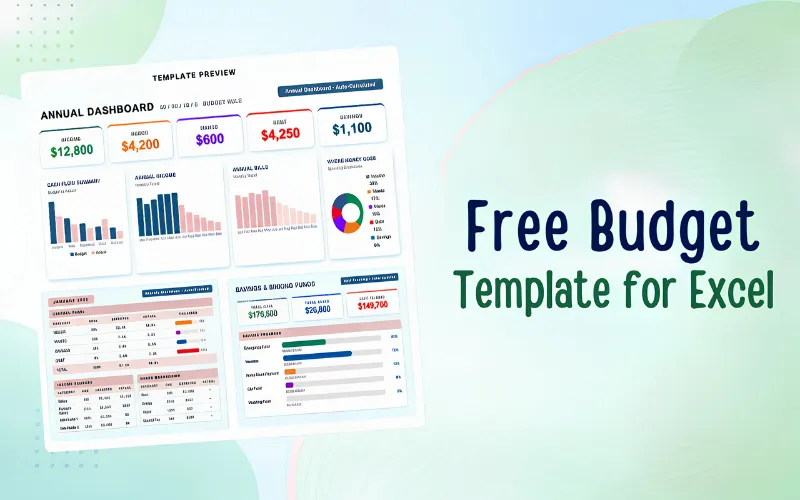
Preview of the Free Budget Planner Template For Excel & Google Sheets

Free Budget Template For Excel and Google Sheets

Why Download This Free Budget Planner Template?

  • Track monthly income and expenses in one place
  • Compare planned spending against actual spending
  • Monitor savings goals and savings rate automatically
  • Get instant visibility into your monthly financial position
  • Use visual charts to understand spending patterns
  • Eliminate manual calculations with built-in formulas
  • Compatible with Excel, Google Sheets, and most spreadsheet software
  • Download once and use every month

Specifications:

  • Resources: Annual budget dashboard, income tracker, expense tracker & savings planner
  • Compatibility: Microsoft Excel (Desktop + Web)
  • Format: Instant-download XLSX spreadsheet template
  • Editing: Fully editable categories, formulas, charts & budget goals
  • Usage: Personal budgeting, household finances, savings planning & expense tracking
  • Documentation: Setup instructions included

Best for:

  • Accountants
  • Business Owners
  • Entrepreneurs
  • Freelancers
  • Small Business Owners
  • Students

Choose Your Plan

Download Now
Limited Time Deal

Deal Terms

  • Instant download after checkout
  • Extended commercial license
  • Personal & Commercial use

Frequently Asked Questions

Find Answers to common questions about the Free Budget Template

Will the calculations update automatically when I enter my expenses?

Yes. The template automatically calculates income totals, expense totals, net balance, and savings rate as you enter or update financial information.

Which applications is this budget planner compatible with?

The template works with Microsoft Excel, Google Sheets, LibreOffice Calc, and most spreadsheet applications that support Excel files.

Can I customize the categories?

Yes. You can rename categories, add new expense rows, adjust formulas, and customize the planner to fit your personal or business budgeting needs.

Customer Feedback

Customer Reviews (0) Customer Q&A (0)

No Reviews Yet

Be the first to try this deal and share your experience.

You must purchase this product to leave a review.

Be The First To Ask

Get clarity before you buy—your question might help others too.

×
Download Now
Scroll to Top