




SurSort – Find Any Video or Audio File Instantly

TL;DR

  • Find any video or audio file the instant you start typing.
  • Keep everything local, no cloud, no accounts.
  • Lock your most private media in a password-protected Vault (Mac).
  • Auto-tag your library by artist, date, and device.

Quick Overview

Alternative to:

  • Adobe Bridge
  • MediaMonkey
  • Microsoft File Explorer

Best for:

  • Content Creators
  • Freelancers
  • Graphic Designers
  • Marketers
  • Video Editors
  • YouTubers

Compatibility:

  • Browser Support:
    Brave, Chrome, Edge, Firefox, Safari
  • Operating Systems:
    MacOS, Windows

Your videos & audio end up everywhere: a downloads folder, an external drive, a dozen half-named subfolders.

Every time you need one file, you’re scrolling & guessing at filenames.

That’s not because you’re disorganized. That’s why DealFuel brings you SurSort Media Manager.

What Is SurSort Media Manager?

SurSort Media Manager is a desktop app for Windows and Mac that brings every video & audio file you own into one searchable library. Fully offline, with nothing sent to the cloud.

Point it at –

  • Home videos
  • Podcasts and voice memos
  • Music
  • Professional media assets

And it gives you –

  • Instant search as you type
  • Automatic tags from each file’s own metadata
  • Hover-to-preview thumbnails
  • A password-protected Vault for your most private files (Mac)

No uploads. No sign-ups. No subscription. Your files never leave your computer.


SurSort Helps You – 

  • FIND any file by name, type, or tag, as you type.
  • ORGANIZE your whole library automatically, using each file’s own metadata.
  • PREVIEW any video or audio file with a hover, before you open it.
  • LOCK your most private media behind a password on Mac.
  • MANAGE everything- rename, move, tag, or trash – without leaving the app.
  • HIDE files you don’t need visible, without deleting or moving them.
  • KEEP every file local, with zero cloud, accounts, or tracking.

Introduction to SurSort:

Youtube video

SurSort Features

sursort-add-your-media

Get Your Whole Library Organized in Minutes:

  • Point SurSort at any folder or drive and let it index everything at once.
  • Get a searchable library built automatically, with no manual sorting.
  • Everything runs fully offline – no cloud, accounts, or uploads involved.
sursort-ai-powered-fast-search

Find Any File the Moment You Type:

  • Get real-time results as you type, matched by name, type, or tag.
  • Hover over any result to preview it instantly; no separate player needed.
  • Locate one file in seconds, even inside a library of thousands.
sursort-auto-tagging

Let SurSort Tag Your Library For You:

  • Get files auto-tagged using each one’s own metadata – artist, date, device.
  • Skip renaming or sorting files by hand just to keep track of them.
  • Watch your search get faster and more accurate as tags build up.
sursort-manual-tagging

Tag Files Exactly How You Think:

  • Add your own tags to any file, in your own words.
  • Pick from smart tag suggestions instead of typing every tag from scratch.
  • Organize your library by how you actually think, not a rigid folder tree.
sursort-smart-sorting

Sort Your Library However You Need:

  • Sort by name, date, size, or type, in one click.
  • Flip between ascending and descending instantly.
  • Find the newest, largest, or oldest file without searching for it.
sursort-unified-media-library

Manage Every File Without Leaving The App:

  • Open, rename, move, tag, or trash any file with one right-click.
  • Lock your most private media inside a password-protected Vault (Mac).
  • Skip switching between a file manager, tagger, and player just to manage media.
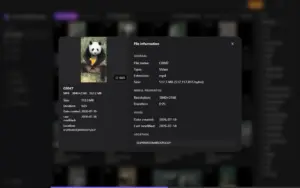
sursort-file-info

See Every File’s Details at a Glance:

  • Check size, duration, resolution, and file location instantly.
  • Confirm exactly what a file is before you open or share it.
  • Skip digging through folder properties just to check the basics.
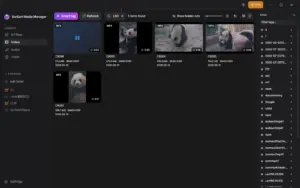
sursort-hide-and-show-hidden-only

Keep Your Library Clean Without Deleting Anything:

  • Hide any file from view instantly with one right-click.
  • Reveal hidden files anytime with Show hidden only.
  • Keep your library tidy without losing or moving a single file.

Why Choose SurSort Media Manager?

  • Stop hunting through folders – find any file the moment you type.
  • Keep your media fully private, with nothing sent to the cloud.
  • Skip the manual tagging – let SurSort organize your library for you.
  • Preview files instantly, without opening a separate app.
  • Protect your most sensitive media behind its own password (Mac).

SurSort is Best For:

  • Content Creators
  • Freelancers
  • Graphic Designers
  • Marketers
  • Video Editors
  • YouTubers

Choose Your Plan

Windows
Windows
Original price was: $39.95.Current price is: $15.95.
Mac
Original price was: $39.95.Current price is: $15.95.
With DealClub
$13.55
$39.95
Without DealClub
$15.95
$39.95
Buy Now
Limited Time Deal

Deal Terms

  • Access via redemption of coupon code
  • 30 Day Coupon Code Validity
  • One Coupon Code for one user/account
  • Coupon Codes are stackable
  • For both - New & Existing Users
  • Free Updates
  • Free Support
  • Accessible only on Windows & Mac - Desktop & Laptop

Plans & Features

Choose the perfect plan for your needs.

Plans & Features
Windows
Mac
$39.95 $15.95
Buy Now
$39.95 $15.95
Buy Now
Device

Windows 10/11 (64-bit)

macOS 12.0+ (Universal)

All-in-One Media Library

for Videos & Audio

for Videos & Audio

Updates

Free & Automatic

Free & Automatic

AI-Powered Instant Search
Smart Sorting
Auto & Custom Tagging
Local Vault for Private Media
Plan 1 of 2

Windows

$39.95 $15.95
Buy Now
30-Day Refund | Lifetime Access | One-time Payment
  • Device: Windows 10/11 (64-bit)
  • All-in-One Media Library : for Videos & Audio
  • Updates: Free & Automatic
  • AI-Powered Instant Search
  • Smart Sorting
  • Auto & Custom Tagging

Frequently Asked Questions

Find Answers to common questions about SurSort

Do I need an internet connection to use this?

No. SurSort runs entirely offline. There's no cloud, no account, and no data sent anywhere.

Is the Vault feature available on Windows?

No. The Local Vault / encryption feature is exclusive to the Mac version.

What file types does SurSort support?

It supports video & audio files in MP4, MOV, MP3, WAV, & other common formats, along with their embedded metadata like artist, date, & device.

Does tagging or hiding a file affect it outside SurSort?

No. Tags & hidden status are managed inside SurSort's own library view, the file on disk stays untouched, so it looks the same in File Explorer or Finder.

Customer Feedback

Customer Reviews (0) Customer Q&A (0)

No Reviews Yet

Be the first to try this deal and share your experience.

You must purchase this product to leave a review.

Be The First To Ask

Get clarity before you buy—your question might help others too.

×

You Might Also Like

Total Video Player for Mac [Pro] - Blu-Ray Video Player | Lifetime Access

Total Video Player for Mac [Pro] - Blu-Ray Video Player | Lifetime Access

, , , , , , ,

GPTImage Magic - Image Generation WP Plugin | Lifetime Access

GPTImage Magic - Image Generation WP Plugin | Lifetime Access

, , , , , , , ,

Genbler - Multimedia Suite | Annual Access
1000 Business Videos Bundle | Extended Commercial License

1000 Business Videos Bundle | Extended Commercial License

, , , , , , , , , ,

Choose Plan
Windows
Windows
Original price was: $39.95.Current price is: $15.95.
Mac
Original price was: $39.95.Current price is: $15.95.
Buy with DealClub
$13.55 $39.95
Buy without DealClub
$15.95 $39.95

Deal Terms

  • ✓ Access via redemption of coupon code
  • ✓ 30 Day Coupon Code Validity
  • ✓ One Coupon Code for one user/account
  • ✓ Coupon Codes are stackable
  • ✓ For both - New & Existing Users
  • ✓ Free Updates
  • ✓ Free Support
  • ✓ Accessible only on Windows & Mac - Desktop & Laptop
Scroll to Top