



Have you ever clicked on a 30-minute video just to find one simple answer? It is very frustrating. You scrub through the timeline, hoping to land on the right spot.
Video content is great, but it takes a lot of time to watch. You cannot “search” inside a video as you do with a book. You often have to sit through long intros and ads just for one fact.
In this ChatTube review, we’re diving deep into the AI tool that’s ending the era of mindless scrubbing and “guessing” where the info is.
We’ll break down the pricing tiers to see if it’s worth your penny, investigate the reality of AI “hallucinations” during transcriptions, & weigh the pros and cons.
Here is everything you need to know about ChatTube.
What is ChatTube?
ChatTube is a smart tool built using advanced AI technology. It works by reading the transcript of a YouTube video. It then lets you “chat” with that text using a chatbot window.
You can find it as a Chrome extension for your computer. This makes it sit right next to your video player. If you use Safari or Firefox, you can use the web app version.
The best part is how easy it is to use. It is a “plug-&-play” tool. You just install it, open a video, and the chat window appears. You do not need any technical skills to get started. It works right inside your browser while you watch.
Key Features Breakdown
ChatTube is packed with features that make video research much easier. Here is a deeper look at what it can do.
1. Real-Time Interaction:
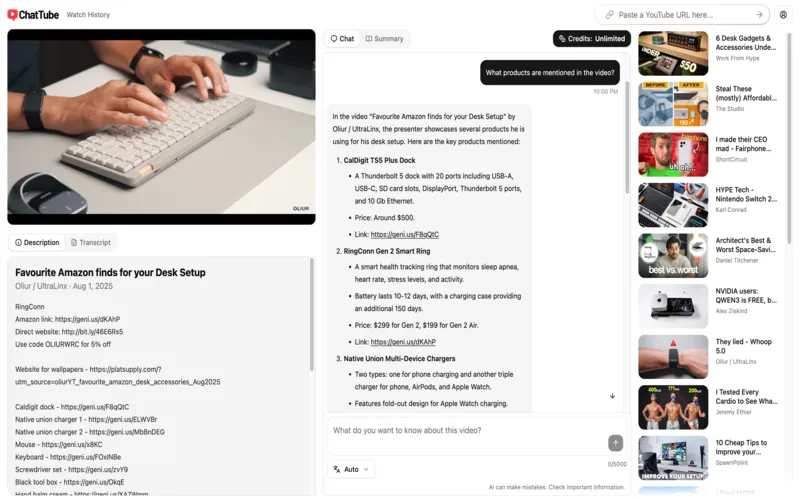
You can ask questions while the video is playing. The AI answers based on exactly what is being said. If a teacher mentions a hard word, just ask the chat to explain it. You do not have to pause or search Google.
2. Smart Summaries with Timestamps:
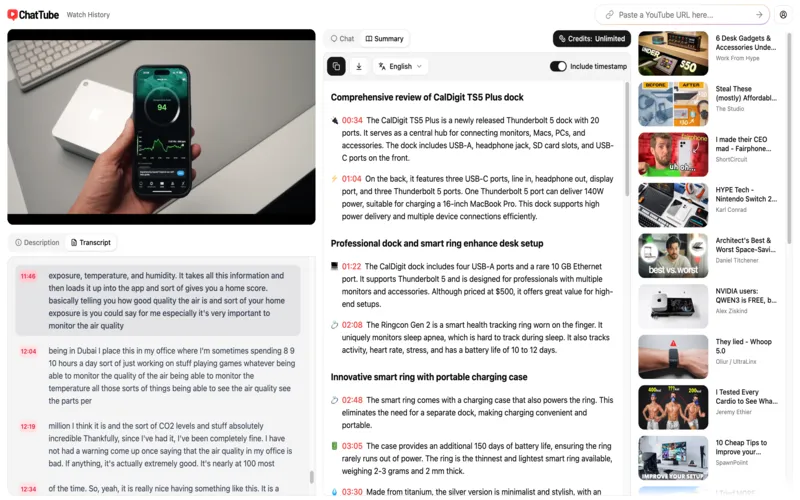
Get a quick list of the main points in a long video. It even includes timestamps. You can click a point and jump to that exact second. This is perfect for long tutorials where you only need one step.
3. Transcribe Everything:
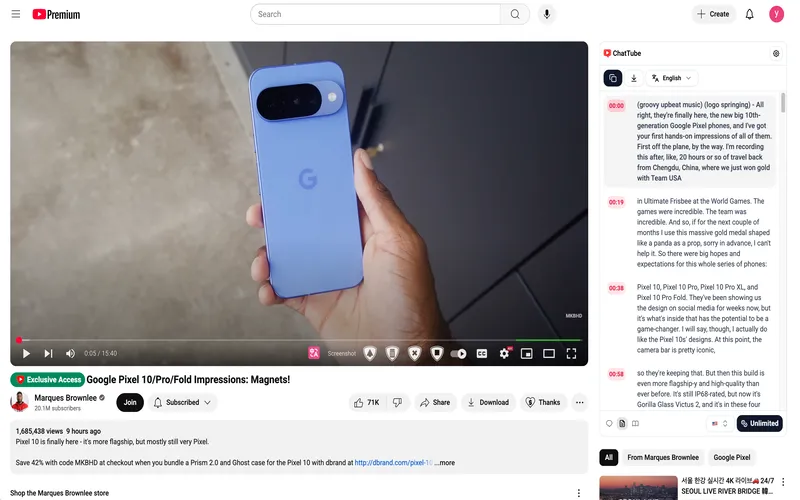
If a video has no captions, ChatTube can create them for you. It uses AI to listen and write down the words. It even works for TikToks and Podcasts. You can turn any audio into a searchable text file.
4. Multilingual Support:
You can translate video text into 12+ major languages. This includes Arabic, Chinese, English, French, Italian, Japanese, Korean, German, Polish, Portuguese, Russian, & Spanish. This is great for learning from creators who speak a different language. It breaks down language barriers for everyone.
5. Chat History and Export:
Your chats are saved automatically. You can come back later and pick up right where you left off. You can also download the transcripts. You can save them as PDF, Word, or text files for your school projects.
6. Instant Summaries:
Helps organize long videos into clear sections with key points & exact timestamps. This makes videos easy to understand & review later.
Who is ChatTube For? Best Use Cases
Our ChatTube review found that this tool is helpful for almost everyone. We have mixed some quick points and detailed examples below:
For Students and Educators
- Instant Virtual Tutor: Students can ask the AI to explain complex concepts like coding or science.
- Creating Study Materials: Educators use the tool to turn a video into a quiz in seconds.
Example: A student watching a long history lecture can ask, “What were the three main causes of the war?” The AI gives a clear list immediately.
For Professionals and Researchers
- Rapid Briefings: Busy managers can get the “gist” of a long webinar without watching it.
- Data Extraction: Researchers can chat with the talks to find specific data points or names.
Example: A programmer learning a new tool can ask, “Show me the exact code for the setup.” They get the answer without rewinding the video.
For Content Creators
- Trend Analysis: Creators can summarize popular videos to see what topics are trending.
- Script Research: Find quotes or facts from documentaries to use in your own scripts.
Example: A reviewer can use ChatTube to find the exact moment a creator mentions a product flaw. This makes comparison videos much easier to plan.
For Casual Viewers and Shoppers
- Smart Travel Planning: Ask a travel vlogger, “What are the best budget hotels mentioned here?”
- Product Review Shortcuts: Skip long intros and ask, “Does the reviewer like the camera quality?”
Pros and Cons
Every tool has its ups and downs. Here is what we found during our ChatTube review.
Pros:
- Very fast processing of long videos. It does not keep you waiting.
- Accurate summaries with clickable timestamps. You can jump to any part.
- Works on YouTube, TikTok, and Podcasts. It is very versatile.
- Simple UI that fits right into your browser. It looks very clean.
- Saves your chat history. You never lose a good conversation.
Cons:
- Works best on Chromium-based browsers (Chrome, Edge, Brave).
- Needs clear audio. If the speaker is hard to hear, the AI might make mistakes.
- The free version is limited to only 3 videos a day.
- It cannot read the YouTube comment section yet.
Free Chrome Extension vs DealFuel Lifetime Deal
| Feature | Free Plan | Lifetime Deal (Essential Plan) |
|---|---|---|
|
Daily Video Limit |
3 to 5 videos/day |
30 videos/day |
|
Payment |
Free |
One-time payment ($29) |
|
Export |
View only |
Download (PDF, DOC, TXT, SRT) |
|
Transcripts |
Upto 15 minutes |
Transcribe up to 30 mins/video |
|
Summaries |
Basic |
Advanced with clickable timestamps |
|
Updates |
Standard |
Lifetime Updates included |
|
Support |
Community |
Basic Support |
ChatTube’s Free Chrome Extension is perfect for casual viewers who only need a quick summary once or twice a week, whereas the Lifetime Deal is the better choice for students & researchers who need to download transcripts and process multiple lecture or tutorial videos every day without worrying about a monthly bill.
Conclusion
To wrap up this ChatTube review, this tool is a game-changer. It turns YouTube into a massive, searchable library. If you are a student or a professional, it will save you hours every week.
It makes learning more interactive and fun. Instead of just watching, you are engaging with the content. This helps you remember things better and finish your work faster.
The tool is constantly being updated. Version 1.7.0 and beyond now support videos without any transcripts at all. This makes it a very reliable choice for the long term.


