FOCUS Projects 4 Professional – Create Sharper Images With Focus Stacking

TL;DR

  • Combine multiple images taken at different focus distances to create a single image that is sharp throughout.
  • Improve macro, product, landscape, and close-up photography by extending the depth of field in your images.
  • Save editing time with automated focus stacking tools that simplify the process of merging multiple shots.
  • Produce sharper, more detailed final images without relying on complex manual editing workflows.

Quick Overview

Alternative to:

Best for:

  • Animators
  • Content Creators
  • Creative Agencies
  • Design agencies
  • Freelancers
  • Graphic Designers
  • Photographers
  • Video Editors

Compatibility:

  • Operating Systems:
    Windows
  • Integrations:
    Adobe Lightroom

Are your close-up shots lacking sharpness due to limited depth of field? Introducing the ultimate solution for photographers who demand perfection in every detail.

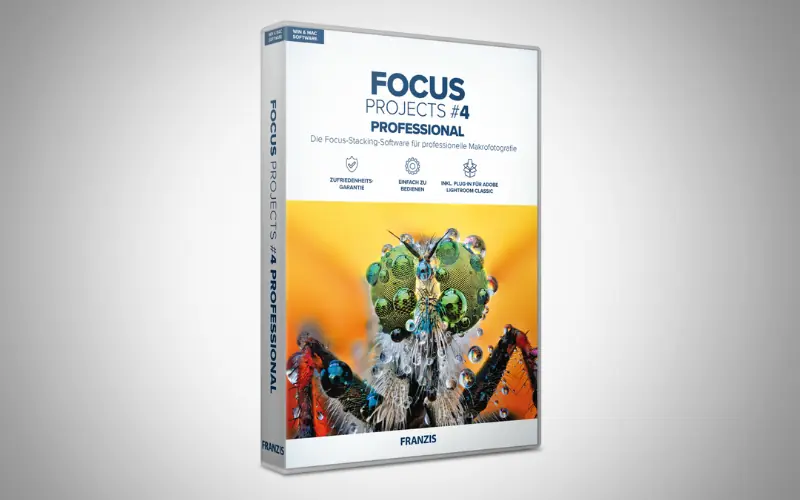
FOCUS Projects 4 Pro – Focus Stacking software

FOCUS Projects 4 Pro is the best focus stacking software for macro photography. This focus stacking software creates stunning macros with unparalleled detail.

Ideal for macro, nature, and product photographers, it excels in mastering Focus Stacking for unparalleled depth.

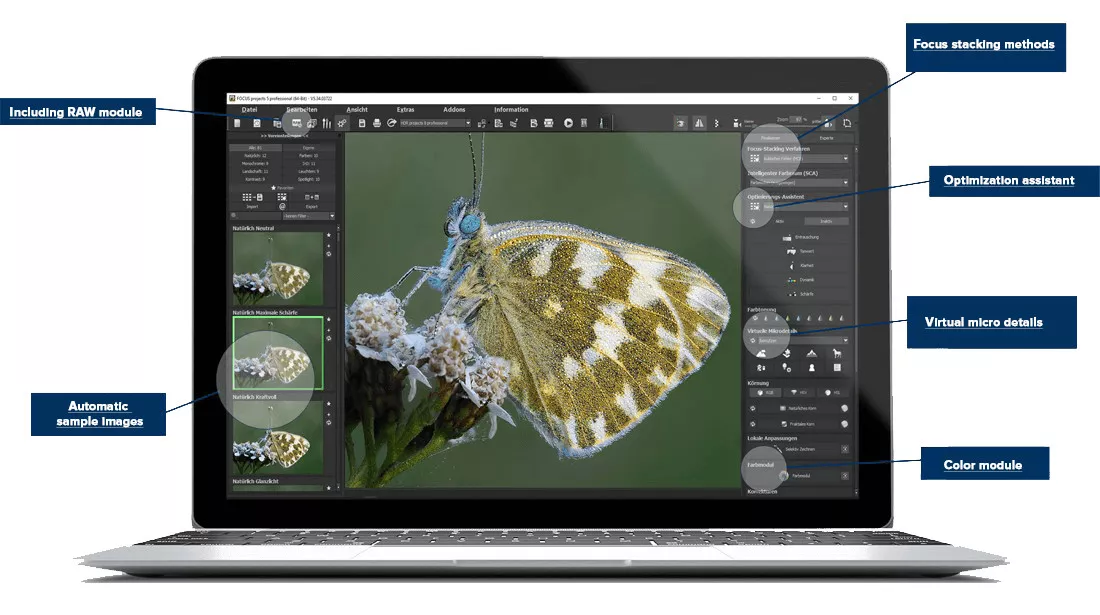
New tools for retouching, filters, and RAW development enhance your creative process.

From mesmerizing macros to standout product images, this software ensures your work shines in forums and online galleries.


What Can You Do With FOCUS Projects 4 Pro?

  • Combine multiple focus levels to create images with greater depth of field.
  • Load and process focus stacks from photos or videos.
  • Choose from 12 focus-stacking algorithms for different image requirements.
  • Work with up to 1,500 focus levels for highly detailed focus stacks.
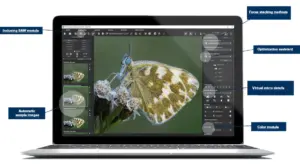
  • Identify sharp areas with the Focus Peaking module.
  • Develop and enhance RAW images with the built-in RAW Development module.
  • Fine-tune color details using SCA processing and HSV/HSL color spaces.
  • Apply professional color adjustments with the Color Toning module.
  • Fix scratches, sensor errors, and other image imperfections.
  • Apply effects selectively with Intelligent Drawing mode.
  • Automatically improve images with the Intelligent Image Optimizer.
  • Add creative enhancements with 24 new Expert Mode effects and 81 presets.
  • Process multiple images efficiently with batch processing.
  • Create 3D presentations using three-axis rotation and 3D lighting.
  • Export your work as a web page, video, or 3D VRML object.

Introduction to FOCUS Projects 4 Pro – Focus Stacking Software:

Youtube video

Features of FOCUS Projects 4 Pro – Best Focus Stacking Software:

Selective Drawing & RAW Module

Create Detailed Focus-Stacked Images:

  • Combine multiple focus levels using PSF Color and PSF Luminance/Brightness stacking algorithms for precise, noise-reduced results.
  • Work with up to 1,500 focus levels for complex focus stacks.
  • Use Focus Boost Technology to achieve greater sharpness, especially in close-up shots.
  • Use the Focus Peaking module to display focused areas for more precise control.
  • Load focus stacks from images or videos.
  • Extend your workflow with the dedicated Adobe Lightroom® Classic plug-in.
Other Additional Features:

  • Work in a redesigned interface optimized for 4K Ultra-HD displays.
  • Use the RAW module to develop and optimize your images.
  • Apply selective drawing to enhance specific areas of your images.
  • Improve image quality with denoising, smooth-area masking, and perspective correction.
  • Add creative effects with new Contrast and Spotlight preset categories.
  • Correct color and luminance details for more refined results.
  • Use additional image-enhancement tools to refine your final compositions.
 

Why Choose FOCUS Projects 4 Pro?

  • Create sharper images with greater depth of field using focus stacking.
  • Combine up to 1,500 focus levels for highly detailed compositions.
  • Process focus stacks from both photos and videos.
  • Choose from multiple stacking algorithms to refine your results.
  • See focused areas clearly with Focus Peaking for more precise adjustments.
  • Boost sharpness in macro and close-up photography.
  • Improve RAW images with built-in development and optimization tools.
  • Correct common image issues such as noise, scratches, and sensor errors.
  • Enhance specific areas with selective editing and creative effects.
  • Speed up repetitive work with batch processing and ready-to-use presets.

FOCUS Projects 4 Pro is best for:

  • Animators
  • Content Creators
  • Creative Agencies
  • Design agencies
  • Freelancers
  • Graphic Designers
  • Photographers
  • Video Editors

Choose Your Plan

With DealClub
$33.15
$99.00
Without DealClub
$39.00
$99.00
Buy Now
Limited Time Deal

Deal Terms

  • Access via redemption of coupon code
  • 30-Day Coupon Code Validity
  • One Coupon Code for one user/account
  • Coupon Codes are not stackable
  • For both - New & Existing Users
  • Free Updates
  • Free Support
  • Accessible only on Windows devices

Plans & Features

Choose the perfect plan for your needs.

Plans & Features
Standard
$99 $39
Buy Now
4K Ultra-HD interface for stunning visuals
Advanced focus stacking with PSF algorithms
Intelligent focus peaking for precision
Supports image and video stacking
Seamless Lightroom Classic integration
24 new effects for enhanced editing
Up to 1500 focus levels, 12 algorithms
RAW development and selective drawing
Batch processing and intelligent optimizer
Export as web, video, or 3D objects

Standard

$99.00 $39.00
Buy Now
30-Day Refund | Lifetime Access | One-Time Payment
  • 4K Ultra-HD interface for stunning visuals
  • Advanced focus stacking with PSF algorithms
  • Intelligent focus peaking for precision
  • Supports image and video stacking
  • Seamless Lightroom Classic integration
  • 24 new effects for enhanced editing
  • Up to 1500 focus levels, 12 algorithms
  • RAW development and selective drawing
  • Batch processing and intelligent optimizer
  • Export as web, video, or 3D objects

Frequently Asked Questions

Find answers to common questions about FOCUS Projects 4 Pro

Does it work with RAW images?

Yes. FOCUS Projects 4 Pro includes a dedicated RAW development module.

Can I process multiple images at once?

Yes. The batch-processing feature lets you handle multiple images efficiently.

Does it include presets and effects?

Yes. You get 81 presets along with additional effects for enhancing your images.

Customer Feedback

Customer Reviews (0) Customer Q&A (0)

No Reviews Yet

Be the first to try this deal and share your experience.

You must purchase this product to leave a review.

Be The First To Ask

Get clarity before you buy—your question might help others too.

×

You Might Also Like

EaseUS RecExperts - Create Professional Videos From Your Screen

EaseUS RecExperts - Create Professional Videos From Your Screen

, , , , , , , , ,

Caption My Event - Real-Time AI Transcription & Live Caption | Lifetime Access

Caption My Event - Real-Time AI Transcription & Live Caption | Lifetime Access

, , , , , , , ,

MP4 Downloader For YouTube - Windows | Lifetime Access

MP4 Downloader For YouTube - Windows | Lifetime Access

, , , , , , ,

Voicely 2.0 - Text-To-Speech & Voice Cloning Tool | Lifetime Access

Voicely 2.0 - Text-To-Speech & Voice Cloning Tool | Lifetime Access

, , , , , , ,

2.0 (1)
Buy with DealClub
$33.15 $99.00
Buy without DealClub
$39.00 $99.00

Deal Terms

  • ✓ Access via redemption of coupon code
  • ✓ 30-Day Coupon Code Validity
  • ✓ One Coupon Code for one user/account
  • ✓ Coupon Codes are not stackable
  • ✓ For both - New & Existing Users
  • ✓ Free Updates
  • ✓ Free Support
  • ✓ Accessible only on Windows devices
Scroll to Top