

Home > All > Operating System > Browser Based > Screentell – Screen Recorder And Video Editor | Lifetime Access

Screentell – Screen Recorder And Video Editor | Lifetime Access

Vendor: Crownbyte Ltd.
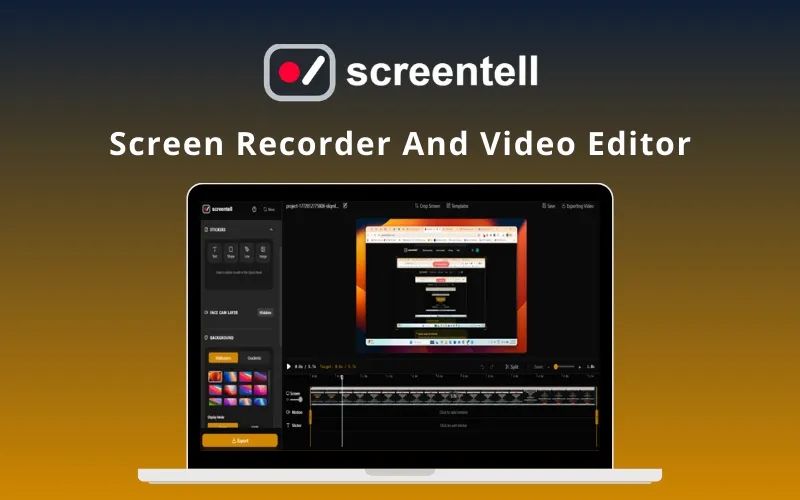
Screentell Screen Recorder And Video Editor Feature Image

Creating professional product demos doesn’t require complex desktop software. Transform plain screen recordings into studio-quality videos in minutes with –

Screentell – Screen Recorder & Video Editor

Screentell is an all-in-one screen recording and video editing tool that transforms standard screen captures into visually stunning demos.

It is a complete video editing & enhancement suite, complete with dynamic 3D effects & smart annotations.

It provides a seamless web-based workflow for everyone who needs conversion-ready videos fast.

It automates the polish of your recordings, ensures high-quality exports, & generates professional results instantly.

Introduction To Screentell:

You can create stunning video tutorials or product demos using Screentell in 3 easy steps:

1. Record:

  • Start by selecting any window or screen.
  • Screentell then captures the screen & camera via a dual-stream engine for high-quality footage.

2. Edit:

  • Add zoom, 3D transforms, & stickers.
  • Crop, cut, & adjust speed with multi-track control for a professional look.

3. Export:

  • Render your video in standard formats to get a crisp HD file instantly.
  • Your videos are now ready for YouTube or social media.

It’s that simple!

This Cinematic Screen Recorder:

  • ADDS professional 3D transforms and depth effects to flat recordings.
  • OFFERS customizable sticker annotations & hand-drawn style shapes.
  • GENERATES optimized video output for social media, landing pages, and launches.
  • INCLUDES a flexible face-cam layer that can be moved or resized even after recording.
  • CREATES clean content by cropping out browser tabs, taskbars, and UI distractions.
  • REQUIRES zero installation; runs entirely in modern browsers like Chrome and Edge.
  • LETS you record, edit, & export in one continuous, high-performance workflow.
  • PROVIDES export Options (MP4, WebM, GIF)

Features of Screentell:

Cinematic Motion & Focus:

  • 3D Transforms: Adds depth, rotation, and perspective to guide viewer focus.
  • Smart Zoom & Pan: Manually apply 2D/3D focal points to highlight key features.
  • Professional Polish: Creates smooth camera movements that mimic high-end cinematography.
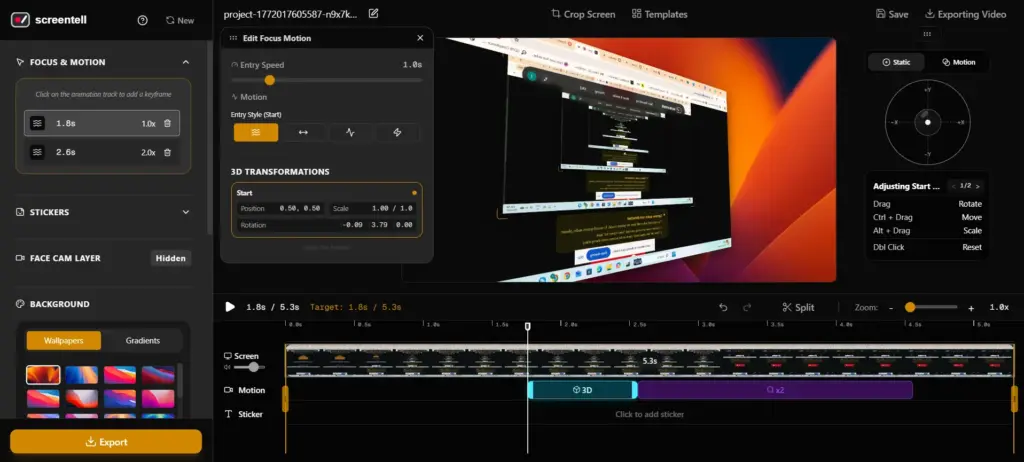
Focus & motion on specific keyframes using Screentell

Advanced Video Editing:

  • Clip Management: Split, cut, and remove unwanted segments with precision.
  • Speed Control: Adjust playback speeds for different segments to keep viewers engaged.
  • Screen Cropping: Easily hide sensitive information or distracting system menus.
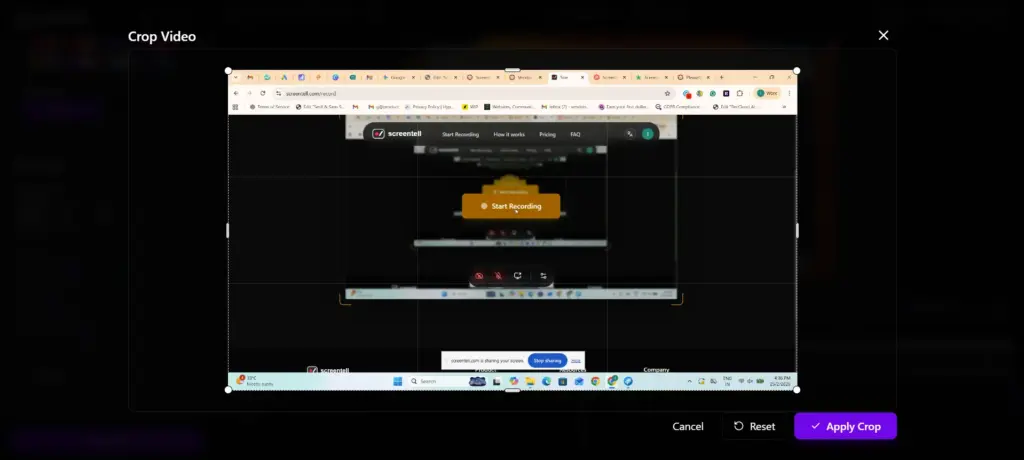
Edit, Cut, Crop Video & Screen with Screentell

Visual Annotations & Layouts:

  • Rich Stickers: Use arrows, bubbles, and shapes with full color and border control.
  • Hand-Drawn Styles: Add personality with sketchy-style text and icons.
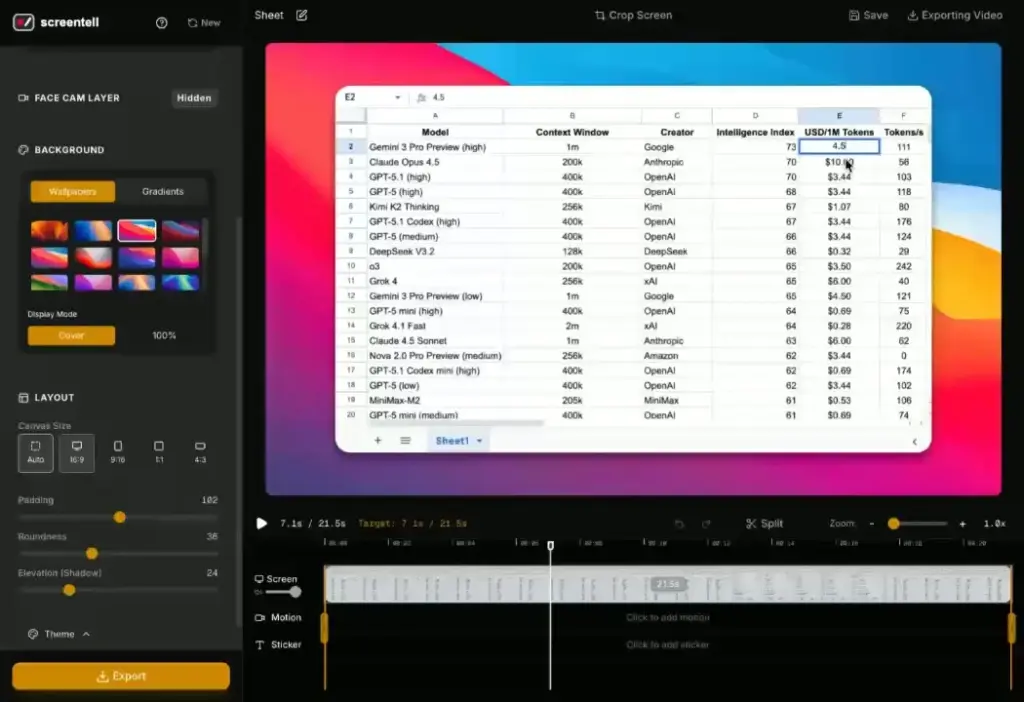
  • Custom Backgrounds: Apply professional gradients, wallpapers, and shadows behind your video.
Flexible Camera & Media:

  • Dynamic Face-Cam: Treat your webcam as a layer to move, resize, or hide at any point.
  • External Imports: Upload and edit existing video files using the full suite of tools.
  • Multi-Format Export: Download your final result in MP4, WebM, or GIF formats.
Screentell Export Options

Additional Key Features Include:

  • High-Quality Recording: Capture screen, camera, & audio.
  • Focus Zoom: Guide viewers with smooth, precise zooms & pans.
  • Cinematic 3D Transform: Add depth with 3D rotation & scaling.
  • Annotation Stickers: Use customizable images & hand-drawn style .
  • Face Camera Layer: Move, resize, or hide your webcam after recording.
  • Clip Cut & Speed Control: Split clips & adjust playback speeds.
  • Screen Cropping: Hide distracting UI elements & browser bars.
  • Beautiful Layouts: Add professional wallpapers, padding, & shadows.
  • External Video Editing: Import & edit existing video files.
  • Preview Player: Verify your clips instantly with real-time playback.
  • Export Options: Full control over resolutions for MP4, WebM, & GIF.
  • Privacy First: All processing happens locally in your browser.

Customer Testimonials:

Q&A

Do I need to install this software?
No. Screentell runs entirely in your browser (Chrome, Edge, Brave) using modern Web APIs for capture and processing.

Does Screentell work on Windows?
Yes. It is a cross-platform solution compatible with all modern desktop browsers. Chromium-based browsers (Chrome, Edge) are recommended for the best experience.

Can I edit videos recorded with other tools using Screentell?
Yes. You can import and edit any existing video file by uploading it to your Projects page.

Can I export multiple clips from one recording?
Yes. Use the timeline handles to trim and export specific segments individually.

Is my data private?
Absolutely. All video processing and storage happen 100% locally on your computer. Your recordings are never uploaded to external servers.

Deal Terms:

How to download/activate this product?
After completing your purchase, you will receive an instructions document. Follow the instructions in this document to redeem the coupon code and activate your subscription.

What is the validity of the license key/coupon code? (Within how many days the coupon code must be redeemed?)
The coupon code must be redeemed within 30 days from the date of purchase.

Is a Lifetime Subscription available for this product?
Yes, a Lifetime Subscription* is available for this product.
*LIFETIME MEANS LIFETIME OF THE PRODUCT.
We strive to provide our customers with high-quality products that offer longevity, but unfortunately, some products are acquired or go bankrupt. Many of these products are from startup companies, offering our customers a great deal. However, in an unfortunate situation where the product does not last long, there is not much DealFuel can do about it.

Are Updates available for this product?
Yes, Updates are available for FREE for this product.

Is support available for this product?
Yes, Free support is available for this product.
For support contact – [email protected].

Is this deal exclusive to new users?
No, this deal is available to all users, unless you already have an existing Lifetime access.

How many users can use the license key/coupon code?
One coupon code can be used for one user/account.

Are the coupon codes stackable?
No, the coupon codes are NOT stackable.

Can this product be accessed on all devices?
Yes, Screentell can be accessed on all devices, provided they have a stable internet connection.

Reviews

There are no reviews yet.

Only logged in customers who have purchased this product may leave a review.

TL;DR

  • Screen recording and video editing
  • Cinematic 3D motion effects
  • Flexible post-record face-cam
  • Customizable rich sticker annotations
  • Browser-based, zero installation
  • Privacy-first local processing

Creating professional product demos doesn’t require complex desktop software. Transform plain screen recordings into studio-quality videos in minutes with –

Screentell – Screen Recorder & Video Editor

Screentell is an all-in-one screen recording and video editing tool that transforms standard screen captures into visually stunning demos.

It is a complete video editing & enhancement suite, complete with dynamic 3D effects & smart annotations.

It provides a seamless web-based workflow for everyone who needs conversion-ready videos fast.

It automates the polish of your recordings, ensures high-quality exports, & generates professional results instantly.

Introduction To Screentell:

You can create stunning video tutorials or product demos using Screentell in 3 easy steps:

1. Record:

  • Start by selecting any window or screen.
  • Screentell then captures the screen & camera via a dual-stream engine for high-quality footage.

2. Edit:

  • Add zoom, 3D transforms, & stickers.
  • Crop, cut, & adjust speed with multi-track control for a professional look.

3. Export:

  • Render your video in standard formats to get a crisp HD file instantly.
  • Your videos are now ready for YouTube or social media.

It’s that simple!

This Cinematic Screen Recorder:

  • ADDS professional 3D transforms and depth effects to flat recordings.
  • OFFERS customizable sticker annotations & hand-drawn style shapes.
  • GENERATES optimized video output for social media, landing pages, and launches.
  • INCLUDES a flexible face-cam layer that can be moved or resized even after recording.
  • CREATES clean content by cropping out browser tabs, taskbars, and UI distractions.
  • REQUIRES zero installation; runs entirely in modern browsers like Chrome and Edge.
  • LETS you record, edit, & export in one continuous, high-performance workflow.
  • PROVIDES export Options (MP4, WebM, GIF)

Features of Screentell:

Cinematic Motion & Focus:

  • 3D Transforms: Adds depth, rotation, and perspective to guide viewer focus.
  • Smart Zoom & Pan: Manually apply 2D/3D focal points to highlight key features.
  • Professional Polish: Creates smooth camera movements that mimic high-end cinematography.
Focus & motion on specific keyframes using Screentell

Advanced Video Editing:

  • Clip Management: Split, cut, and remove unwanted segments with precision.
  • Speed Control: Adjust playback speeds for different segments to keep viewers engaged.
  • Screen Cropping: Easily hide sensitive information or distracting system menus.
Edit, Cut, Crop Video & Screen with Screentell

Visual Annotations & Layouts:

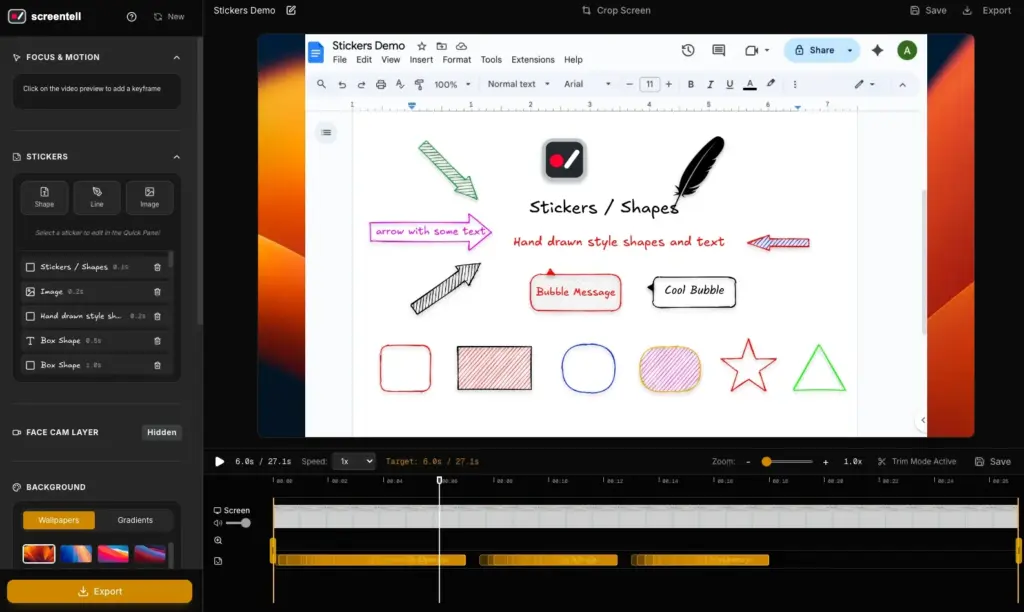
  • Rich Stickers: Use arrows, bubbles, and shapes with full color and border control.
  • Hand-Drawn Styles: Add personality with sketchy-style text and icons.
  • Custom Backgrounds: Apply professional gradients, wallpapers, and shadows behind your video.
Flexible Camera & Media:

  • Dynamic Face-Cam: Treat your webcam as a layer to move, resize, or hide at any point.
  • External Imports: Upload and edit existing video files using the full suite of tools.
  • Multi-Format Export: Download your final result in MP4, WebM, or GIF formats.
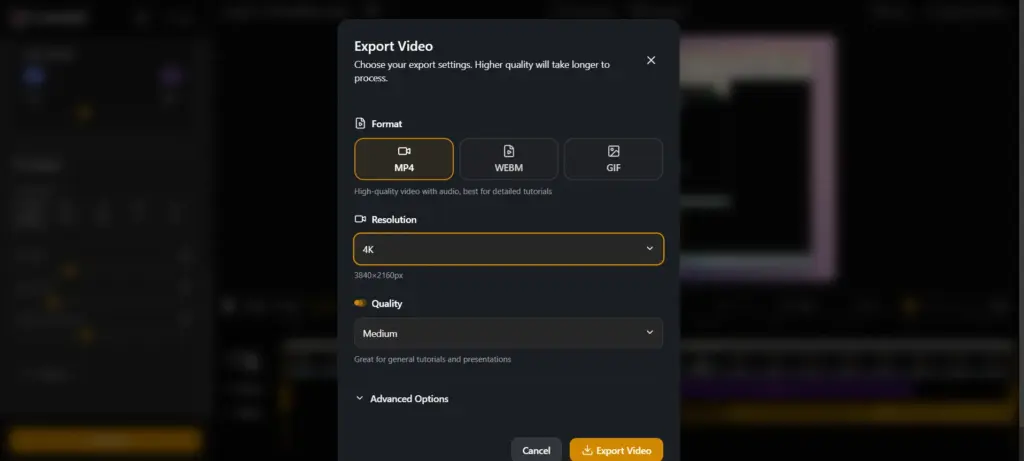
Screentell Export Options

Additional Key Features Include:

  • High-Quality Recording: Capture screen, camera, & audio.
  • Focus Zoom: Guide viewers with smooth, precise zooms & pans.
  • Cinematic 3D Transform: Add depth with 3D rotation & scaling.
  • Annotation Stickers: Use customizable images & hand-drawn style .
  • Face Camera Layer: Move, resize, or hide your webcam after recording.
  • Clip Cut & Speed Control: Split clips & adjust playback speeds.
  • Screen Cropping: Hide distracting UI elements & browser bars.
  • Beautiful Layouts: Add professional wallpapers, padding, & shadows.
  • External Video Editing: Import & edit existing video files.
  • Preview Player: Verify your clips instantly with real-time playback.
  • Export Options: Full control over resolutions for MP4, WebM, & GIF.
  • Privacy First: All processing happens locally in your browser.

Customer Testimonials:

Q&A

Do I need to install this software?
No. Screentell runs entirely in your browser (Chrome, Edge, Brave) using modern Web APIs for capture and processing.

Does Screentell work on Windows?
Yes. It is a cross-platform solution compatible with all modern desktop browsers. Chromium-based browsers (Chrome, Edge) are recommended for the best experience.

Can I edit videos recorded with other tools using Screentell?
Yes. You can import and edit any existing video file by uploading it to your Projects page.

Can I export multiple clips from one recording?
Yes. Use the timeline handles to trim and export specific segments individually.

Is my data private?
Absolutely. All video processing and storage happen 100% locally on your computer. Your recordings are never uploaded to external servers.

Deal Terms:

How to download/activate this product?
After completing your purchase, you will receive an instructions document. Follow the instructions in this document to redeem the coupon code and activate your subscription.

What is the validity of the license key/coupon code? (Within how many days the coupon code must be redeemed?)
The coupon code must be redeemed within 30 days from the date of purchase.

Is a Lifetime Subscription available for this product?
Yes, a Lifetime Subscription* is available for this product.
*LIFETIME MEANS LIFETIME OF THE PRODUCT.
We strive to provide our customers with high-quality products that offer longevity, but unfortunately, some products are acquired or go bankrupt. Many of these products are from startup companies, offering our customers a great deal. However, in an unfortunate situation where the product does not last long, there is not much DealFuel can do about it.

Are Updates available for this product?
Yes, Updates are available for FREE for this product.

Is support available for this product?
Yes, Free support is available for this product.
For support contact – [email protected].

Is this deal exclusive to new users?
No, this deal is available to all users, unless you already have an existing Lifetime access.

How many users can use the license key/coupon code?
One coupon code can be used for one user/account.

Are the coupon codes stackable?
No, the coupon codes are NOT stackable.

Can this product be accessed on all devices?
Yes, Screentell can be accessed on all devices, provided they have a stable internet connection.


$67.15$99.99
$79$99.99
Buy Now
30 Day Refund Policy
For support contact: [email protected] 

Want to save another 25% on this deal?

Join DealClub

Plans & Features

Lifetime Plan
$79 $99.99
  • Unlimited recordings
  • High-Quality Recording
  • HD quality export
  • Unlimited Export video length
  • Basic editing tools
  • Focus Motion, 2D zoom / Cinematic 3D Transform
  • Rich Annotation Stickers
  • Clip Cut & Speed Control
  • Screen Cropping
  • Beautiful Layouts
  • Face Camera Layer
  • Preview Player
  • External Video Editing
  • No watermark
  • Privacy First
Buy Now

    No Q&A available yet.

    No Reviews available.

    Only logged in customers who have purchased this product may leave a review.

Scroll to Top