


StudioMagic – Image Composite Editor For Windows & Mac | Lifetime Access

TL;DR

  • Create striking photo composites in one click, transforming ordinary shots into dramatic visual artwork.
  • Add natural-looking sunbeams, moonlight, reflections, rainbows, lightning, and seasonal effects with minimal editing effort.
  • Give images a modern, portfolio-ready look with color-pop and grunge effects.
  • Work faster inside Photoshop with five specialized toolsets for enhancing and compositing images.

Quick Overview

Alternative to:

  • Adobe Photoshop
  • Affinity Photo
  • Agile CRM
  • GIMP
  • Luminar Neo

Best for:

  • Agencies
  • Content Creators
  • Freelancers
  • Graphic Designers
  • Photographers

Compatibility:

  • Browser Support:
    Brave, Chrome, Edge, Firefox, Safari
  • Operating Systems:
    MacOS, Windows

Are you a photographer struggling with time-consuming photo editing processes and costly software? Transform your ordinary images into extraordinary works of art in just one click with StudioMagic.

What is StudioMagic?

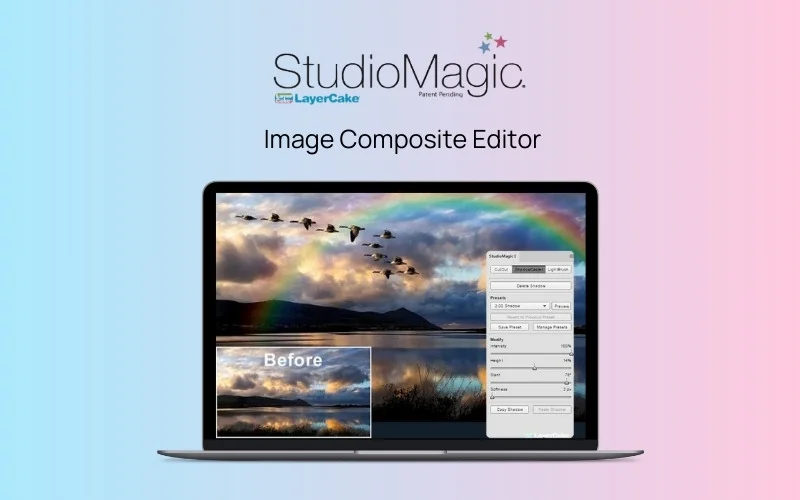
StudioMagic – Image Composite Editor is a powerful, user-friendly photo editing tool that helps you create stunning composite photos instantly.

StudioMagic seamlessly integrates into Photoshop, providing five spectacular toolsets at your fingertips.

Whether you want to add sunbeams to a photo, give it an edgy grunge look, or create compelling reflections, StudioMagic makes it possible in just one click.

How To Use StudioMagic - Image Composite Editor?

Youtube video

StudioMagic Features

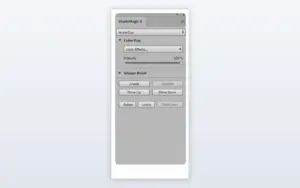
Environmental Effects Panel

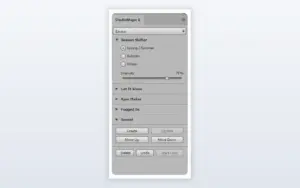
Transform Your Photos With Environmental Effects:

  • Change scenes between Spring/Summer, Autumn, and Winter
  • Add effects such as snow, rain, fog, and sunsets
  • Create different moods and environments from existing photos
  • Adjust effect intensity to suit your image
create-water-mirror-reflections-panel

Create Realistic Water & Mirror Reflections:

  • Add water reflections to your photographs
  • Create mirror effects for entire images or selected subjects
  • Adjust ripples, height, cooling, blur, and intensity
  • Add more depth to landscapes and creative composites
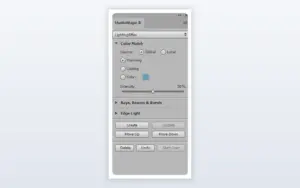
Creative Lighting Panel
Creative Lighting Example

Enhance Photos With Creative Lighting:

  • Add rays, beams, bursts, and edge lighting
  • Apply warming, cooling, and custom color effects
  • Recreate different lighting conditions in your photos
  • Adjust lighting intensity for greater control
Creative Element Photos Example
Creative Elements Panel

Add Creative Elements to Your Photos:

  • Add clouds, moons, rainbows, lightning, birds, and flocks
  • Enhance existing photographs with ready-made visual elements
  • Adjust individual elements to suit your composition
  • Build creative scenes with fewer manual editing steps
Studiomagic Photoshop Panel
Creative Look Example

Give Your Photos a Distinctive Creative Look:

  • Make selected colors stand out using Color Pop
  • Apply Grunge Boost for a textured appearance
  • Adjust effect intensity to match your preferred style
  • Give ordinary photos a more distinctive finish

Why Choose StudioMagic?

  • Create complex-looking effects without building everything from scratch.
  • Experiment with multiple environmental and atmospheric effects.
  • Adjust effect intensity and other settings for greater creative control.
  • Use LayerCake backgrounds with applications that support JPEG files.
  • Use layered PSD and TIFF sheets with compatible layer-based applications.
  • Save time when creating composites, portraits, landscapes, and creative edits.
 

StudioMagic Specifications:

Operating Systems Windows & Mac
Software Type Photoshop-integrated image composite editor
Photoshop Compatibility Photoshop 2014–2022 V23.3.1
Photoshop Elements Not supported
Photoshop CS5 / CS6 Not supported
LayerCake Backgrounds Works with applications that open JPEG files
Layered PSD & TIFF Sheets Works with applications that support layers
Access Lifetime

StudioMagic is best for:

  • Agencies
  • Content Creators
  • Freelancers
  • Graphic Designers
  • Photographers

Choose Your Plan

With DealClub
$42.49
$245.00
Without DealClub
$49.99
$245.00
Buy Now
Limited Time Deal

Deal Terms

  • Download the software and redeem the coupon code after purchase
  • 30-Day coupon code validity
  • Available for new users only
  • One coupon code for one user/account
  • Coupon codes are not stackable
  • Lifetime updates
  • Lifetime support
  • Accessible on Mac and Windows only, with Photoshop installed
  • Compatible with Photoshop 2014–2022 (up to v23.3.1); not compatible with Photoshop Elements, CS5, or CS6

Customer Testimonials

“StudioMagic has allowed me to make my ordinary images into great images. The application really takes my vision for an image and makes it a reality. It’s so fast and intuitive.”

-Walter Wright, Professional Wedding Photographer

Professional Wedding Photographer “StudioMagic is magically easy and intuitive to understand and use. Opens up so many doors to my creativity. Saves so much time compositing! Thanks for such a brilliant product!”

-Kathy Hanson, Portrait Photographer

“I just wanted you to know that LayerCake’s StudioMagic has opened up shiny new vistas to my image making! Its possibilities are endless and give me the freedom to think beyond what I see from the image I capture in my camera. Thank you for your wonderful product. It is a ton of new ideas”

-Penelope P., Professional Photographer

Plans & Features

Choose the perfect plan for your needs.

Plans & Features
Standard
$245 $49.99
Buy Now
Seasonal photo effects
Sunbeam and moonlight effects
Enhance water and mirror reflections
Add moon, lightning, or rainbows
Modern color pop and grunge effects
Compatiblility

With MAC & Windows OS

Works with

Photoshop 2014-2022 V23.3.1

Not compatible with

Photoshop Elements, CS5, CS6

Layercake backgrounds work with any Photoshop version
Action sets not supported in Photoshop Elements

may run in newer versions

Backgrounds compatible with

apps that open JPEG files

Layered PSD & Tiff sheets compatible with

layer-based apps

Standard

$245.00 $49.99
Buy Now
30-Day Refund | Lifetime Access | One-Time Payment
  • Seasonal photo effects
  • Sunbeam and moonlight effects
  • Enhance water and mirror reflections
  • Add moon, lightning, or rainbows
  • Modern color pop and grunge effects
  • Compatiblility: With MAC & Windows OS
  • Works with : Photoshop 2014-2022 V23.3.1
  • Not compatible with : Photoshop Elements, CS5, CS6
  • Layercake backgrounds work with any Photoshop version
  • Action sets not supported in Photoshop Elements: may run in newer versions
  • Backgrounds compatible with : apps that open JPEG files
  • Layered PSD & Tiff sheets compatible with : layer-based apps

Frequently Asked Questions

Find Answers to common questions about StudioMagic

What can I create with StudioMagic?

You can add effects like rainbows, clouds, lightning, birds, reflections, seasonal changes, lighting effects, Color Pop, and Grunge Boost.

Does StudioMagic work with Adobe Photoshop?

Yes. StudioMagic is compatible with Photoshop versions 2014–2022 V23.3.1.

Does StudioMagic work with Photoshop Elements?

No. StudioMagic does not support Photoshop Elements, Photoshop CS5, or CS6.

Does StudioMagic work on Windows and Mac?

Yes. StudioMagic is compatible with both Windows and Mac operating systems.

Customer Feedback

Customer Reviews (0) Customer Q&A (0)

No Reviews Yet

Be the first to try this deal and share your experience.

You must purchase this product to leave a review.

Be The First To Ask

Get clarity before you buy—your question might help others too.

×

You Might Also Like

Caption My Event - Real-Time AI Transcription & Live Caption | Lifetime Access

Caption My Event - Real-Time AI Transcription & Live Caption | Lifetime Access

, , , , , , , ,

Enhance Videos With 1000 Royalty-Free Dynamic Tech Video Backgrounds

Enhance Videos With 1000 Royalty-Free Dynamic Tech Video Backgrounds

, , , , , , , , , , ,

VoiceWave - Transform Your Voice in Real Time With AI

VoiceWave - Transform Your Voice in Real Time With AI

, , , , , , , ,

Buy with DealClub
$42.49 $245.00
Buy without DealClub
$49.99 $245.00

Deal Terms

  • ✓ Download the software and redeem the coupon code after purchase
  • ✓ 30-Day coupon code validity
  • ✓ Available for new users only
  • ✓ One coupon code for one user/account
  • ✓ Coupon codes are not stackable
  • ✓ Lifetime updates
  • ✓ Lifetime support
  • ✓ Accessible on Mac and Windows only, with Photoshop installed
  • ✓ Compatible with Photoshop 2014–2022 (up to v23.3.1); not compatible with Photoshop Elements, CS5, or CS6
Scroll to Top