
You publish content. But it doesn’t add up to much.
That’s frustrating. But it’s rarely a writing problem. It’s usually a structure problem, and it’s fixable.
Most small business owners don’t sit down thinking, “my content isn’t connected.” The feeling is simpler: you keep publishing, but you’re never sure what to write next.
Here’s why. Posts get written one at a time, with no plan tying them together. Over time, you end up with dozens of pages that don’t connect. Each one stands alone, competing for its own tiny slice of search traffic.
The fix isn’t writing more. It’s writing with a plan. When your pages are connected, each new one helps the others instead of competing with them. That’s what pillar-cluster content does.
To be clear: it’s not a shortcut that earns you a special ranking boost. It’s a way of organizing your site that makes your content easier for search engines and readers to understand.
Let’s break down what it is, why it helps, and how you can build one without any SEO background.
What Is Pillar-Cluster Content?

Pillar-cluster content is a way of organizing your blog around central topics instead of random posts. Instead of publishing whatever comes to mind, you group related content together on purpose.
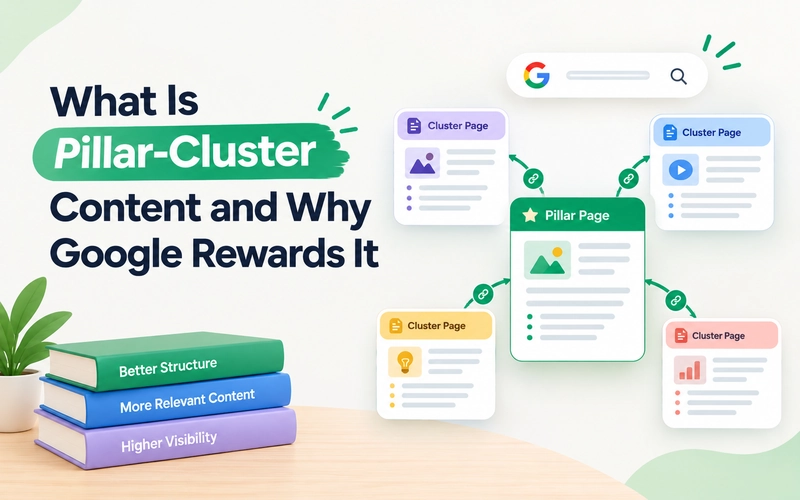
Think of a pillar page as the main guide to a book. It introduces the subject and gives readers real, useful information on its own, then points them toward deeper chapters. The “clusters” are those chapters. Each one goes deep on one specific piece of the subject.
The pillar links to each cluster, and cluster pages link back to the pillar. That linking is what ties the whole structure together.
HubSpot popularized the topic-cluster model as a way to organize blog content around central topics instead of scattered, one-off keywords.
Pillar Page vs. Cluster Page: What’s the Difference?

The two page types serve different jobs, but they work together as one content structure.
| Pillar Page | Cluster Page |
|---|---|
| Covers a broad topic at a high level | Covers one specific subtopic in detail |
| Gives readers an overview of the subject | Answers a focused question or solves a specific problem |
| Links to related cluster pages | Links back to the pillar page and other relevant pages |
| Acts as the central hub for the topic | Acts as one of the supporting pages around that hub |
| Example: How to Brew Coffee at Home: A Complete Guide | Example: French Press Brewing: Step-by-Step |
A well-planned content pillar strategy gives each page a clear role. This helps prevent related content from becoming scattered or disconnected.
Here’s a simple example. Imagine a business that sells home coffee equipment.
The pillar page could be titled “How to Brew Coffee at Home: A Complete Guide.” It would introduce the main brewing methods and explain the basic equipment needed.
One cluster page could be “French Press Brewing: Step-by-Step.” It would focus only on French press brewing and cover that topic in greater detail.
The pillar page links to the French press post, and the French press post links back to the pillar. The same structure can connect the other related cluster pages.
Think of it as a hub-and-spoke structure: one central page connects to several focused pages, creating a clear path between related content.
Why Does This Structure Help With Search Visibility?

Here’s where the plain-language explanation matters, because this part gets misunderstood a lot.
Pillar-cluster content isn’t a trick or a shortcut. Google says links help it discover new pages and understand how those pages relate to each other
1. Internal Linking Connects Related Pages:
Search engines don’t just look at single pages in isolation. They also look at how a site’s pages connect to each other, through what’s called internal linking.
Internal linking simply means linking from one page on your site to another page on your own site.
When your content is spread out with no links between related pieces, search engines have a harder time understanding how those pieces relate.
When you group related pages together and link them clearly, you’re giving search engines a much easier map to follow.
2. It Shows Broader Topic Coverage:
This connects to something SEO professionals often call “topical authority.”
In plain terms, that just means how thoroughly a site covers a subject.
A site with one shallow post about coffee brewing provides less topic coverage than a site with a full pillar page and ten connected cluster posts on the same subject.
3. It Helps Search Engines Understand Your Content:
Google’s own Search Central documentation backs up the mechanism here, not the outcome.
Google says links help it discover new pages and understand how those pages relate to each other, and it recommends using descriptive, relevant anchor text so both users and Google understand what a linked page is about.
A pillar-cluster structure is really just a deliberate way of putting that guidance into practice.
4. It Creates a Clearer Topic Structure:
This is the basic idea behind topic clusters SEO: related pages support a broader subject through useful content and clear internal links, so search engines have an easier time understanding what your site covers.
5. It Doesn’t Guarantee Rankings:
It’s important to be precise here.
Search engines don’t publish their full ranking formulas, and no single structural change guarantees a ranking boost.
What pillar-cluster content does is address a real obstacle: disorganized, disconnected content that’s harder for both readers and search engines to make sense of.
A clear structure can help your visibility. It’s not a shortcut around writing genuinely useful content.
A Simple Example: Pillar Plus Clusters

Let’s walk through one hypothetical example, using that same home coffee equipment business.
Pillar page: “How to Brew Coffee at Home: A Complete Guide”
This page would briefly cover every major brewing method, plus the basic equipment each one needs.
Cluster pages linked from that pillar:
- “French Press Brewing: Step-by-Step”
- “Pour-Over Coffee: A Beginner’s Guide”
- “How to Choose the Right Coffee Grinder”
- “Cold Brew at Home: What You Need to Know”
The pillar links to each cluster, and cluster pages link back to the pillar. A reader who lands on any one of these pages can easily find the others.
That’s the whole structure. One hub, with several connected spokes around it.
How to Build One Without Any SEO Experience?
Planning a pillar-cluster structure by hand takes real work. You have to research a topic, figure out which subtopics deserve their own page, and map out how everything should link together.
An AI tool can take on most of that groundwork in one sitting.
Describe your business and your goals, and it can help you:
- Identify a core topic worth building a pillar around
- Research the subtopics your customers actually search for
- Group related keywords instead of guessing at them one by one
- Draft a pillar topic and a matching set of cluster ideas
- Suggest which pages should link to which
That doesn’t replace good writing. You still need to create genuinely useful pages. But it removes the hardest part of getting started, which is figuring out the structure itself.
Try It Yourself
You don’t need an SEO background to plan a pillar-cluster structure for your own business. You just need a starting point.
Want your own pillar-cluster roadmap?
Open the free AI SEO Strategy Playbook and get a personalized content pillar and cluster plan in minutes.
It’s an on-page tool, nothing to install.
FAQ
Is pillar-cluster content the same as backlinks?
No. Backlinks are links from other websites pointing to yours. Pillar-cluster content is about internal linking, meaning links between pages on your own site.
How many cluster pages should a pillar page have?
There’s no fixed number. Start with the subtopics that genuinely support your main topic, and let the cluster grow from there as new subtopics come up.
Does pillar-cluster content guarantee higher rankings?
No structure guarantees a specific ranking result. Pillar-cluster content is a way to organize your site more clearly, which can support how search engines and readers understand your coverage of a topic.
Can I turn existing blog posts into a cluster?
Often, yes. If you already have several related posts, you can write one new pillar page and link it to those existing posts, effectively turning scattered content into a connected cluster.