
AI multimedia tools have changed how people create content. They help users edit videos, transcribe audio, generate subtitles, and create content faster. Many creators now use AI to save time and reduce manual work.
Tasks like transcription, subtitle creation, and audio cleanup once took hours. Today, AI can handle these tasks in minutes. This allows creators to focus more on content and less on repetitive work.
Two popular AI multimedia platforms are RecCloud and Descript. Both offer AI-powered tools for video and audio workflows. However, they serve different types of users.
As a result, many creators searching for a Descript alternative often compare RecCloud. Both platforms offer AI-powered multimedia features, but they approach content creation differently.
In this guide, we’ll compare RecCloud and Descript based on features, editing tools, usability, pricing, and ideal use cases.
What Is RecCloud?
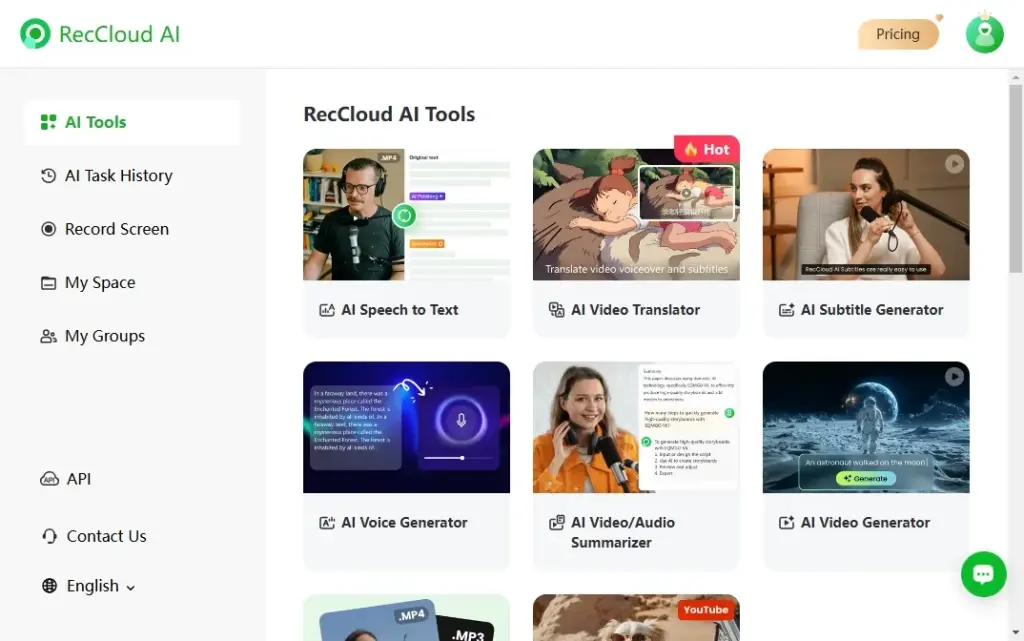
RecCloud is an AI-powered multimedia platform designed for content creation and management. It combines screen recording, transcription, subtitle generation, and cloud storage on a single platform.
Key RecCloud features include:
- AI transcription
- Subtitle generation
- AI summaries
- Video translation
- Text-to-speech tools
- AI video generation
- AI clip maker
- Vocal remover
- Cloud storage (100GB on the annual plan)
RecCloud is designed to be simple and easy to use. Most features require little training, making it accessible for beginners.
It is especially useful for educators, marketers, trainers, business users, and content creators who want fast results without having to learn complex editing software.
What Is Descript?
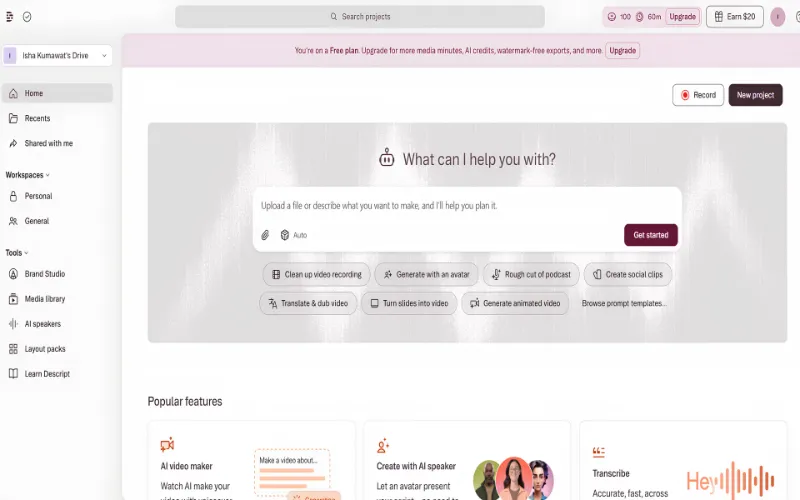
Descript is an AI-powered audio and video editing platform. It is best known for its text-based editing workflow.
Instead of editing directly on a timeline, users edit a transcript. Changes made to the text automatically update the video or audio.
Key Descript features include:
- Text-based video editing
- AI transcription
- Podcast editing tools
- AI voice cloning (Regenerate)
- Studio Sound audio enhancement
- Eye Contact correction
- Team collaboration
- Screen recording
- Multitrack editing
The platform is popular among podcasters, YouTubers, agencies, and professional creators. It offers more advanced editing capabilities than many beginner-focused tools.
Descript is designed for users who need greater control over their content production process.
Feature Comparison:
AI Transcription & Subtitles:
Both RecCloud and Descript offer accurate AI transcription tools.
RecCloud places a strong focus on transcription and subtitles. Users can generate subtitles automatically and translate them into more than 100 languages. The platform also makes it easy to edit transcripts and create summaries.
Descript also provides high-quality transcription. However, transcription is closely tied to its editing workflow. Users edit content directly in the transcript.
For users who mainly need transcription, subtitles, and content repurposing, RecCloud offers a simpler experience. This is one reason many users searching for a Descript alternative consider RecCloud.
Video & Audio Editing
This is one of the biggest differences between the two platforms.
Descript offers advanced editing tools. Users can edit videos and podcasts by editing text. The platform also includes multitrack editing, filler-word removal, voice cloning, and Studio Sound audio enhancement.
RecCloud focuses on lightweight editing and recording. It helps users create content quickly without a complicated workflow.
Most beginners will find RecCloud easier to learn. Professional creators may benefit more from Descript’s advanced editing tools.
AI Content Features
AI plays a major role in both platforms.
RecCloud includes AI summaries, subtitle generation, speech-to-text conversion, text-to-speech tools, video translation, AI video generation, and an AI clip maker. These features help users turn recordings into useful content quickly.
Descript focuses more on AI-powered production tools. These include Regenerate voice cloning, AI voice generation, Studio Sound enhancement, filler-word removal, and Eye Contact correction.
Both platforms offer strong AI features. However, RecCloud focuses more on simplicity and automation. Descript focuses more on content production and editing.
Collaboration & Cloud Features
Descript includes strong collaboration tools. Teams can review projects, leave comments, and edit content together.
These features make Descript a good choice for agencies and production teams.
RecCloud focuses on cloud accessibility. The annual plan includes 100GB of cloud storage. Users can access projects from different devices and share content easily.
Small teams and individual creators may find RecCloud more than sufficient. Larger teams may prefer Descript’s collaboration features.
Ease of Use
RecCloud is easier to learn.
The interface is clean and straightforward. Most users can start recording, transcribing, and creating content within minutes.
Descript is easier than traditional editing software. However, its larger feature set creates a steeper learning curve.
For users who value simplicity, RecCloud offers a smoother experience.
RecCloud vs Descript: At-a-Glance Comparison
| Feature | RecCloud | Descript |
|---|---|---|
| AI Transcription | Yes | Yes |
| Subtitle Generation | Yes | Yes |
| Video Translation | Yes (100+ languages) | Yes |
| Text-Based Editing | No | Yes |
| AI Voice Cloning | No | Yes |
| Filler Word Removal | No | Yes |
| Audio Enhancement | No | Studio Sound |
| Eye Contact Correction | No | Yes |
| AI Video Generator | Yes | Yes |
| AI Clip Maker | Yes | Yes |
| Screen Recording | Yes | Yes |
| Team Collaboration | Limited | Strong |
| Cloud Storage | 100GB | Plan-based |
| Free Plan | Limited | Yes |
| Pricing | $59/year | From $16/month (annual billing) |
| Best For | Beginners, educators, marketers | Podcasters, teams, professionals |
Pricing Comparison:
Pricing is one of the biggest differences between these platforms.
RecCloud is available for $59 per year. The plan includes AI features, 100GB cloud storage, recording tools, transcription capabilities, and access to its multimedia toolkit.
Descript offers a free plan with limited usage. Paid plans start at $16 per month when billed annually or $24 per month when billed monthly. Higher tiers are available for users who need advanced editing, AI voice tools, and collaboration features.
For budget-conscious creators searching for a Descript alternative, RecCloud’s pricing may be especially appealing. It provides a wide range of AI multimedia tools without the recurring monthly cost associated with many professional editing platforms.
Winner by Category:
| Category | Winner |
|---|---|
| Ease of Use | RecCloud |
| AI Transcription | RecCloud |
| Subtitle Generation | RecCloud |
| Affordability | RecCloud |
| Video Editing | Descript |
| Podcast Production | Descript |
| Collaboration | Descript |
| Overall Value | RecCloud |
Pros and Cons of RecCloud:
Pros
- Easy to use
- Strong AI transcription tools
- Fast subtitle generation
- AI summaries and AI clip maker
- 100GB cloud storage
- Affordable pricing
- Beginner-friendly workflow
- Supports 100+ languages
Cons
- Fewer advanced editing tools
- No text-based editing
- Limited professional production features
- Basic collaboration capabilities
Pros and Cons of Descript:
Pros
- Advanced AI editing tools
- Powerful text-based editing
- Excellent podcast workflow
- Strong collaboration features
- Professional audio enhancement
- AI voice cloning capabilities
Cons
- Higher pricing
- Steeper learning curve
- More demanding on lower-end devices
- Some features may be excessive for casual users
Which Tool Should You Choose?
Choose RecCloud If…
- You want an easy-to-use AI multimedia platform.
- You mainly need transcription and subtitle generation.
- You create educational, marketing, or business content.
- You prefer a simple workflow.
- You want strong value for your money.
Choose Descript If…
- You create professional podcasts or videos.
- You need advanced editing features.
- You work with a content team.
- You want transcript-based editing.
- You need a complete production workflow.
Conclusion
RecCloud and Descript are both capable AI multimedia platforms with distinct strengths.
Descript stands out with advanced editing features, powerful collaboration tools, and professional production capabilities. It is a strong choice for podcasters, agencies, and experienced creators.
RecCloud focuses on ease of use, AI-powered automation, transcription, and affordability. For many users searching for a Descript alternative, it delivers a compelling mix of features and value.
The best choice depends on your workflow and content goals. If you want advanced production tools, Descript is worth considering. If you want an accessible AI multimedia platform that delivers strong features at a lower cost, RecCloud is a compelling option in 2026.
Frequently Asked Questions
Is RecCloud free?
Yes. RecCloud offers a free plan with limited usage, allowing users to try its AI multimedia tools before upgrading.
Does RecCloud support Mac?
Yes. RecCloud works on Mac, Windows, and web browsers, making it accessible across multiple devices.
Can Descript translate videos?
Yes. Descript supports video and caption translation, helping creators reach multilingual audiences.
Which software is better for YouTube creators?
Descript is better for advanced video editing and production. RecCloud is better for fast content creation, subtitles, and AI-powered automation.
Which is better for online courses?
RecCloud is often the better choice for educators. Its transcription, subtitles, summaries, and translation tools help make course content more accessible.
Can RecCloud replace Descript?
For many users, yes. RecCloud can be a strong Descript alternative for transcription, subtitles, and AI content creation. However, professional editors may still prefer Descript’s advanced editing tools.
Is Descript good for beginners?
Yes. Descript is easier than traditional video editors. However, RecCloud offers a simpler interface and a shorter learning curve.