Wideo Pro – Create Instant Videos & Presentations | Lifetime Access

TL;DR

  • Turn text-heavy content into scroll-stopping video, boost social engagement and CTRs with professional animations, no design skills needed.
  • Go from idea to finished video in minutes, customize any of 100+ templates with your own images, colors, and branding.
  • Skip the render wait, preview scenes instantly and export as MP4 or GIF, or share directly via link.
  • Repurpose one video into many, duplicate for different languages or turn it into a slide presentation in a single click.

Quick Overview

Alternative to:

  • Canva
  • Powtoon
  • Vyond

Best for:

  • Content Creators
  • Digital Agencies
  • Marketing Professionals

Compatibility:

  • Browser Support:
    Brave, Chrome, Edge, Firefox, Safari
  • Operating Systems:
    Browser Based
  • Integrations:
    HubSpot, YouTube

Yes, a huge chunk of text to explain your product is nice and decent.


But, do you know what would look better? A creative animation or a well made video for that sake.


A video or an animation attracts more attention and commands better retention.


We all know, a video maker is the key to create instant videos and presentations.


But, choosing the right one is what matters. Say Hello! to Wideo Pro.

Wideo Pro – Create Videos & Presentations


Create instant videos and animations with this online, easy-to-use video editor.


This web-based video creation platform is suitable for SMBs, Marketing Professionals, and Digital Agencies.


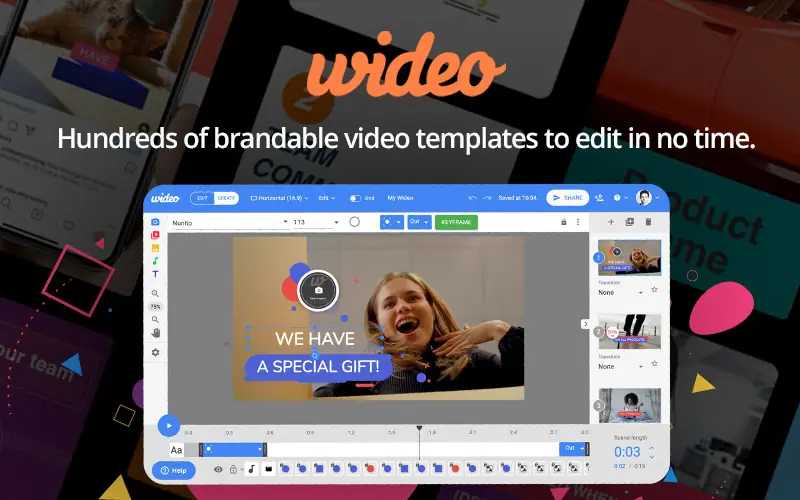
Produce videos instantly with access to more than hundreds of video templates.


Add your images and audio, or create a your own video from scratch, then animate in just a few clicks.


Increase your Social Media engagement, boost CTRs, grab your audience’s attention by making professional-looking videos and animations.


You can edit your video from any computer, and download it as an mp4 or gif, and upload it to YouTube, HubSpot or share it as a link.


Do loads of more stuff totally based on your creativity with the help of Wideo Pro.

How To Create Instant Videos & Animations?

Youtube video

Create Instant Videos & Animations Using These Features

Wideo-6

Animation & Templates

  • Add intro/outro animations to an object in a single click: Add intro and outro animations to objects with a single click.
  • Create complex and extensive animations using keyframes: Create detailed animations using keyframes.
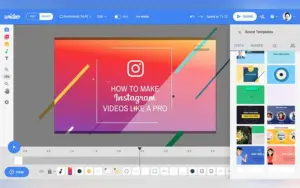
  • Pick your favourite video template out of 100s and customize the images, texts, and colors in minutes: Choose from hundreds of templates and customize their images, text, and colors.
Wideo-3

Media & Brand Customization

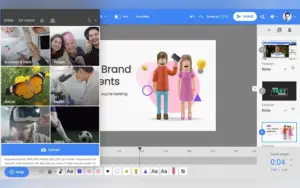
  • Upload your video file or choose from thousands of free video clips from our built-in library: Upload your own videos or select free clips from the built-in library.
  • Browse a huge range of high-quality images, object styles, and animations to use in your videos: Access images, object styles, and animations for your videos.
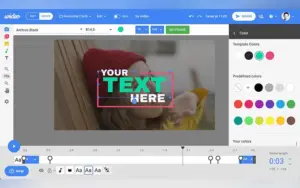
  • Use your brand’s color scheme as part of customizing your own videos: Customize videos using your brand colors.
  • Upload your own logos and images in jpg, png or gif format: Upload logos and images in JPG, PNG, or GIF formats.
  • Add music from the library, or upload your own voiceover and soundtracks: Add music from the library or upload voiceovers and soundtracks.
Wideo-1

Preview, Sharing & Presentations

  • Preview your scene or video instantly without having to wait for it to render: Preview scenes and videos instantly.
  • Share your video with anyone, anywhere by simply copying and pasting the unique video URL: Share videos through a unique URL.
  • Turn your video into an awesome slide presentation in a single click: Convert videos into slide presentations with one click.
  • Duplicate any video to create multiple versions if you have to translate your videos into several languages: Duplicate videos to create different language versions.
  • Wideo works on any internet browser and you don’t need to download anything: Use Wideo directly through an internet browser without downloading the software.

Benefits

  • Create videos and animations without complex software.
  • Start with hundreds of customizable video templates.
  • Add your own images, logos, audio, and video files.
  • Create branded videos using your own colors.
  • Share completed videos through unique URLs.
  • Convert videos into slide presentations.
  • Create multiple versions of videos for different languages.
  • Work directly from any internet browser.

Wideo Pro is best for:

  • Content Creators
  • Digital Agencies
  • Marketing Professionals

Choose Your Plan

With DealClub
$84.15
$1188.00
Without DealClub
$99.00
$1188.00
Buy Now
Limited Time Deal

Deal Terms

  • Access via redemption of coupon code
  • 30-Day Coupon Code Validity
  • One Coupon Code for one user/account
  • Coupon Codes are not stackable
  • For both - New & Existing Users
  • Free Updates
  • Free Support
  • Accessible on all devices - Desktop, Mobile and Tablet

Customer Testimonials

As animated movies improve interest and sales conversion, you can find them on websites, social networks, blogs, and emails. You can engage and captivate your audience without investing a lot of time or money. Use the most user-friendly, straightforward tools available today to produce animated videos online instead of learning complex ones. With just a few clicks using Wideo software, even those without any prior knowledge may produce professional-quality videos.

-

Creating interactive videos is fantastic, I have used other video-making tools with interactive capabilities but they´re expensive and limited. Wideo allows me to create interactive video content in seconds using the ready-made templates and saves a lot of time too.

-

What I like most is the good implementation of the tools with the different formats of videos that can be created either from scratch using the different pkantillas that are integrated in wideo or simply make an edition of a video already created and only adding effects and details to improve it also stands out for its interface so simple to use and the final result that is more than outstanding Review collected by and hosted on G2.com.

-Alisa O

I liked best the simplicity of the video editing. The templates were very helpful made the videos extremely professional. When I had no prior experience with creating full marketing videos, Wideo filled in the gaps for me. I also loved how the templates were exactly what I needed. The customer support team really helped me out when I had an issue which will keep me as a long-term customer

-

I am not an artist or animator, but I often need video animations as part of the video content I produce. Wideo has a lot of animated templates that I can use to make my videos more professional. And it's pretty easy to edit them with our company colors, logo, etc. Review collected by and hosted on G2.com.

-

Plans & Features

Choose the perfect plan for your needs.

Plans & Features
Lifetime Access
$1188 $99
Buy Now
Add intro/outro animations in one click
Create animations with keyframes
Customize 100+ video templates (images, text, colors)
Upload videos or use free clips from the library
Access high-quality images, object styles, and animations
Use your brand colors, upload logos/images (JPG, PNG, GIF)
Add music, voiceovers, and soundtracks
Instant preview without rendering
Share videos with a unique URL
Turn videos into slideshows in one click
Duplicate videos for multiple language versions
No downloads needed, works on any browser

Lifetime Access

$1,188.00 $99.00
Buy Now
30-Day Refund | Lifetime Access | One-Time Payment
  • Add intro/outro animations in one click
  • Create animations with keyframes
  • Customize 100+ video templates (images, text, colors)
  • Upload videos or use free clips from the library
  • Access high-quality images, object styles, and animations
  • Use your brand colors, upload logos/images (JPG, PNG, GIF)
  • Add music, voiceovers, and soundtracks
  • Instant preview without rendering
  • Share videos with a unique URL
  • Turn videos into slideshows in one click
  • Duplicate videos for multiple language versions
  • No downloads needed, works on any browser

Frequently Asked Questions

Find answers to common questions about Wideo Pro

Does Wideo Pro require software installation?

No. Wideo works on any internet browser and does not require a download.

Can I upload my own videos?

Yes. You can upload your own video files or select free video clips from Wideo's built-in library.

Customer Feedback

Customer Reviews (0) Customer Q&A (0)

No Reviews Yet

Be the first to try this deal and share your experience.

You must purchase this product to leave a review.

Be The First To Ask

Get clarity before you buy—your question might help others too.

×

You Might Also Like

UnifiedTools Pro - Access 130+ AI Productivity Tools in One Platform
RecCloud AI - AI Multimedia Toolkit | Annual Access
Romo AI - Best All-In-One AI Platform | Lifetime Access
Photo Stamp & Watermark Remover For Windows | Lifetime Access

Photo Stamp & Watermark Remover For Windows | Lifetime Access

, , , , , , ,

Buy with DealClub
$84.15 $1188.00
Buy without DealClub
$99.00 $1188.00

Deal Terms

  • Access via redemption of coupon code
  • 30-Day Coupon Code Validity
  • One Coupon Code for one user/account
  • Coupon Codes are not stackable
  • For both - New & Existing Users
  • Free Updates
  • Free Support
  • Accessible on all devices - Desktop, Mobile and Tablet
Scroll to Top